TM-258 267 Page 27Handler 140
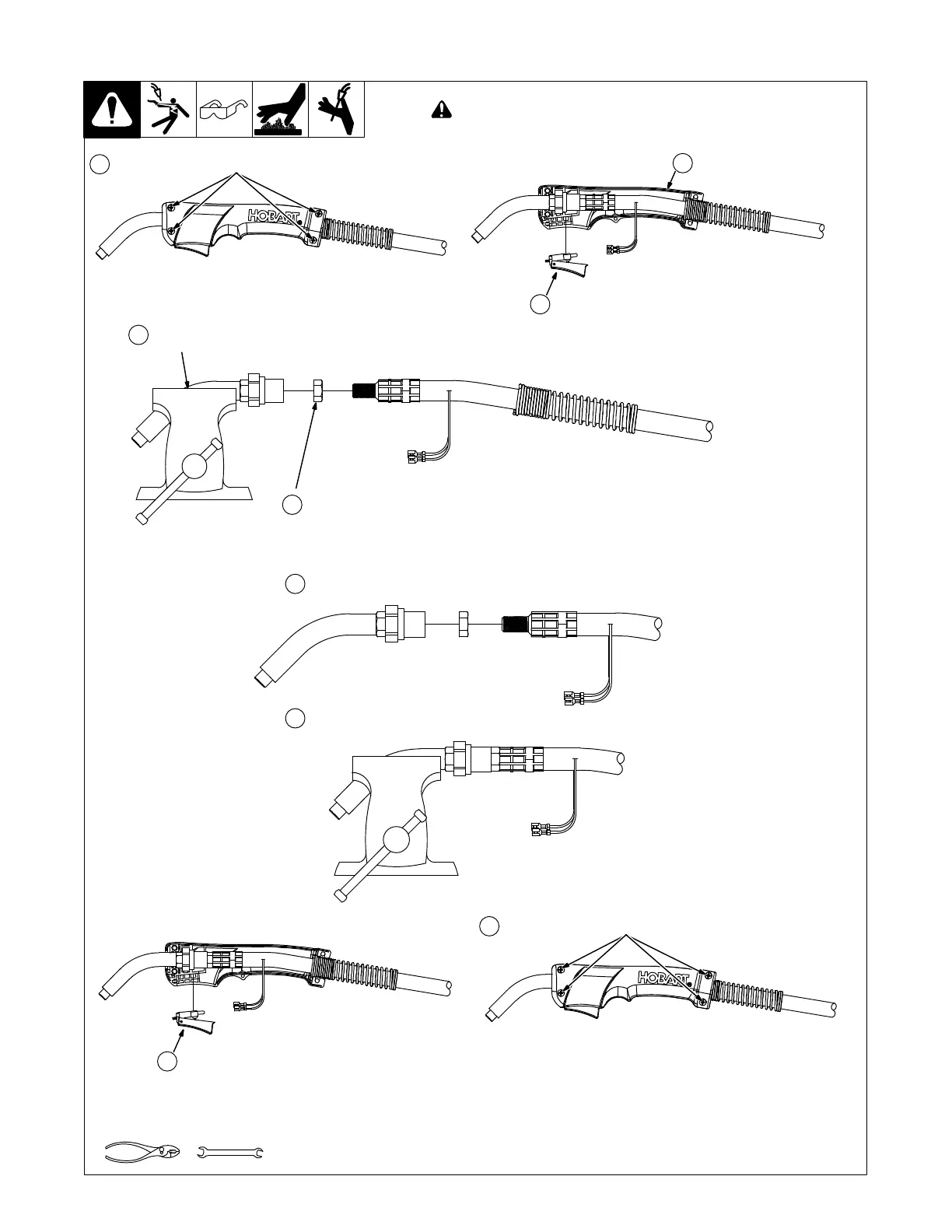
8-7. Replacing Switch And/Or Head Tube
Ref. 243 840-A
Tools Needed:
19 mm
Remove screws from handle.
Remove handle half.
Secure head tube in vice.
Loosen jam nut. Remove from vice
and turn head tube out by hand.
Hand-tighten head tube into cable connector.
Place head tube in vice and tighten until nuts are tight.
! Turn Off welding power source/wire feeder and disconnect gun.
Remove switch housing. Install new switch and
connect leads (polarity is not important). Reassemble
in reverse order. If replacing head tube, continue to
end of figure.
1
2
3
4
5
6
7
Remove from vice. install switch housing.
8
Install handle half with secure with screws.
9



 To Next Page