119
uuIndicatorsu
Continued
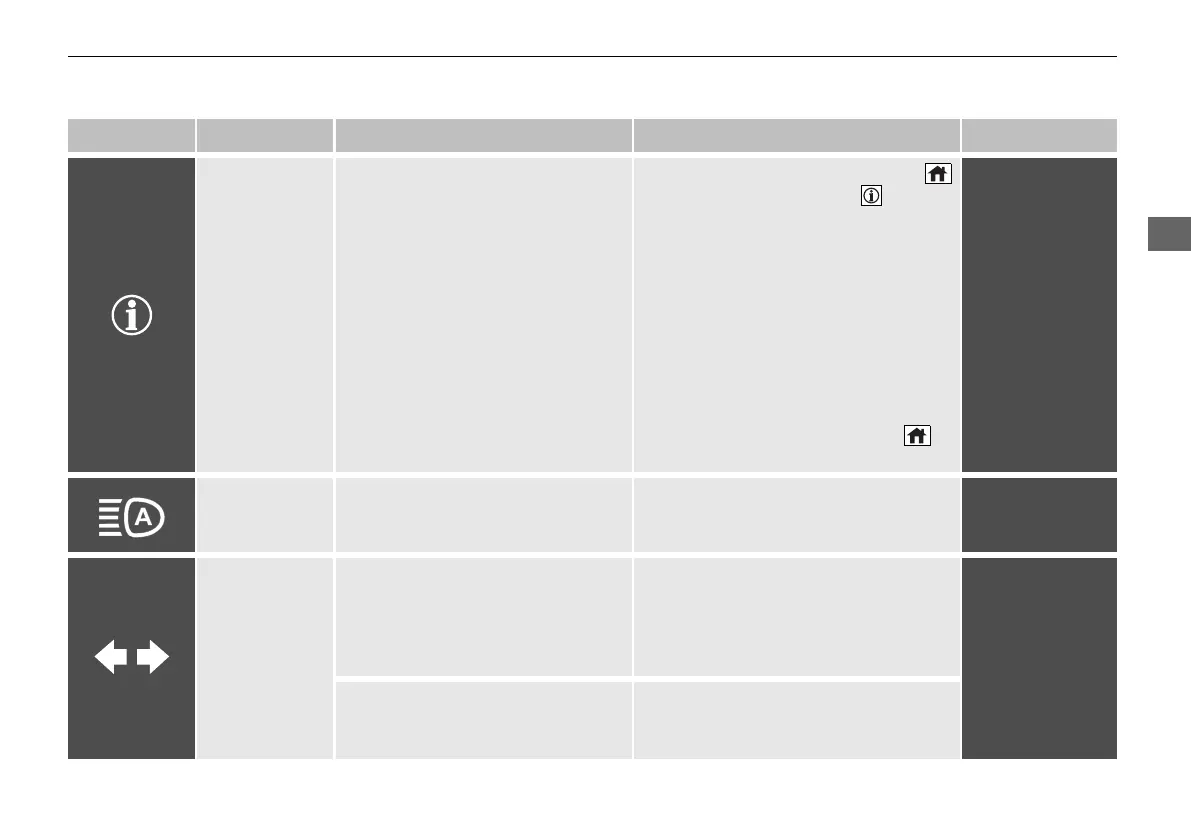
Indicator Name On/Blinking Explanation Message
System Message
Indicator
• Comes on along with a beep when
a problem is detected. A system
message on the driver information
interface appears at the same time.
• While the indicator is on, press the
(home) button, and select
(information) to see the message
again.
2 Switching the Display P. 156
• Refer to the Indicators information in
this chapter when a system message
appears on the driver information
interface. Respond to the message
accordingly.
• The driver information interface does
not return to the normal screen unless
the warning is cancelled, or the
(home) button is pressed.
—
Auto High-Beam
Indicator
• Comes on when all the operating
conditions of the auto high-beam
are met.
2 Auto High-Beam P. 206
—
Turn Signal and
Hazard Warning
Indicators
• Blinks when you operate the turn
signal lever.
• Blink along with all turn signals
when you press the hazard
warning button.
• Does not blink or blinks rapidly -
Have your vehicle checked by a dealer.
—
• Blink along with all turn signals
when you depress the brake pedal
while the high speed driving.
2 Emergency Stop Signal P. 509
20 2EX JSS (KE KG)-32TYF6000.book 119 ページ 2020年3月6日 金曜日 午後6時58分


 To Next Page
 Loading...









