326
uuDisplay AudiouDriver Assist System On and Off
Driver Assist System On and Off
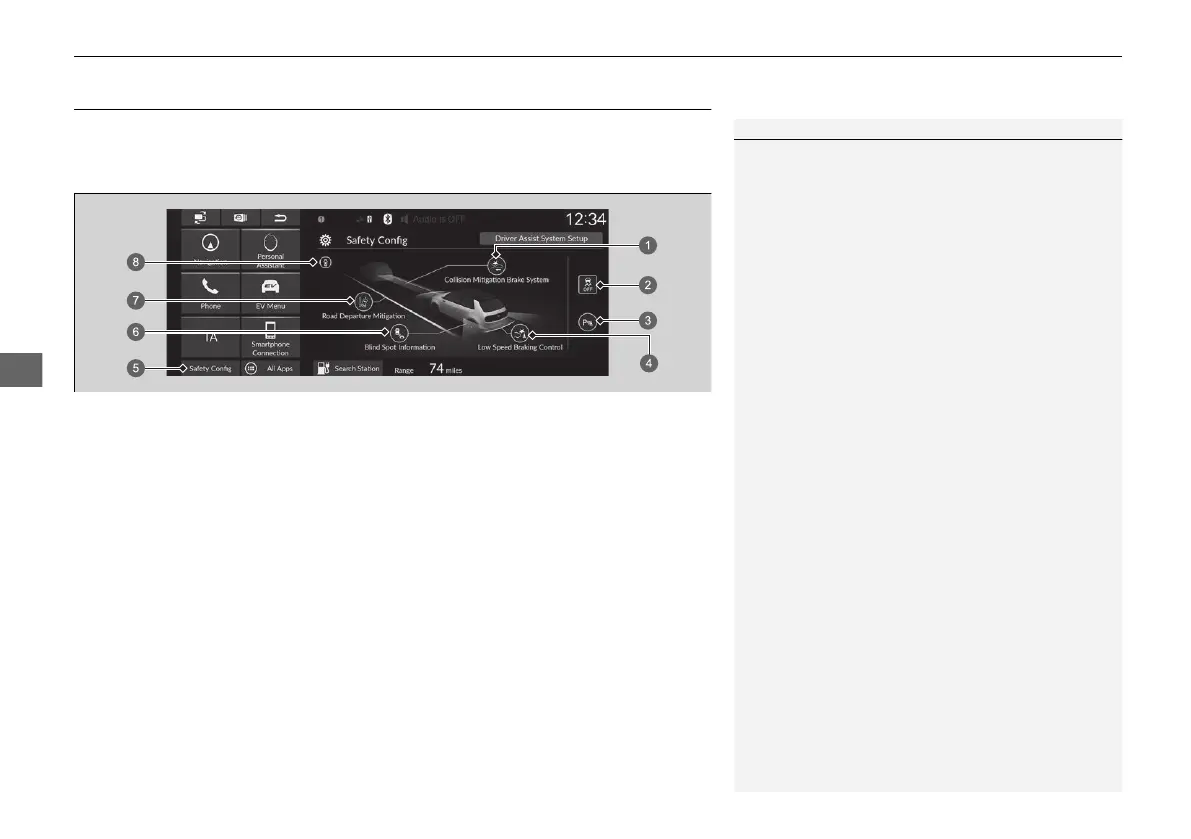
The Driver Assist System functions can be set to On/Off on the Safety Config
screen. Select Safety Config on the audio/information screen, and then select each
function icon to change the settings.
1Driver Assist System On and Off
If there is a problem with any of the functions below,
the applicable icon/indicator will come on in amber.
If this happens, have your vehicle checked by a
dealer.
a Collision Mitigation Brake System Icon
c Parking Sensor Icon
d Low Speed Braking Control Icon
f Blind Spot Information Icon
g Road Departure Mitigation Icon
h Safety Support Indicator
If there is a problem with the function below, the
icon will come on in gray.
If this happens, have your vehicle checked by a
dealer.
b VSA OFF Icon
a Collision Mitigation Brake System Icon green (On)/gray (Off)
b VSA OFF Icon green (On)/amber (Off)
c Parking Sensor Icon green (On)/gray (Off)
d Low Speed Braking Control Icon green (On)/gray (Off)
e Safety Config Icon
f Blind Spot Information Icon green (On)/gray (Off)
g Road Departure Mitigation Icon green (On)/gray (Off)
h Safety Support Indicator
20 2EX JSS (KE KG)-32TYF6000.book 326 ページ 2020年3月6日 金曜日 午後6時58分













 To Next Page