EasyManua.ls Logo

Honda E - Basic Operation

Honda E
689 pages
Print Icon
To Next Page IconTo Next Page
To Previous Page IconTo Previous Page
Loading...
257
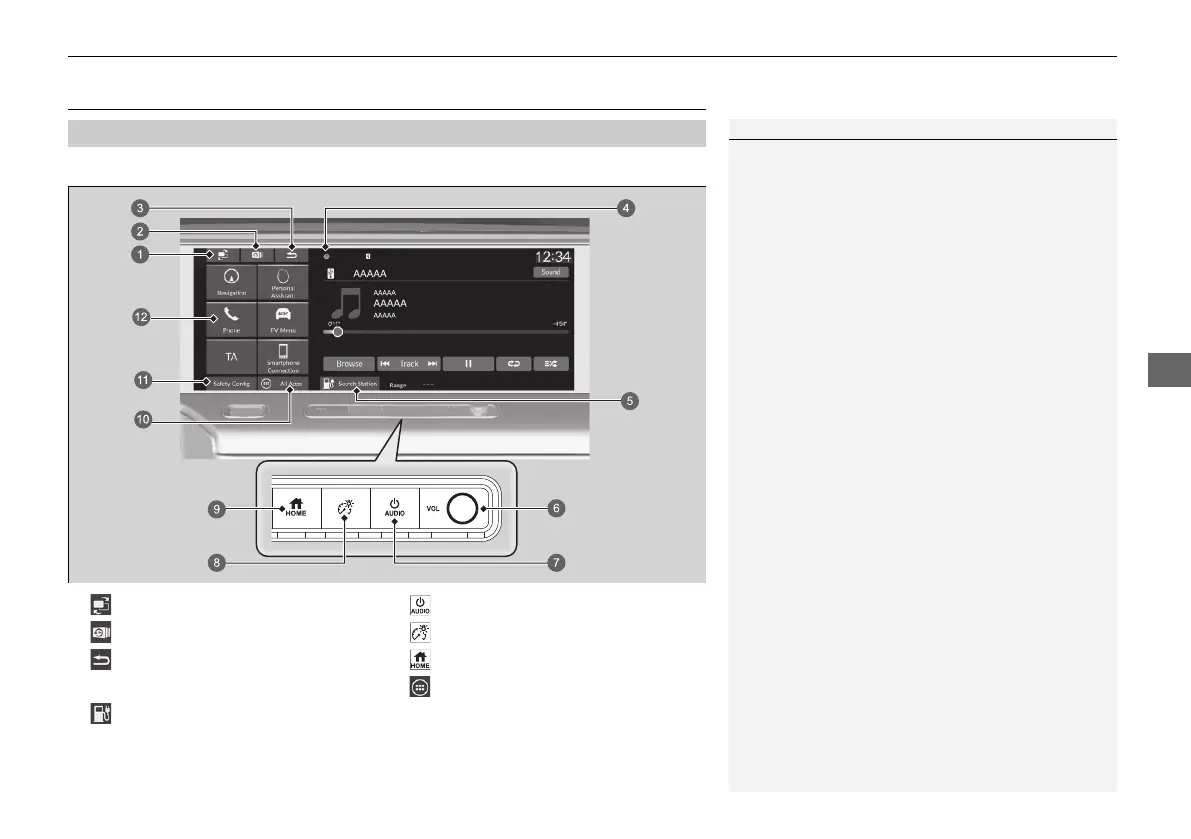
uuDisplay AudiouBasic Operation
Continued
Features
Basic Operation
To use the audio system function, the power mode must be in ACCESSORY or ON.
Audio System Function
1Audio System Function
This screen is shown for the left-hand drive models.
For the right-hand drive models, these are located at
the symmetrically opposite to the left-hand drive
model.
You can use the audio system for 30 minutes when
the power mode is in VEHICLE OFF, the system will
then turn off automatically.
If you want to keep using it, we recommend that you
set the power mode to ACCESSORY or ON.
Key Off Operation
2 Key Off Operation P. 254

a
(Screen Switch) Icon
g
(Power/Audio) Button
b
(Recent) Icon
h
(Brightness) Button
c
(Back) Icon
i
(Home) Button
d Status Icons j
All Apps
e
Search Station
k Safety Config
f VOL Knob l Shortcut Icon
20 2EX JSS (KE KG)-32TYF6000.book 257 ージ 020年3月6日 金曜日 午後6時8分

Table of Contents

Related product manuals