278
uuDisplay AudiouDisplay Setup
Display Setup
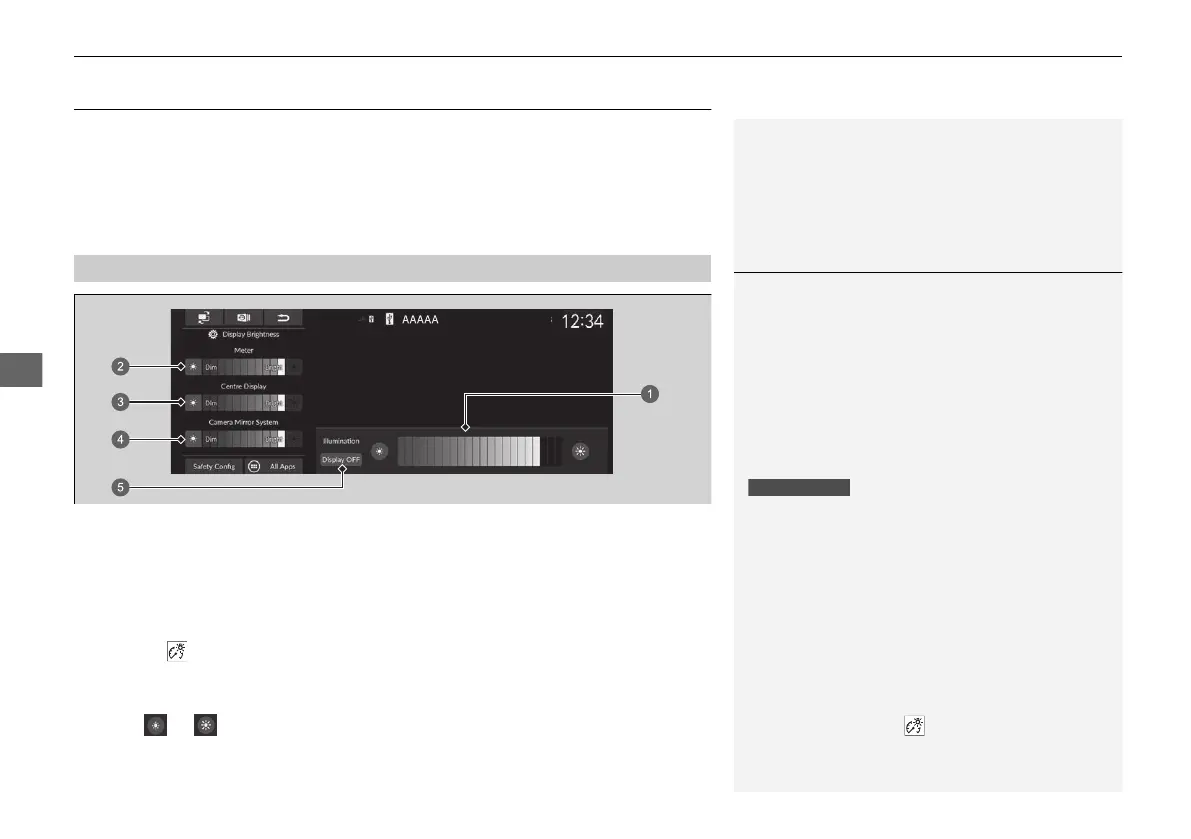
The brightness of the screens, which are included the meter, centre screen and
camera mirror system, is automatically adjusted depending on the surrounding
brightness.
The brightness of the screens which have been automatically adjusted can be
adjusted manually.
1. Press the (Brightness) button.
u The brightness bar is displayed for a few seconds.
2 Basic Operation P. 257
2. Select or to adjust the brightness.
■
Changing the Screen Brightness
1Changing the Screen Brightness
The screens' brightness will gradually be adjusted
darker automatically as ambient light decreases. You
can adjust the brightness of the screens when the
ambient light is low.
The screens can also be adjusted in high ambient
light, but the screens' brightness will not change.
You can adjust the screen brightness by swiping or
tapping on the brightness bar.
You can also change the centre screen brightness on
the following procedures.
1. Select General Settings.
2. Select Display.
3. Select Image Quality Adjustment.
4. Select the setting you want.
To reset the centre display setting, select Default on
the Display screen.
When the brightness bar is displayed, you can
increase the brightness of the meter and centre
screen by pressing the (brightness) button.
a Meter and Centre Screen Brightness
b Meter Brightness
c Centre Screen Brightness
d Camera Mirror System Brightness
e Display OFF
20 2EX JSS (KE KG)-32TYF6000.book 278 ページ 2020年3月6日 金曜日 午後6時58分













 To Next Page