215
Continued
Adjustment of Each Type of Mirror
Adjust each mirror before driving so you can check the rear in the correct driving
position.
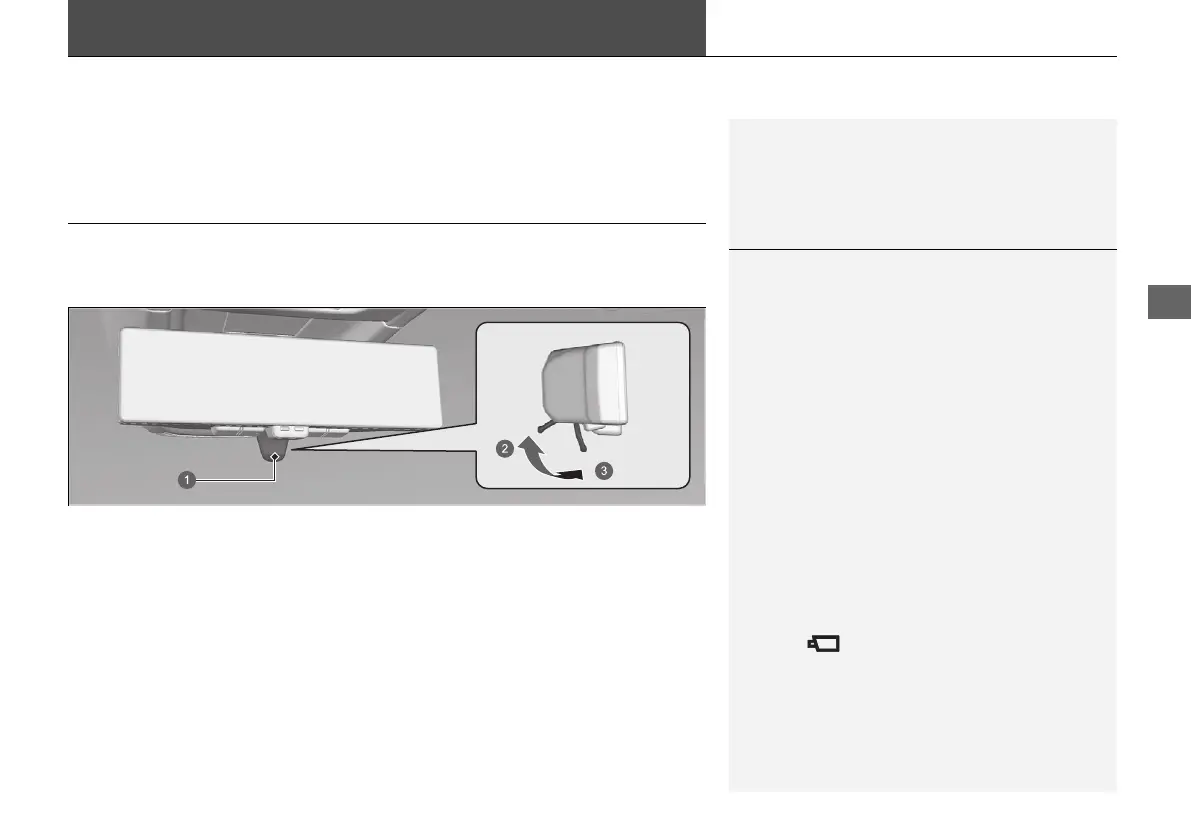
Centre Camera Mirror System
*
By displaying video on the rearview mirror from a camera in the rear of the vehicle,
it is possible to check your rear view without blocking by the headrest or passengers.
It can also be used as a mirror without the video display by moving the lever position.
If you move the lever to the monitor mode position while the power mode is in ON,
video will be displayed. When you move the lever, the direction of the mirror will
change, so adjustments to the position of the mirror should be made in mirror
mode.
1Centre Camera Mirror System
*
When driving, visually check for other vehicles and
confirm the safety of your surroundings.
Depending on ambient conditions, the following may
appear on the image.
• The area around bright objects like the sun or the
headlights of following vehicles blurs white.
• The image flickers due to ambient light.
Depending on conditions, it may take some time for
your eyes to focus on the image. Make sure you can
see it clearly before use.
Monitor mode and mirror mode appear differently. If
it is hard to see the image in monitor mode, use
mirror mode instead.
Using the monitor mode for a long time may cause
the rearview mirror to get hot.
This icon displays in monitor mode.
a Lever
b Mirror mode
c Monitor mode
* Not available on all models
20 2EX JSS (KE KG)-32TYF6000.book 215 ページ 2020年3月6日 金曜日 午後6時58分













 To Next Page