Continued
195
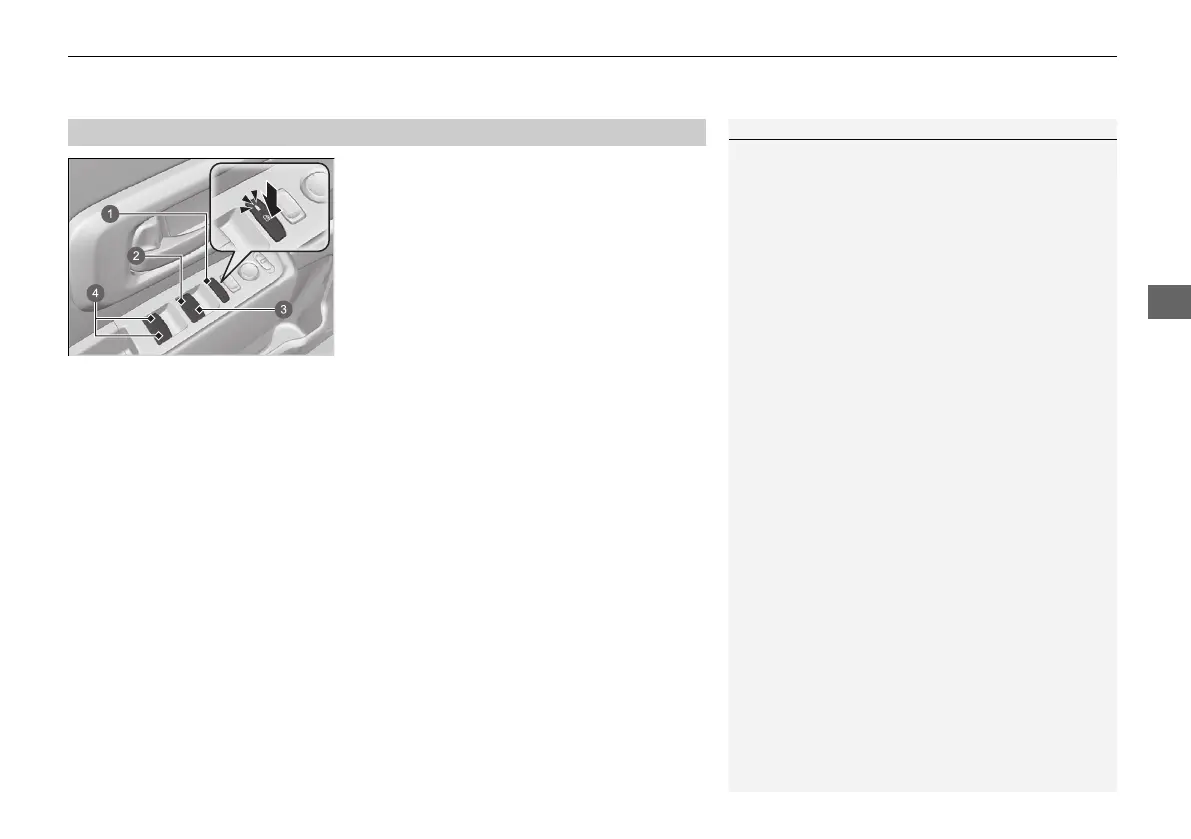
uuWindowsuOpening/Closing the Power Windows
■
Manual operation
To open: Push the switch down lightly, and
hold it until the desired position is reached.
To close: Pull the switch up lightly, and hold it
until the desired position is reached.
■
Automatic operation
To open: Push the switch down firmly.
To close: Pull the switch up firmly.
The window opens or closes completely. To
stop the window at any time, push or pull the
switch briefly.
■
Opening/Closing the Windows with Auto-Open/Close Function
1Opening/Closing the Power Windows
Auto Reverse
If a power window senses resistance when closing
automatically, it will stop closing and reverse
direction.
The driver’s window auto reverse function is disabled
when you continuously pull up the switch.
The auto reverse function stops sensing when the
window is almost closed to ensure that it fully closes.
a Power Window Lock Button
b Driver's Window Switch
c Front Passenger’s Window
Switch
d Rear Passenger’s Window
Switch
20 2EX JSS (KE KG)-32TYF6000.book 195 ページ 2020年3月6日 金曜日 午後6時58分













 To Next Page