28
Setting the work timer
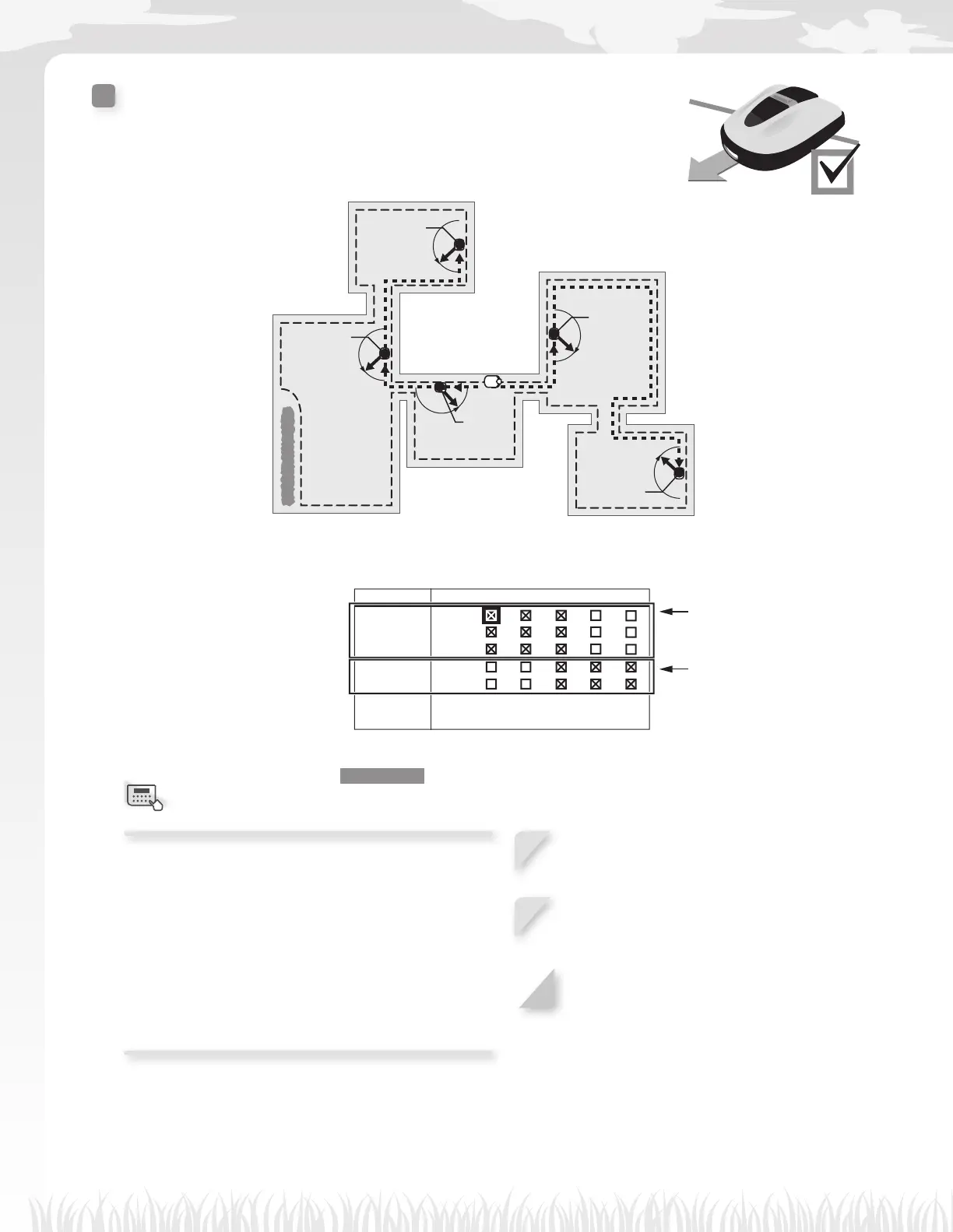
Mowing start points
You can set the mowing start points for each day of week.
For example, if you set the following 5 start points in your lawn, you enable
the lawn mower to reach other areas through narrow passages and mow your
lawn effectively.
Point 1
Point 2
Point 3
Point 4
Point 5
By setting the start points for each day of week, you can effectively operate the lawn mower to mow your lawn
such as below:
Point 1 2 3 4 5
MON
TUE
WED
THU
FRI
SAT
SUN
From Monday to Wednesday:
the lawn mower starts mowing
from point 1, point 2, or point 3.
From Thursday to Friday:
the lawn mower starts mowing
from point 3, point 4, or point 5.
Home screen J [1.Work timer] J [2.Mowing start points]
Confi gure this setting to make the lawn mower start
mowing from specifi c start points on specifi c days of
week.
NOTE:
- You can confi gure the following start points for
each model:
HRM310: 3 start points
HRM520: 5 start points
1
Add a check to the box by pressing the H
button to select the start points.
2
If you want to set the start points in detail,
see the setup wizard top screen is displayed
and [2.Mowing start points] is checked.
3
Press the G button to return to the previous
screen.
Menu screen



 To Next Page