11
Operation
Switching on
Press the "On/O" button momentarily.
After a new start and after changing or
reprogramming the computer the data will be
loaded from the computer.
Restart the system
Once the terminal has been connected to the
ISOBUS of the tractor, the computer is not
automatically restarted when the terminal is
switched o and on.
To restart the system you must
disconnect the connecting cable to the
machine for a short moment.
It is highly recommended to make a note of the
machine and adjustment data before running
an update.
In case of update of minor extent the data will
be maintained.
With extensive updates and if new graphics
have to be displayed, the old adjustment and
performance data may be lost.
With some system dependent faults it may be
necessary to delete the control masks from the
terminal and to upload these again from the
computer by restarting.
The pool will in this case saved again in the
terminal.
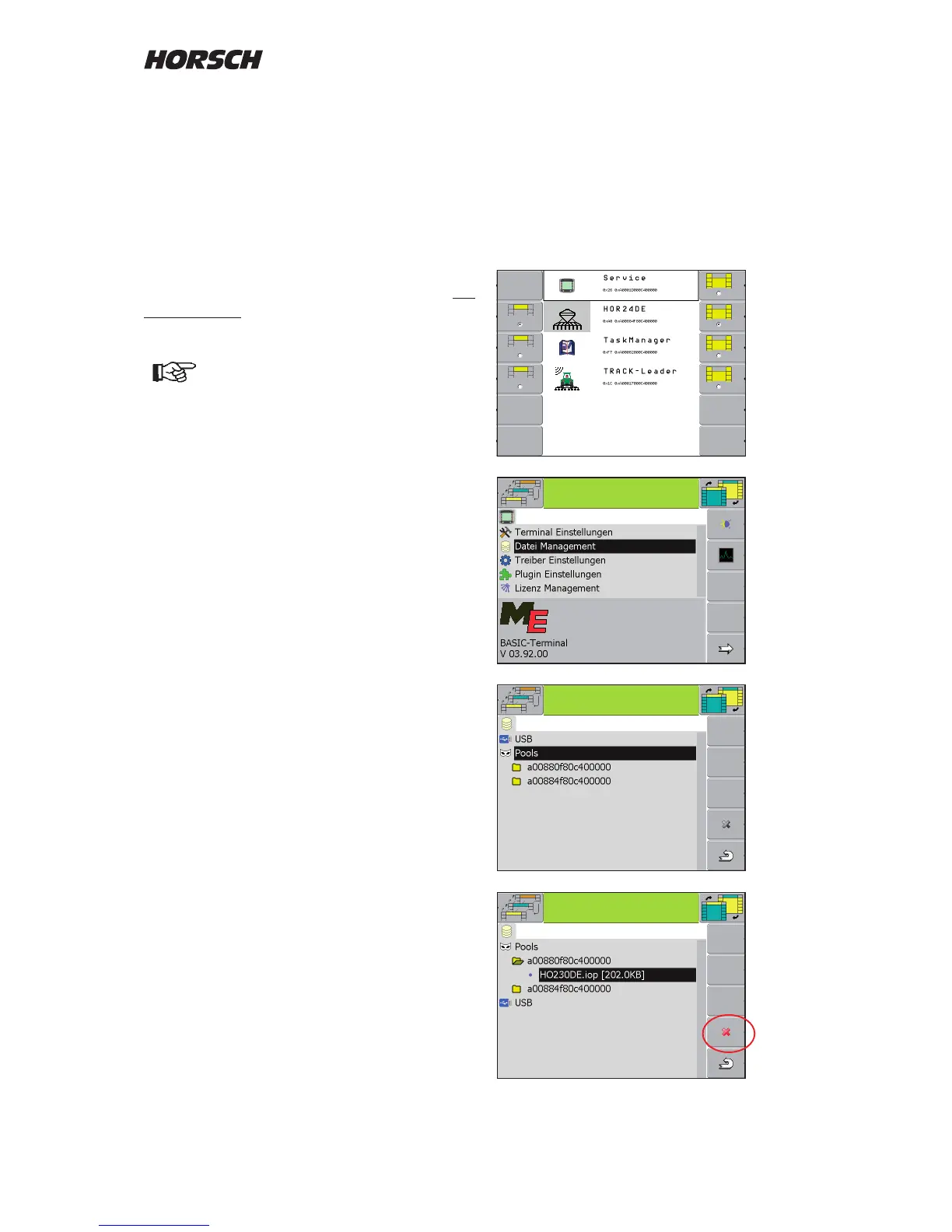
Deleting the pool
Choose the "Service" area. In the menu "File
management" select "Pools" and delete the rst
le for the drill and the second le for the single
grain metering.
The switch the terminal o for a moment. The
masks will be loaded new during a restart.



 To Next Page