53
Setting the sensitivity
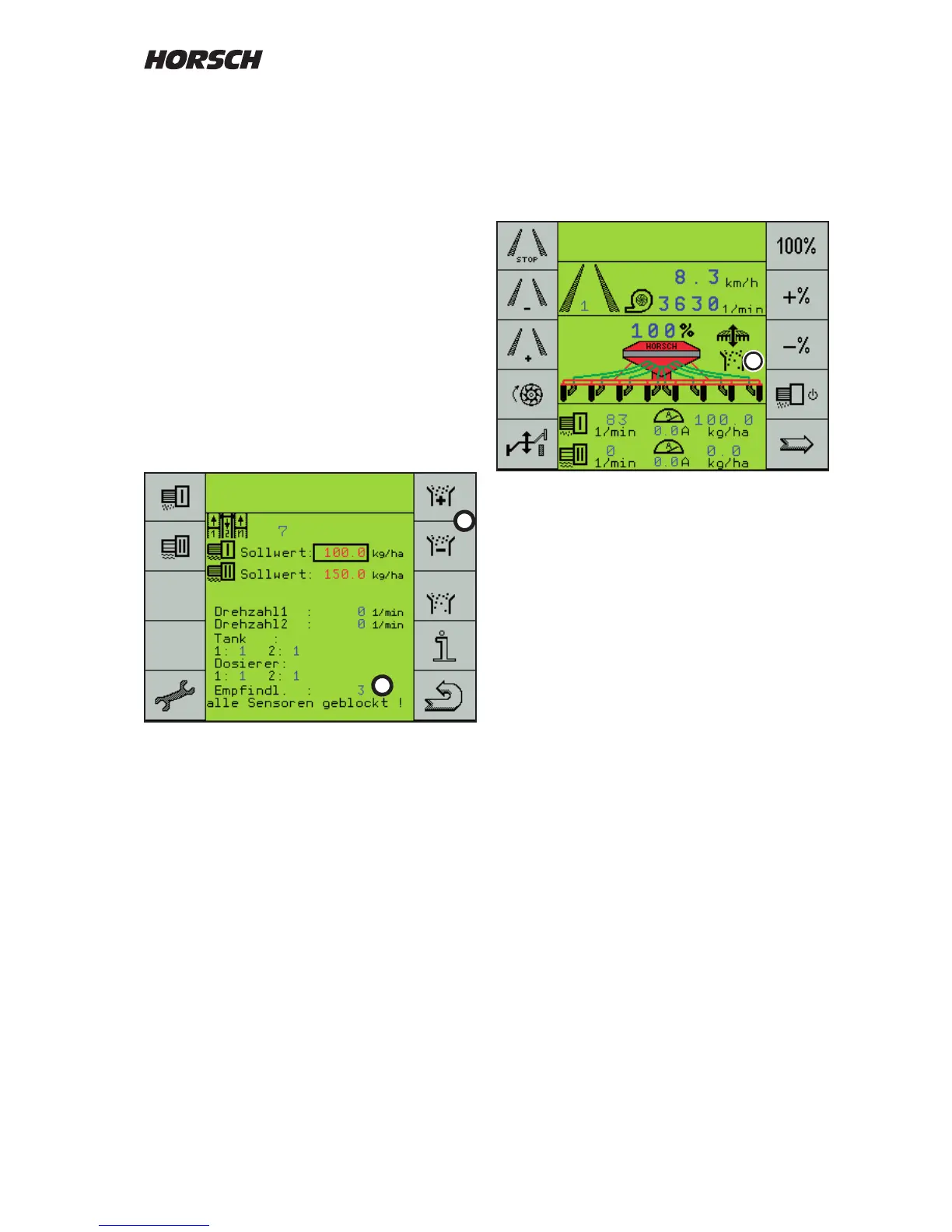
On the third page the sensitivity can be set with
the + and - keys (1) in 10 steps.
The setting depends on grain size, type and
quantity of seed.
Setting
The setting must be made during seeding and
at normal working speed.
The sensitivity is thereby matched to the seed
quantity. Deviations are indicated by means of
an alarm.
During sowing regulate the sensitivity (2) up with
the + key (1), until the rst sensors are reported
blocked.
Then reduce the sensitivity, until no blockage
is reported.
Normally 1 to 2 stages back are sucient. The
further you regulate down, the more quantity
deviations will be accepted, until the alarm will
respond.
Seed ow monitoring
Seed ow monitoring is switched on as soon as
the sensitivity is set to 1 or higher.
The display of the rst work page shows the
seed ow monitoring with the symbol (3).
During sowing the symbol is permanently visible.
If the work signal fails, e.g. when turning and no
grains are blown through, the symbol will ash.
On the third page all sensors will then be
reported as blocked.
1
2
3



 To Next Page