8-6
Time Protocols
SNTP: Viewing, Selecting, and Configuring
Time Protocols
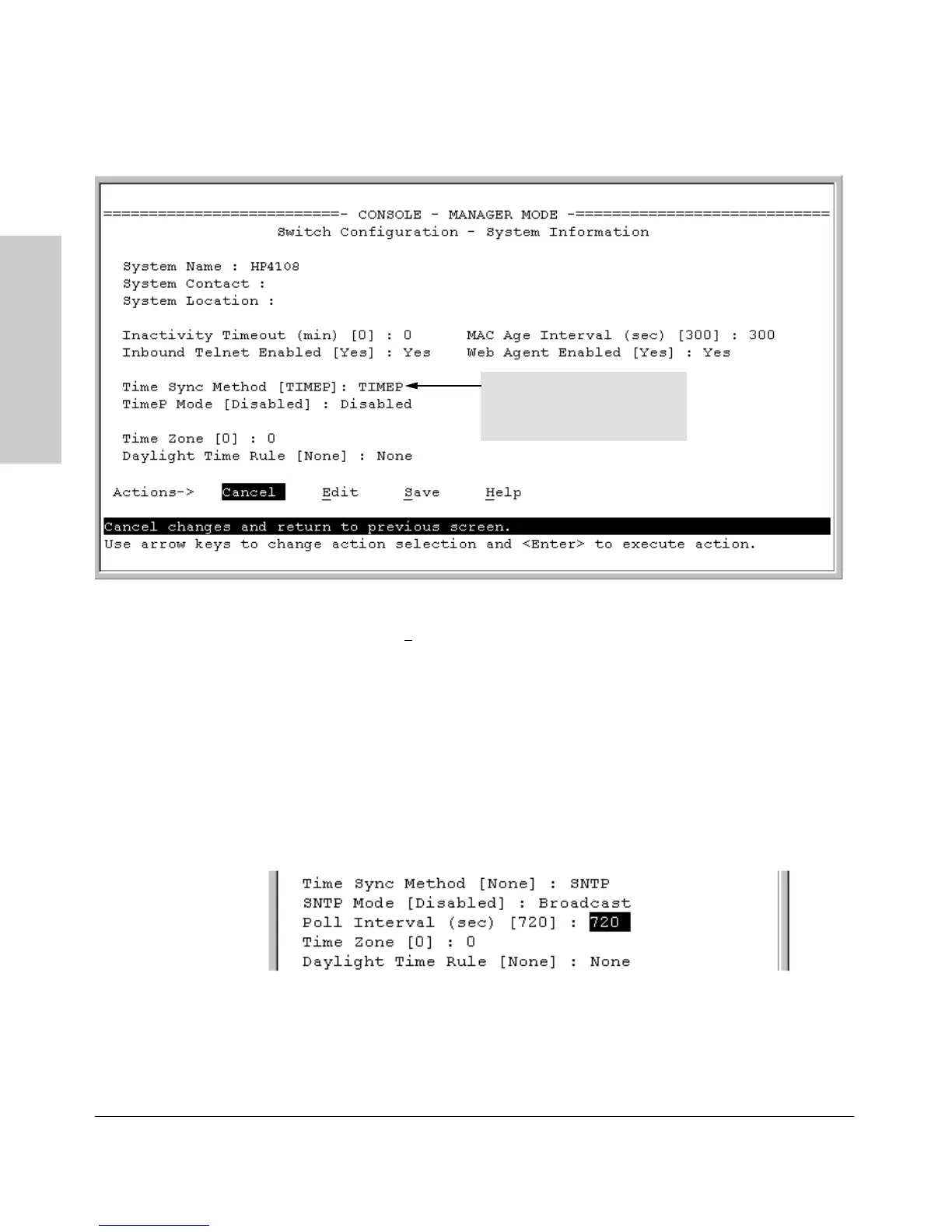
Figure 8-4. The System Information Screen (Default Values)
2. Press [E] (for
Edit). The cursor moves to the System Name field.
3. Use [v] to move the cursor to the
Time Sync Method field.
4. Use the Space bar to select
SNTP, then press [v] once to display and move
to the
SNTP Mode field.
5. Do one of the following:
• Use the Space bar to select the
Broadcast mode, then press [v] to
move the cursor to the
Poll Interval field, and go to step 6. (For
Broadcast mode details, see "SNTP Operating Modes" on page 2.)
• Use the Space bar to select the
Unicast mode, then do the
following:
i. Press [>] to move the cursor to the
Server Address field.
Time Protocol Selection Parameter
– TIMEP
– SNTP
– None


 To Next Page