2-20
Modulate
or
Sum
the Signals
Key
Poinfs
about
Operation
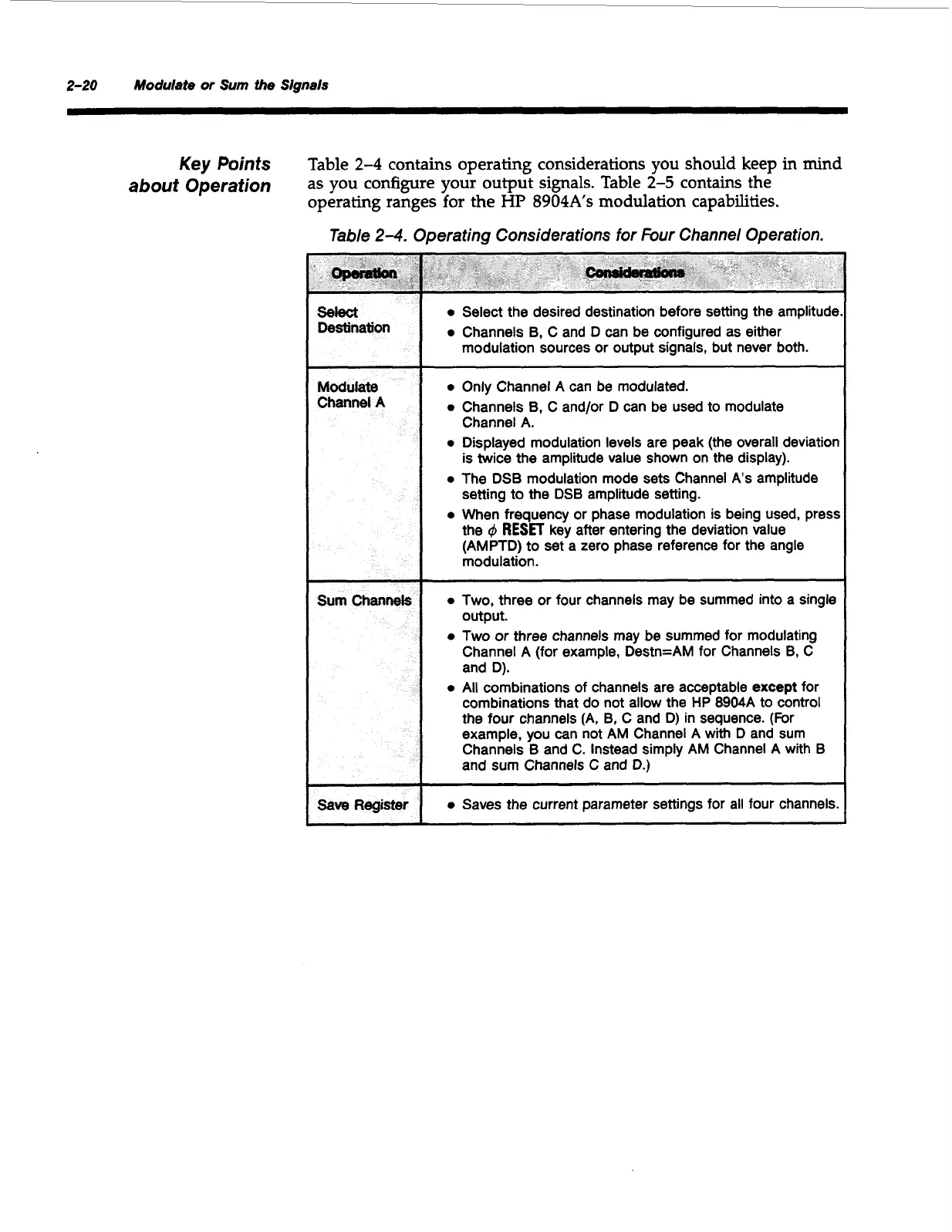
Table
2-4
contains operating considerations you should keep
in
mind
as you configure your output signals. Table
2-5
contains the
operating ranges
for
the
HP
8904As
modulation capabilities.
Table
2-4.
Operating Considerations for Four Channel Operation.
3ave
Register
0
Select the desired destination before setting the amplitude
0
Channels B, C and D can be configured as either
modulation sources or output signals, but never both.
0
Only Channel
A
can
be
modulated.
0
Channels
B,
C and/or D can be used to modulate
0
Displayed modulation levels are peak (the overall deviation
0
The DSB modulation mode sets Channel
As
amplitude
0
When frequency
or
phase modulation is being used, press
RESET
key after entering the deviation value
Channel
A.
is twice the amplitude value shown on the display).
setting to the DSB amplitude setting.
the
(AMPTD) to set a zero phase reference for the angle
modulation.
0
Two,
three or four channels may
be
summed into a single
output.
0
Two
or
three channels may be summed for modulating
Channel A (for example, Destn=AM for Channels
B,
C
and D).
0
All combinations of channels are acceptable except for
combinations that do not allow the HP 8904A to control
the four channels (A, B, C and
D)
in sequence. (For
example, you can not
AM
Channel A with
D
and sum
Channels
B
and C. Instead simply AM Channel
A
with B
and sum Channels
C
and D.)
__~
~
0
Saves the current parameter settings for all four channels.
Artisan Technology Group - Quality Instrumentation ... Guaranteed | (888) 88-SOURCE | www.artisantg.com



 To Next Page