Model
8904A
3-7.
STATUS
BYTE
General Information
Operation
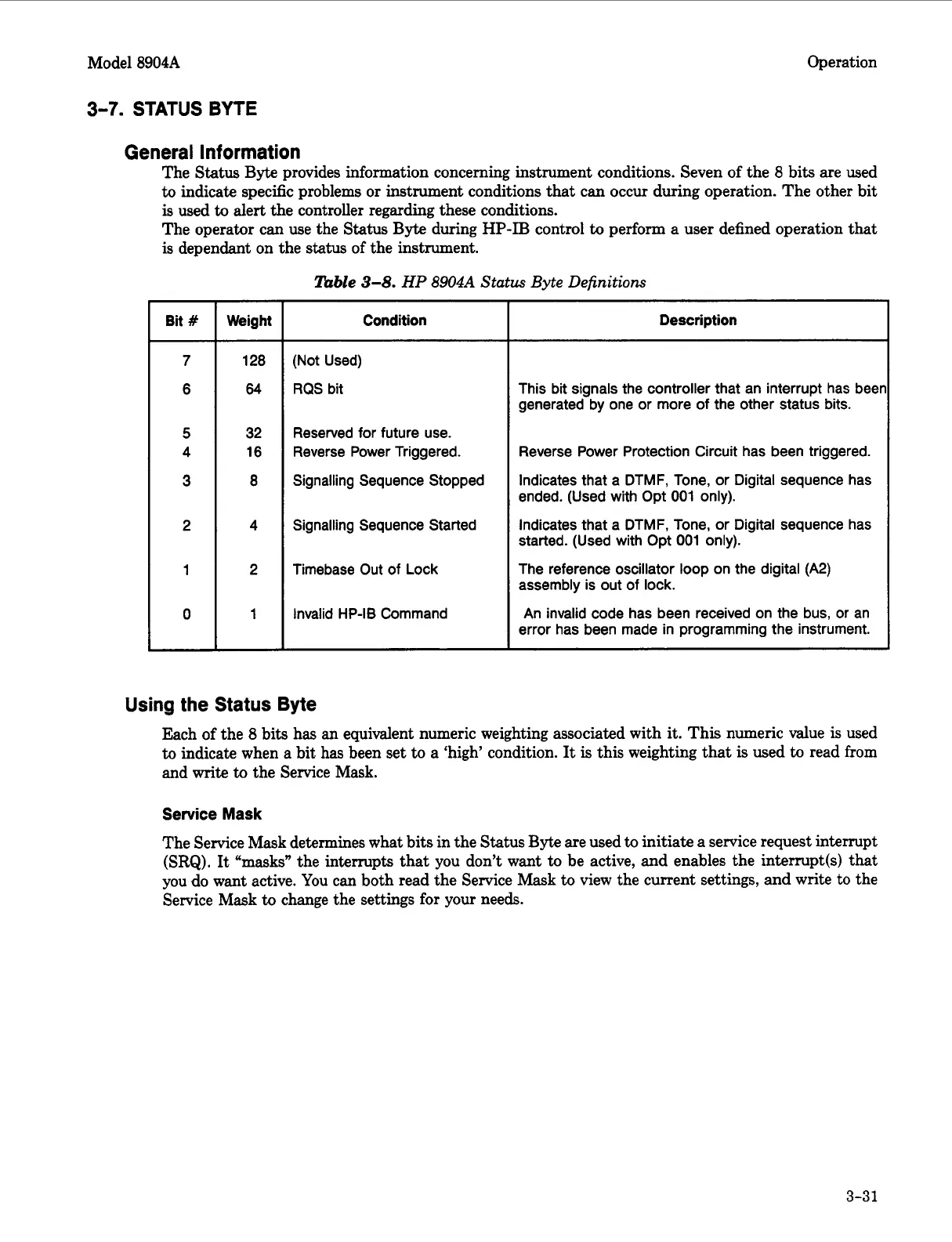
The Status
Byte
provides information concerning instrument conditions. Seven of the
8
bits are used
to
indicate specific problems or instrument conditions that
can
occur
during operation. The other bit
is
used
to
alert the controller regarding these conditions.
The operator can use the Status
Byte
during
HP-IB
control
to
perform
a
user defined operation
that
is dependant on the status
of
the instrument.
nzble
3-8.
HP
8904A
Status Byte Definitions
Bit
#
Weight
128
64
32
16
8
4
2
1
Condition
(Not Used)
RQS
bit
Reserved for future use.
Reverse Power Triggered.
Signalling Sequence Stopped
Signalling Sequence Started
Timebase Out of
Lock
Invalid
HP-I6
Command
Description
This
bit signals the controller that an interrupt has beer
generated
by
one or more of the other status bits.
Reverse Power Protection Circuit has been triggered.
Indicates that a
DTMF,
Tone, or Digital sequence has
ended. (Used with Opt
001
only).
Indicates that a
DTMF,
Tone, or Digital sequence has
started.
(Used
with Opt
001
only).
The
reference oscillator loop on the digital (A2)
assembly
is
out of
lock.
An
invalid code has been received on the
bus,
or an
error has been made
in
programming the instrument.
Using the Status Byte
Each of the
8
bits has
an
equivalent numeric weighting associated with
it.
This numeric value
is
used
to
indicate when a bit has been set
to
a ‘high’ condition.
It
is
this weighting that
is
used
to
read from
and
write
to
the Service Mask.
Service
Mask
The Service Mask determines what bits in the Status
Byte
are used
to
initiate
a
service request interrupt
(SRQ).
It “masks” the interrupts that you don’t want
to
be active,
and
enables the interrupt(s)
that
you
do
want active. You
can
both read the Service Mask
to
view the current settings, and write to the
Service Mask
to
change the settings for your needs.
3-31
Artisan Technology Group - Quality Instrumentation ... Guaranteed | (888) 88-SOURCE | www.artisantg.com



 To Next Page