Operation
3-8.
ERROR CODES AND HELP MESSAGES
Model
89048
When the
HP
8904A
detects an inappropriate operating condition (such
as
when an inactive key
is
pressed),
it
beeps to let you
know
that
a
message about the condition
is
available on the Help display.
The
HP
8904A’s Help display
is
accessed
by
pressing the
blue
SHIFT
key and then the
HELP
key.
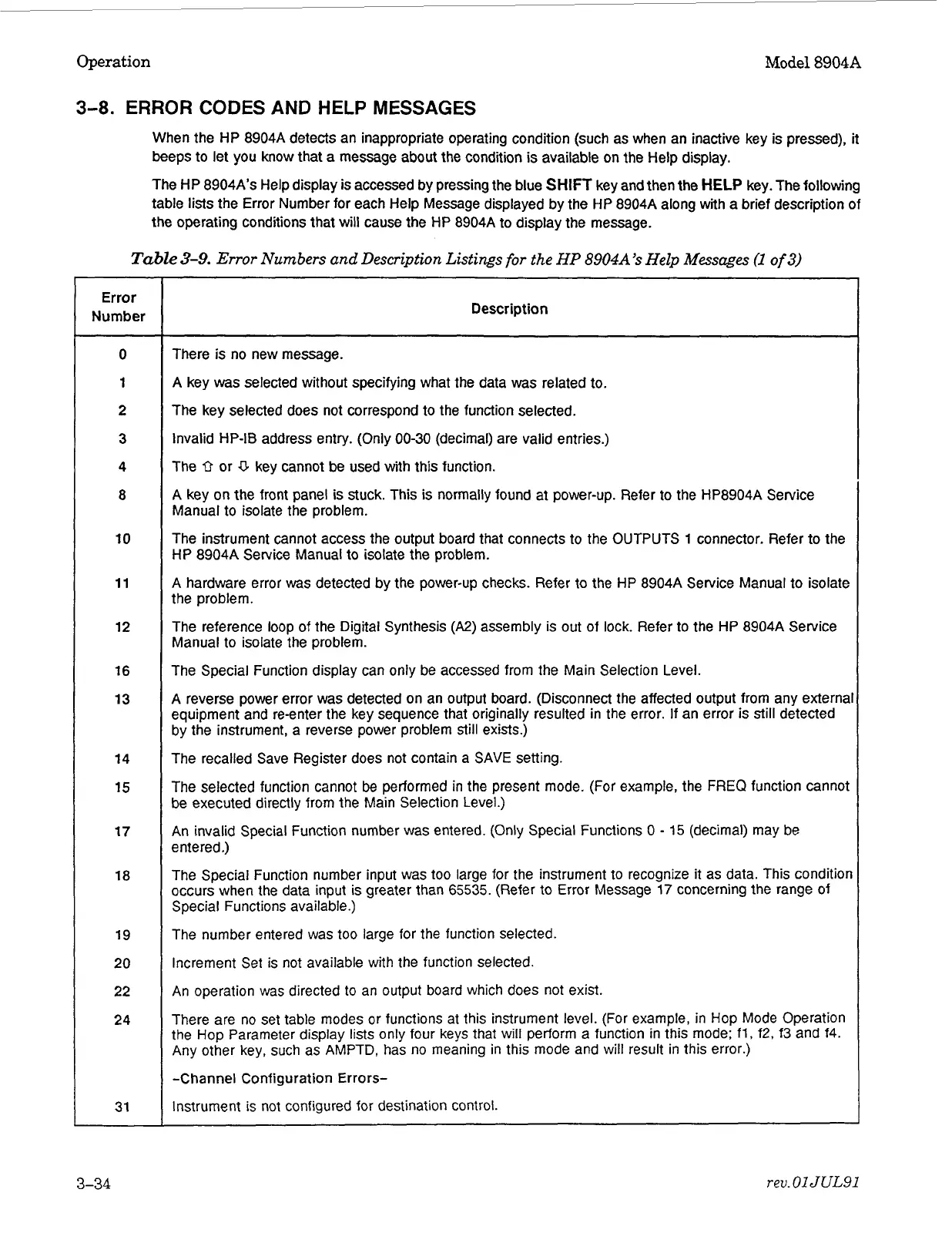
The following
table
lists
the
Error
Number for each Help Message displayed
by
the
HP
8904A
along with a brief description of
the
operating conditions that
will
cause the
HP
8904A
to display
the
message.
Table
3-9.
Error
Numbers
and
Description Listings
for
the
HP
8904A’s
Help
Messages
(1
of
3)
Error
Number
0
1
2
3
4
8
10
11
12
16
13
14
15
17
18
19
20
22
24
31
0
escr
i
p
tio
n
There
is
no new message.
A
key
was
selected without specifying what the data
was
related to.
The key selected does not correspond to the function selected.
Invalid
HP-IB
address entry.
(Only
00-30
(decimal) are valid entries.)
The
0
or
U
key cannot be used
with
this function.
A
key on the front panel
is
stuck.
This
is
normally found at power-up. Refer to the
HP8904A
Service
Manual to isolate the problem.
The instrument cannot access the output board that connects to the OUTPUTS
1
connector. Refer to the
HP
8904A
Service Manual to isolate the problem.
A
hardware error
was
detected
by
the power-up checks. Refer to the
HP
8904A
Service Manual to isolate
the problem.
The reference loop
of
the Digital Synthesis
(A2)
assembly
is
out
of lock. Refer to the
HP
8904A
Service
Manual to isolate the problem.
The Special
Function
display can
only
be accessed
from
the Main Selection Level.
A
reverse power error was detected on an output board. (Disconnect the affected output
from
any external
equipment and re-enter the key sequence that originally resulted
in
the error.
If
an error
is
still
detected
by
the instrument, a reverse power problem still exists.)
The recalled Save Register does not contain a SAVE setting.
The selected function cannot
be
performed
in
the present mode.
(For
example, the
FREQ
function cannot
be executed directly from the Main Selection Level.)
An
invalid Special Function number
was
entered.
(Only
Special Functions
0
-
15
(decimal) may be
entered.)
The Special Function number
input
was too large for the instrument
to
recognize
it
as data.
This
condition
occurs when the data
input
is
greater than
65535.
(Refer to Error Message
17
concerning the range of
Special Functions available.)
The number entered was
too
large for the function selected.
Increment Set
is
not
available
with
the function selected.
An
operation was directed
to
an
output
board
which
does
not
exist.
There are
no
set table modes
or
functions at
this
instrument level.
(For
example,
in
Hop
Mode Operation
the Hop Parameter
display
lists
only
four keys that
will
perform a function
in
this
mode:
fl,
f2,
f3
and 14.
Any
other key, such as
AMPTD,
has
no
meaning
in
this
mode and
will
result
in
this
error.)
-Channel Configuration Errors-
Instrument
is
not configured for destination control.
3-34
rev.
01
JUL91
Artisan Technology Group - Quality Instrumentation ... Guaranteed | (888) 88-SOURCE | www.artisantg.com



 To Next Page