3A-4
HP
8904A
Option
005
Accessing the Required Menu Settings
Two instrument settings are required to phase synchronize multiple
HI?
8904As;
both settings are in the the
Special
menu. These are the
specials:
1.
Special
#6
-
Enable Synchronous Mode, and
2.
Special
#7
-
Configure As MASTER Controller.
Enable Synchronous Mode
-
allows you to enable or disable the
Option
005
capabilities. Configure as MASTER Controller
-
defines
whether the instrument will be a Master or Slave when using
Option
005
capabilities. (Only one instrument may be configured to
be the Master controller.)
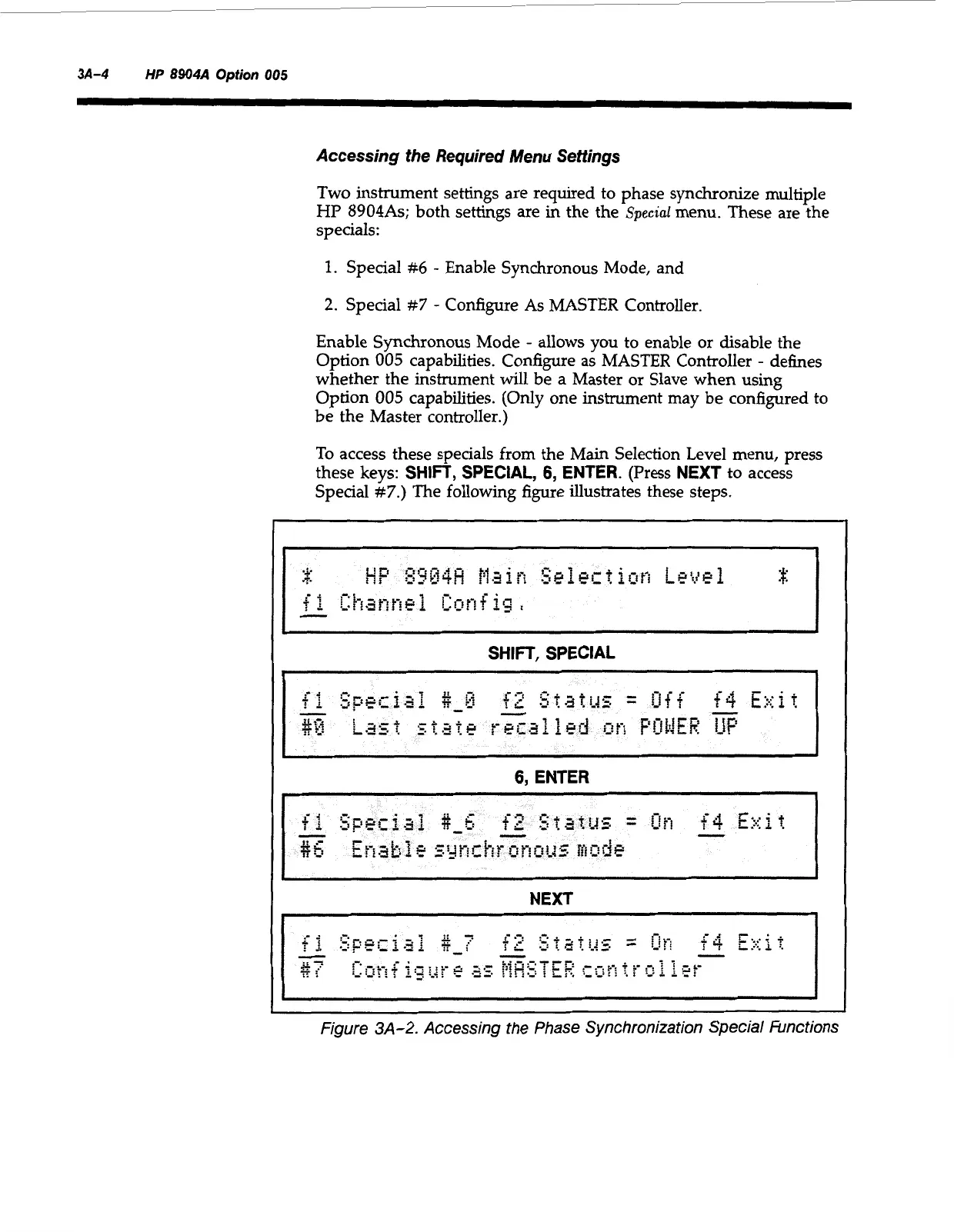
To access these specials from the Main Selection Level menu, press
these
keys:
SHIFT, SPECIAL,
6,
ENTER.
(Press
NEXT
to access
Special
#7.)
The following figure illustrates these steps.
~~
SHIFT,
SPECIAL
6,
ENTER
NEXT
Figure
3A-2.
Accessing the Phase Synchronization Special Functions
Artisan Technology Group - Quality Instrumentation ... Guaranteed | (888) 88-SOURCE | www.artisantg.com



 To Next Page