3A-6
HP 8904A
Option
005
6)
Connect the
OUTPUTS-1-HIGH
signal from
each
instrument to
the inputs of a multi-channel oscilloscope. Set the oscilloscope to
trigger on the signal from the Master controller. Set the
time/division at
0.1
ms.
7)
Center each waveform
on
the oscilloscope’s display
so
that the
tops and bottoms of each waveform are at the same level.
8)
Using the
SAVE/RECALL
function,
SAVE
the instrument settings
for both of the Slave instruments, and then
turn
the power
off.
9)
Turn both Slave instruments back on and recall the saved settings.
At this point, the zero-crossings of the three signals should not
align.
10)
Press
SHIFT,
RESET
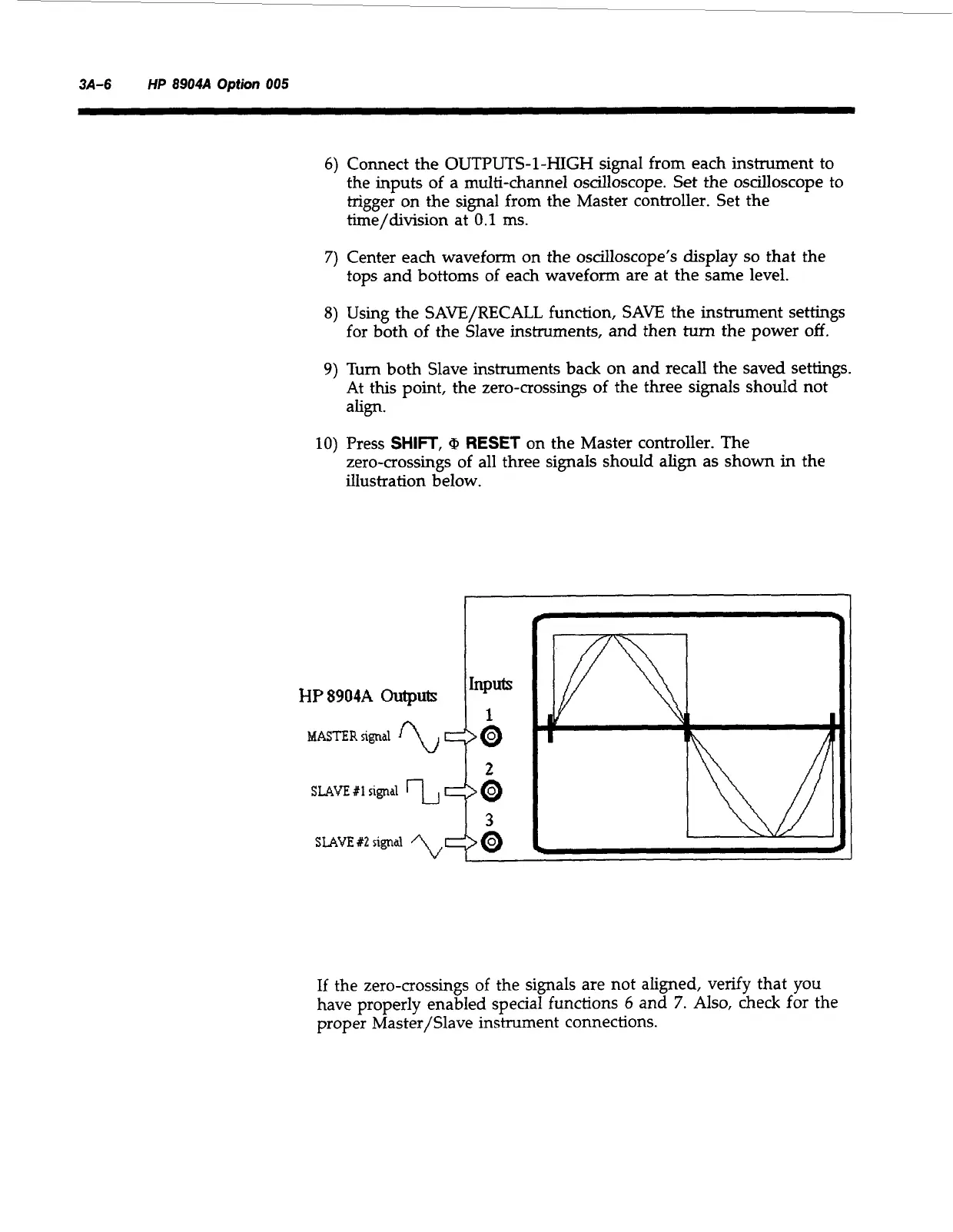
on the Master controller. The
zero-crossings of all three signals should align as shown in the
illustration below.
HP8904A
Outputs
2
If the zero-crossings of the signals are not aligned, verify that
you
have properly enabled special functions
6
and
7.
Also,
check for the
proper Master/Slave instrument connections.
Artisan Technology Group - Quality Instrumentation ... Guaranteed | (888) 88-SOURCE | www.artisantg.com



 To Next Page