HP D300 Digital Dispenser
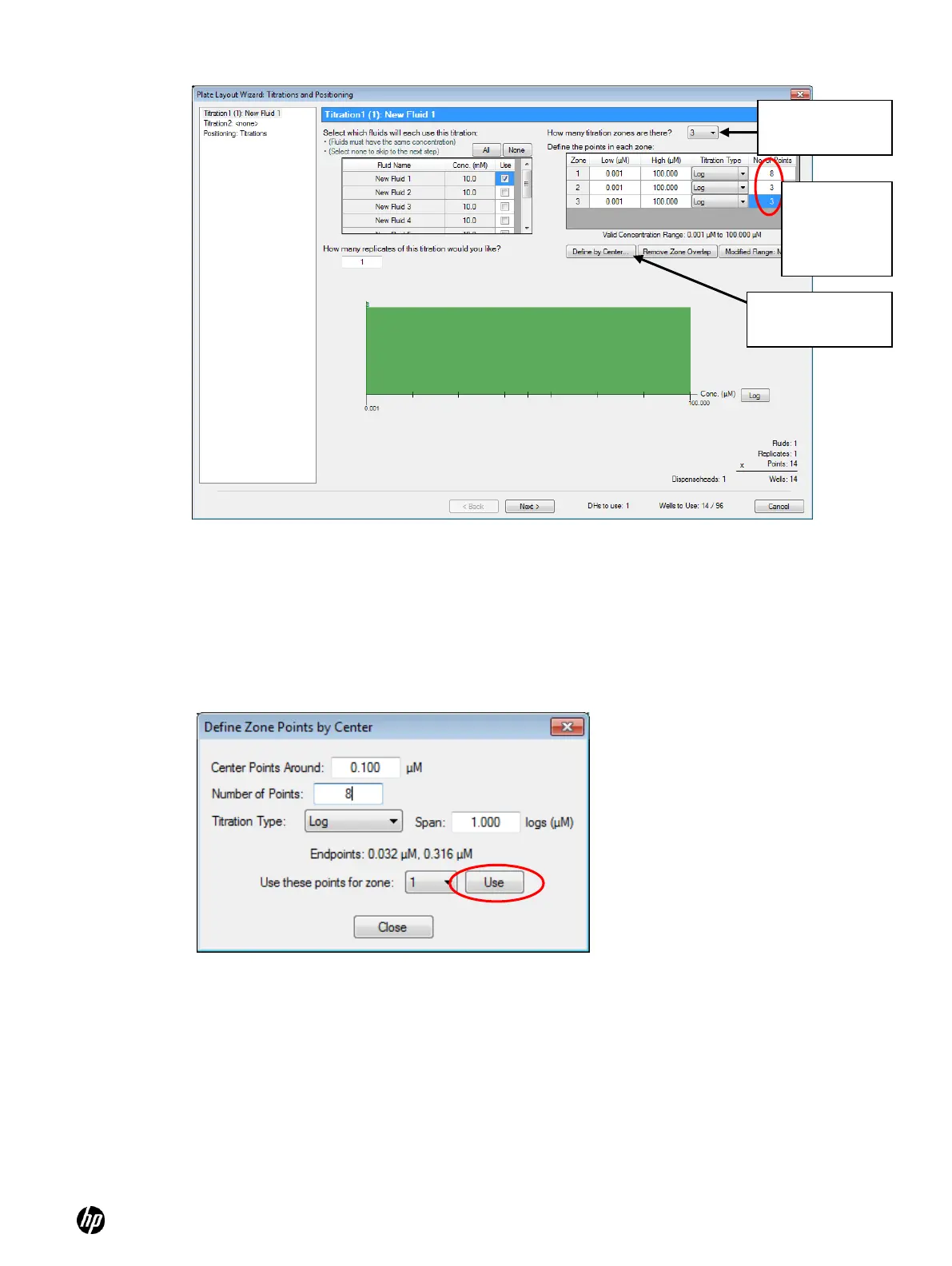
Figure 5-22 Titration1 pane—creating a multizone titration1 layout
c. Define the densely spaced doses in the center of the titration as zone 1:
Click the Define by Center button. The Define Zone Points by Center dialog box appears.
Ensure that the Use these points for zone: drop done is set to ―1‖), as shown in Figure 5-23.
Figure 5-23 Define Zone Points by Center dialog box
i. Enter the center point concentration for the finely spaced region in the Center Points
Around box.
For example, the presumed IC50 value might be used. A value of 100 nM has been
chosen for this example.
ii. Enter the number of points for the finely spaced region in the Number of Points box.
iii. Select the titration type to be used for the set of points by clicking the arrow on the
Titration Type drop-down list box.
iv. Enter a value in the Span box for this zone; if a span of 1 log is entered, the points will
span plus and minus a half log around the center point.
Enter 8, 3,
and 3 for
number of
points
Click the Define
by Center button



 To Next Page