EasyManua.ls Logo

HP HP-18C - Editing a Formula

HP HP-18C
226 pages
Print Icon
To Next Page IconTo Next Page
To Previous Page IconTo Previous Page
Loading...
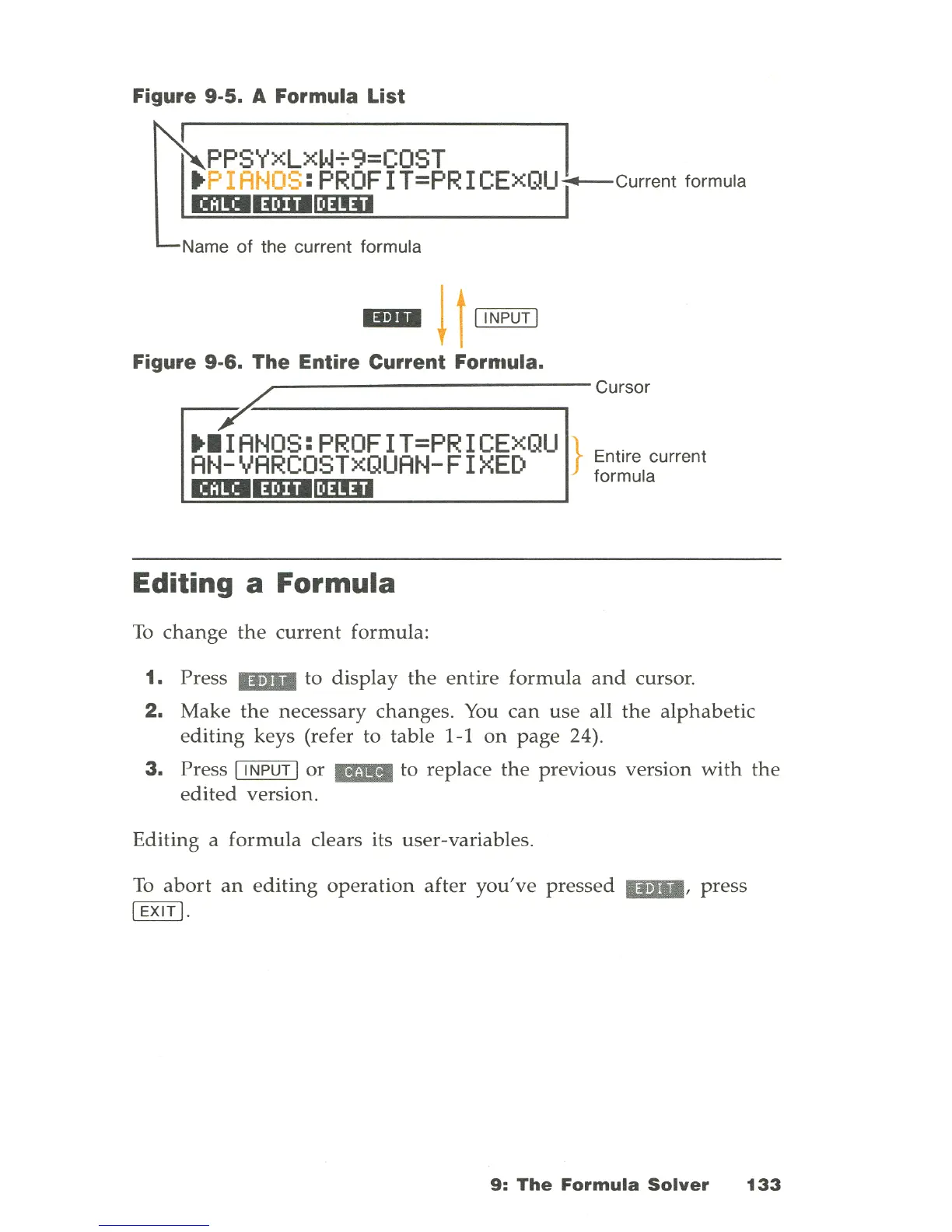
Figure
9-5_
A Formula List
. P I
ANOS
:
PROF
I T=PR I CEXQU--current formula
~
PPSYXLXW+9=COST
I
DmlllmIllm:D
Name
of
the current formula
IBII
l
t
~
Figure 9-6. The Entire Current Fornlula.
-r,...------------cursor
••
IANOS:PROFIT=PRICExQU
AN-VARCOSTxQUAN-FIXED
DmlllmIllm:D
Editing a Formula
To
change
the
current
formula:
} Entire current
formula
1.
Press
IBII
to
display
the
entire
formula
and
cursor.
2.
Make
the
necessary changes.
You
can
use
all
the
alphabetic
editing
keys (refer to table
I-Ion
page
24).
3.
Press I
INPUT
lor
_ to replace
the
previous version
with
the
edited
version.
Editing a
formula
clears its user-variables.
To
abort
an
editing
operation
after
you've
pressed
IBII
, press
I
EXIT
I.
9:
The
Formula
Solver
133

Table of Contents

Related product manuals