●
The system will operate in a higher-performing dual channel mode if the memory capacity of the
SODIMM in Channel A is equal to the memory capacity of the SODIMM in Channel B.
●
In any mode, the maximum operational speed is determined by the slowest SODIMM in the system.
To remove a memory module:
1. Prepare the computer for disassembly (see Preparing to disassemble the computer on page 22).
2. Remove the rear port cover (see Rear port cover on page 23).
3. Remove the stand (see Attaching and removing a stand on page 24).
4. Remove the access panel (see Access panel on page 28).
5. Remove the system board shield (see System board (EMI) shield on page 37).
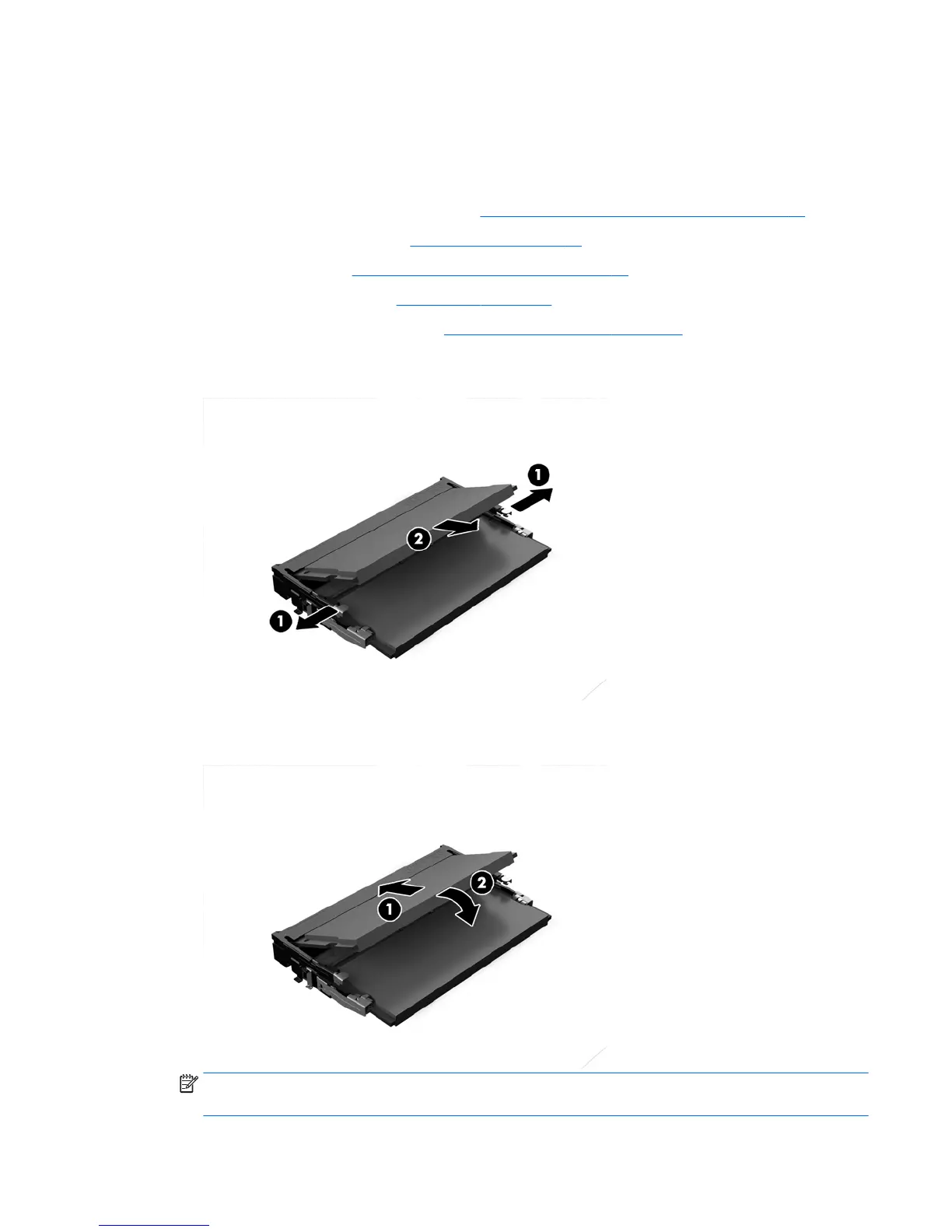
6. To remove a memory module, press outward on the two latches on each side of the SODIMM (1), then
pull the SODIMM out of the socket (2).
7. To install a memory module, slide the SODIMM into the socket at approximately a 30° angle (1), then
press the SODIMM down (2) so that the latches lock it in place.
NOTE: A memory module can be installed in only one way. Match the notch on the module with the tab
on the memory socket.
Memory 39



 To Next Page
 Loading...


