System board
The system board is secured with a a total of ten Torx screws. Two of the screws also secure the removable
side bracket, and two other screws secure the I/O bracket.
To remove the system board:
1. Prepare the computer for disassembly (see Preparing to disassemble the computer on page 22).
2. Remove the rear port cover (see Rear port cover on page 23).
3. Remove the stand (see Attaching and removing a stand on page 24).
4. Remove the access panel (see Access panel on page 28).
5. Remove the system board shield (see System board (EMI) shield on page 37).
6. Remove the memory modules (see Memory on page 38).
7. Remove the WLAN module (see WLAN module on page 43).
8. Remove the heat sink (see Heat sink on page 46).
9. Remove the processor (see Processor on page 47).
10. Disconnect all cables from the system board, noting their location for reinstallation.
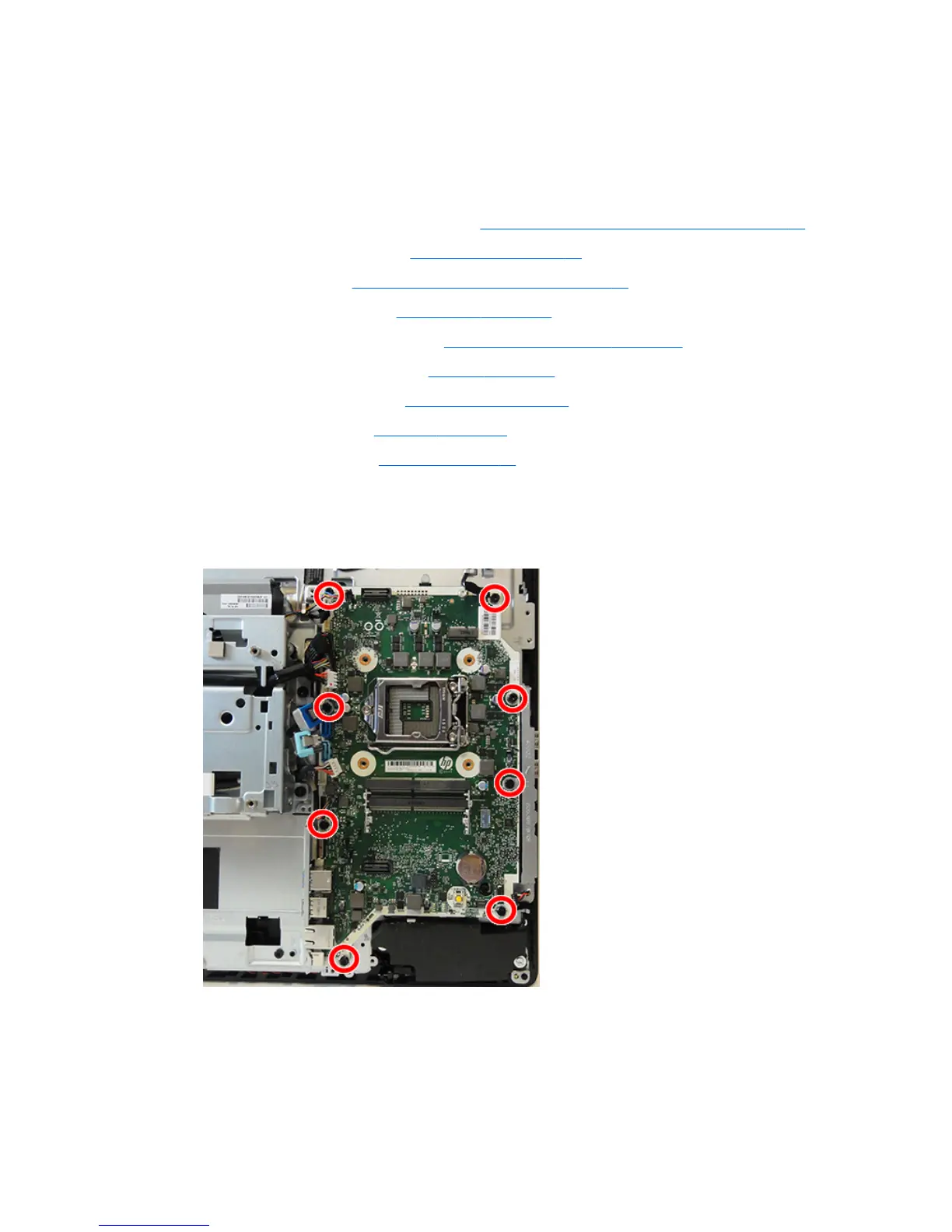
11. Remove the eight Torx screws that secure the system board to the computer.
12. Rotate the bracket o the right side of the system board.
13. Position the cables on the side of the board out of the way so you can freely slide the board out of the
computer.
14. Lift the system board up and out of the computer.
To install the system board, reverse the removal procedures.
System board 49



 To Next Page
 Loading...


