Speakers
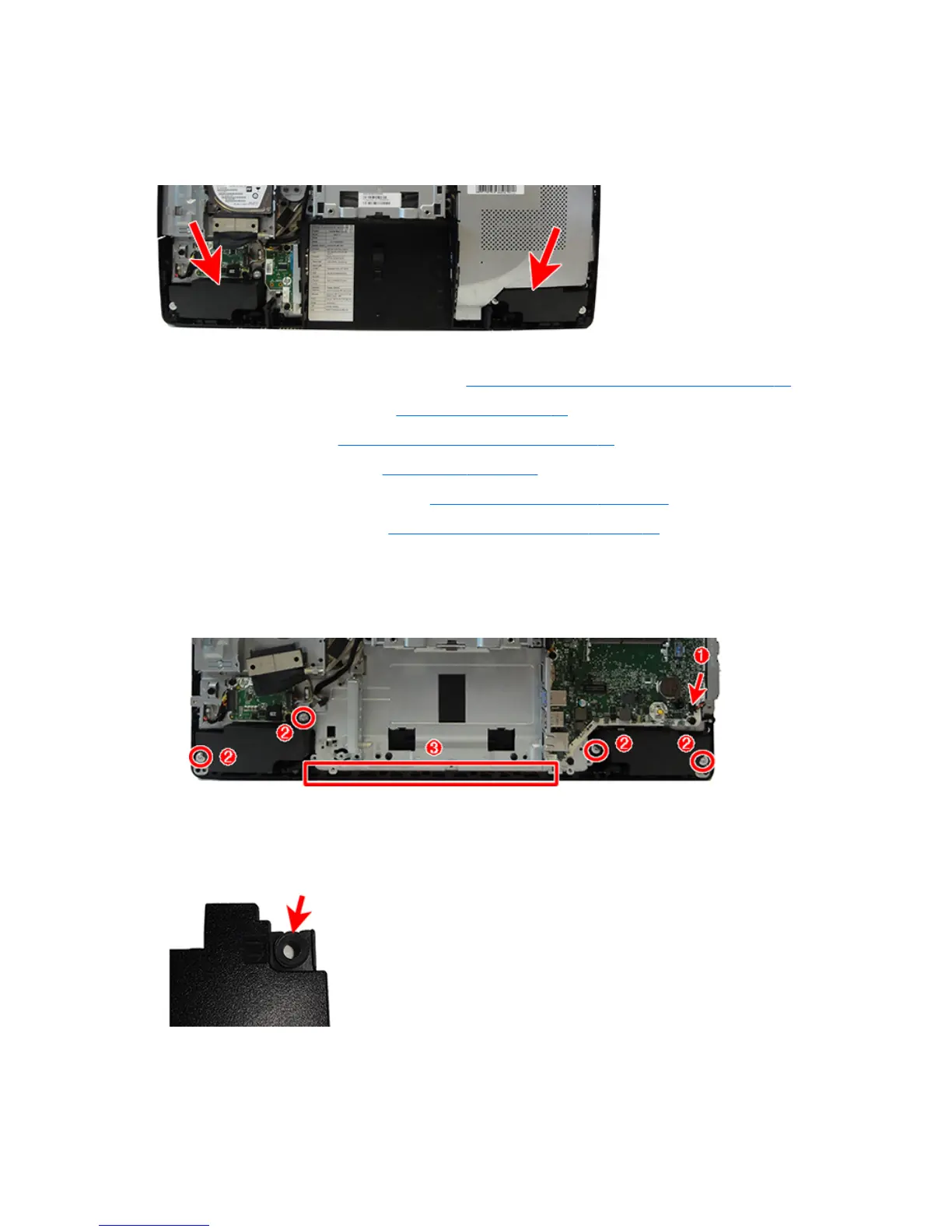
The speakers are located at the bottom of the computer. Two separate speakers are each secured by two Torx
screws.
To remove the speakers:
1. Prepare the computer for disassembly (see Preparing to disassemble the computer on page 22).
2. Remove the rear port cover (see Rear port cover on page 23).
3. Remove the stand (see Attaching and removing a stand on page 24).
4. Remove the access panel (see Access panel on page 28).
5. Remove the system board shield (see System board (EMI) shield on page 37).
6. Remove the rear I/O panel (see Rear I/O cover and bottom trim on page 64).
7. Disconnect the speaker cable from the system board (1).
8. Remove two Torx screws (2) that secure each speaker to the computer.
9. Remove speaker cable from the clips and routing path built into the chassis (3).
10. Remove the speakers from the computer.
To install the speakers, reverse the removal procedures.
When installing the speakers, make sure the rubber grommets are correctly installed in the speakers.
54 Chapter 4 Removal and Replacement Procedures



 To Next Page
 Loading...


