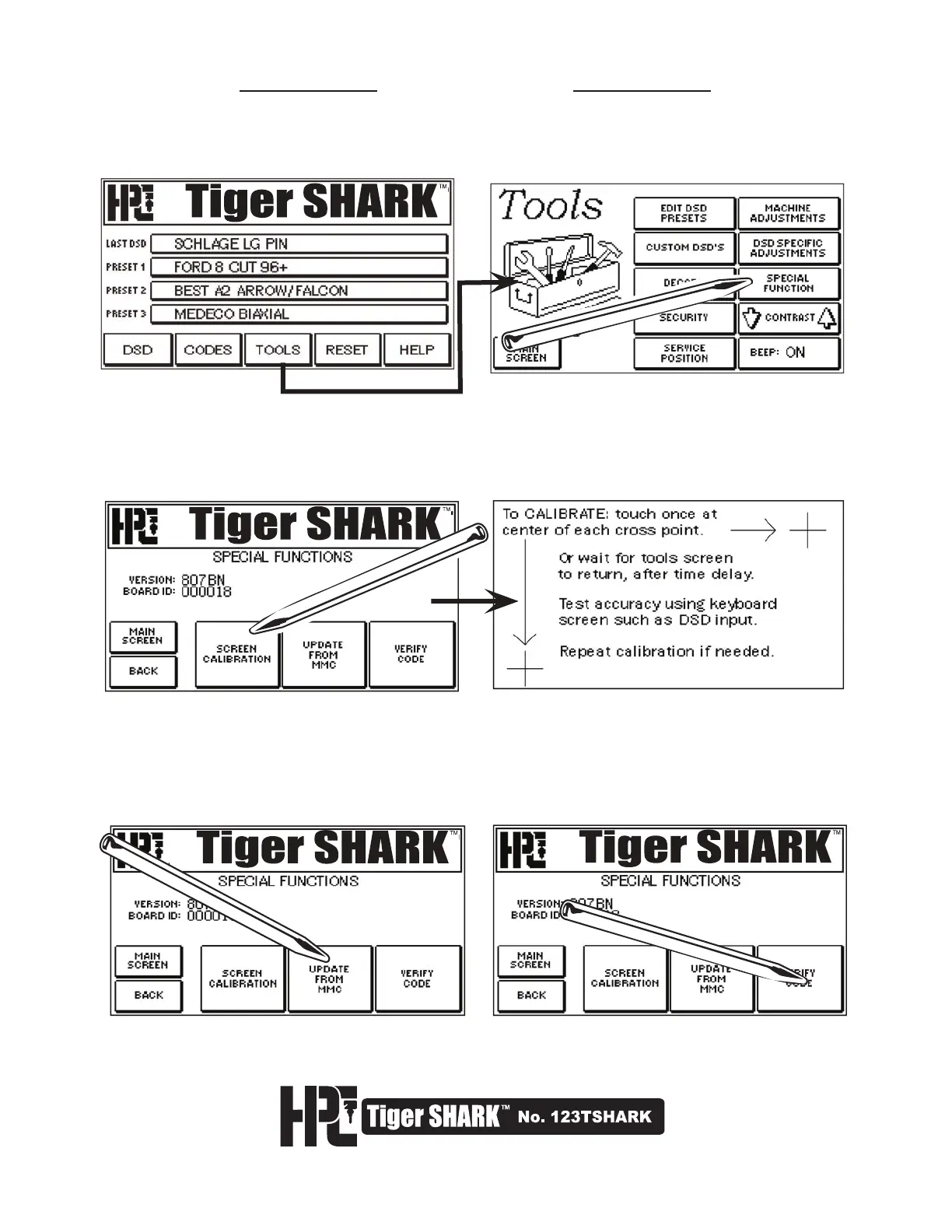
5.6 Special Function
The SPECIAL FUNCTION button accesses several operations and displays the version number of your machine
From the Main Menu, select TOOLS. From the TOOLS Screen select SPECIAL FUNCTION.
1. Selecting SCREEN CALIBRATION will display the Screen Calibration window. The screen has been calibrated
during production of the machine. However, if you notice that the accuracy of your stylus taps have diminished
(you do not get the results expected from a particular key) this indicates the screen requires re-calibration to
align the image on the screen with the touch-sensitive coating.
Tap or touch the 2 cross points to calibrate the screen. The display will return to the SPECIAL FUNCTION screen.
2. UPDATE FROM MMC (multi-media card) is used when updating the code information in the machine.
Complete directions will be provided with each update. Selecting this button will not affect your machine
(unless you have a new update to install).
3. VERIFY CODE is used during assembly to check initial installation. Selecting this button will not
affect your machine.



 To Next Page