5.3 Custom DSDs
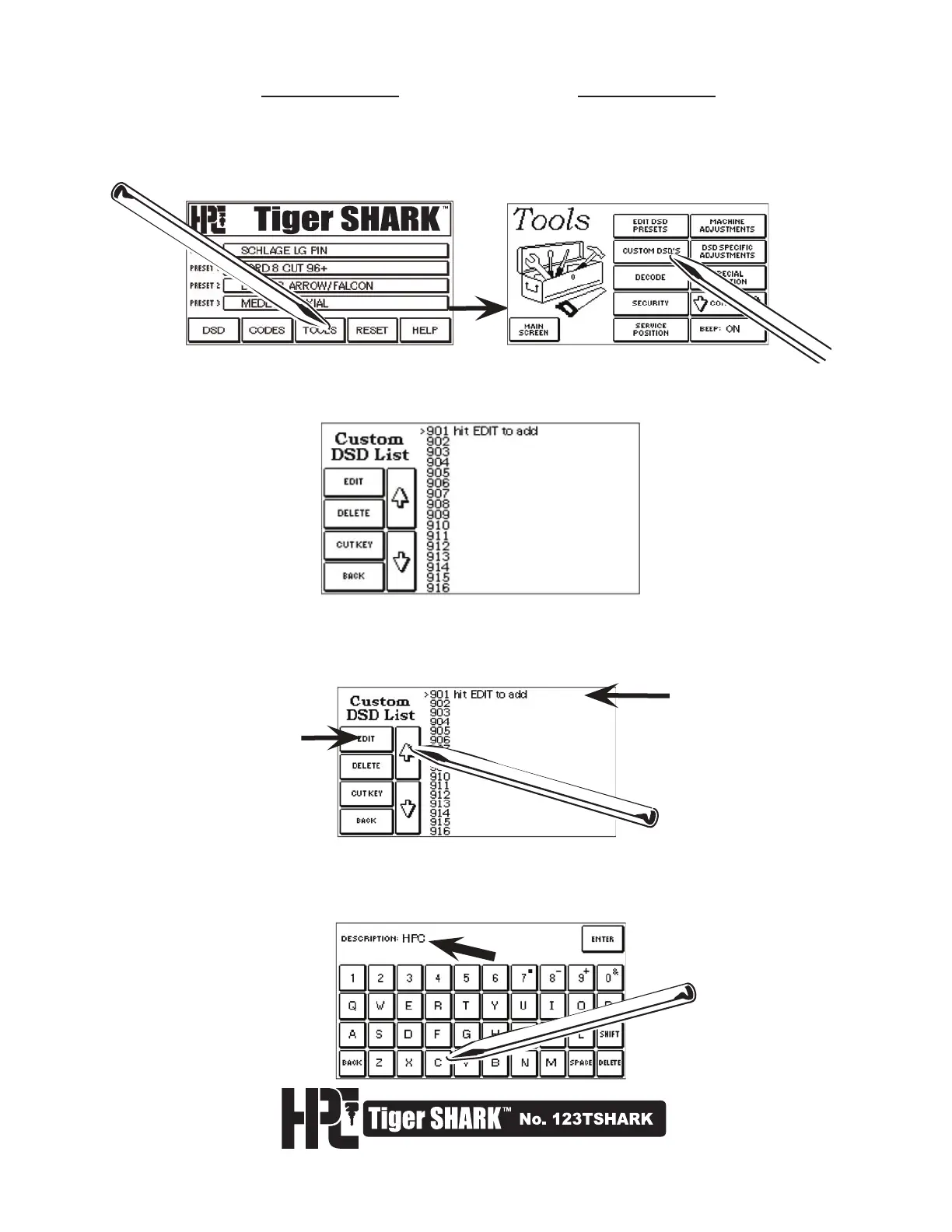
1. Custom DSDs allow for the creation of your own original DSD. This is particularly useful if you have a
proprietary or restricted lock for which you are cutting keys. To create a custom DSD, first choose
TOOLS from the Main Menu, and then select CUSTOM DSDS from the TOOLS Menu.
2. The machine will display the Custom DSD List as shown below. You may create and store up to 38 Custom
DSDs. From this menu, you have the option to edit the list, create a new DSD, delete a DSD from the list, or cut
a key using a specified DSD.
3. To create a new DSD, scroll down to a blank line. You will see “hit EDIT to add.” Select the EDIT button from
the menu.
4. From this screen you can now type in a description to give your new DSD a name. By pressing the SHIFT
key, you can insert a period(.), dash(—), plus sign(+) or ampersand(&) into the description. In this example,
we have used the name HPC. Press ENTER to record the description for your new DSD.



 To Next Page