SUN2000L-(2KTL-5KTL)
User Manual
Huawei Proprietary and Confidential
Copyright © Huawei Technologies Co., Ltd.
Working Modes
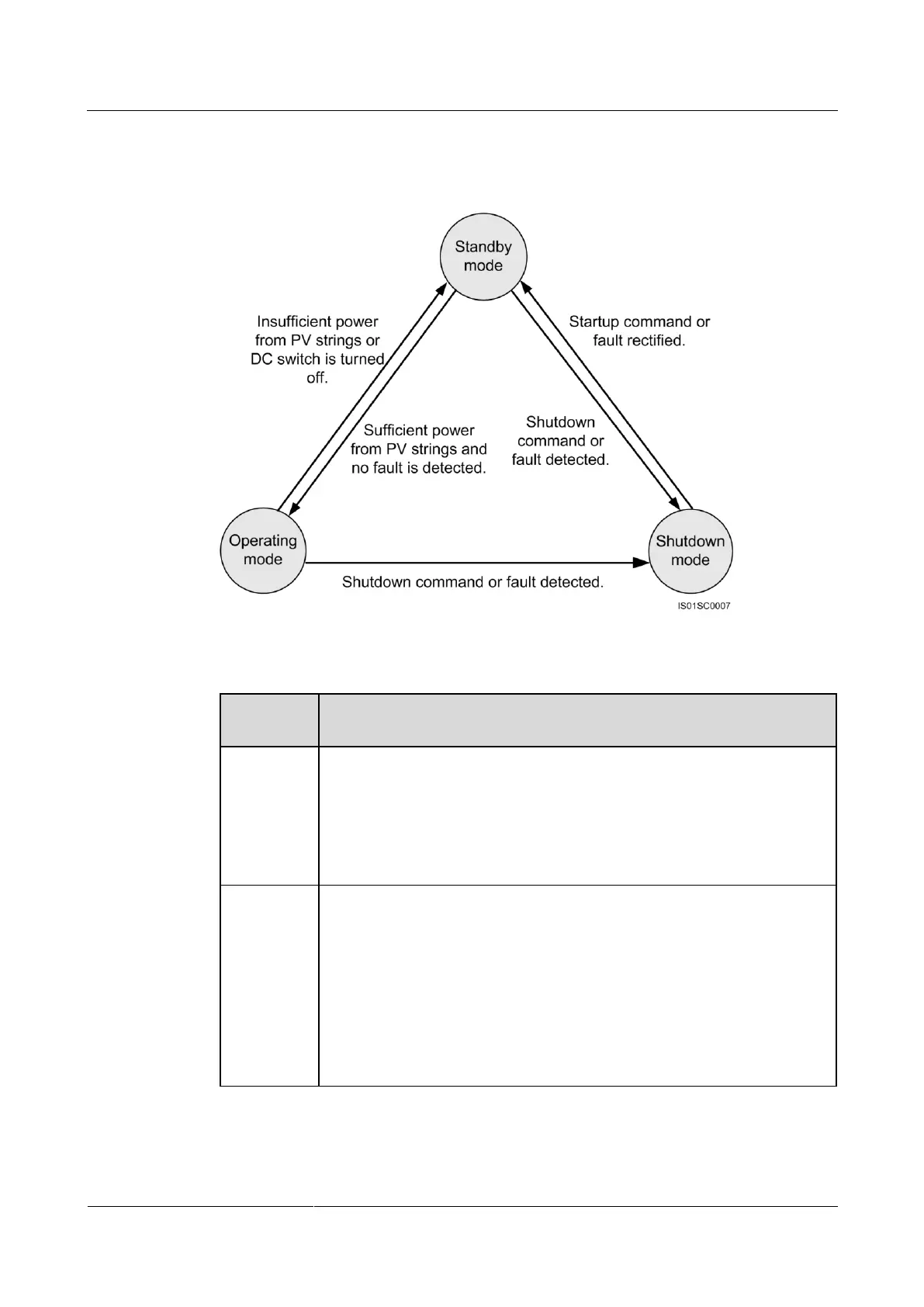
Figure 2-11 Working modes
Table 2-5 Working mode description
The SUN2000L enters Standby mode when the external environment does
not meet the requirements for starting the SUN2000L. In Standby mode:
The SUN2000L continuously checks its status and enters Operating
mode once the operating requirements are met.
The SUN2000L enters Shutdown mode after detecting a shutdown
command or a fault after startup.
In Operating mode:
The SUN2000L converts DC power from PV strings into AC power and
feeds the energy to the power grid.
The SUN2000L tracks the maximum power point to maximize the PV
string output.
The SUN2000L enters Shutdown mode after detecting a fault or a
shutdown command, and enters Standby mode after detecting that the
PV string output power is not suitable for connecting to the power grid
and producing power.











 To Next Page