SUN2000L-(2KTL-5KTL)
User Manual
7 Operations on the Local FusionHome App
Huawei Proprietary and Confidential
Copyright © Huawei Technologies Co., Ltd.
The IPS check function is available only for the Italy CEI0-21 grid code.
7.4.3.1 Adding/Deleting Devices
Procedure
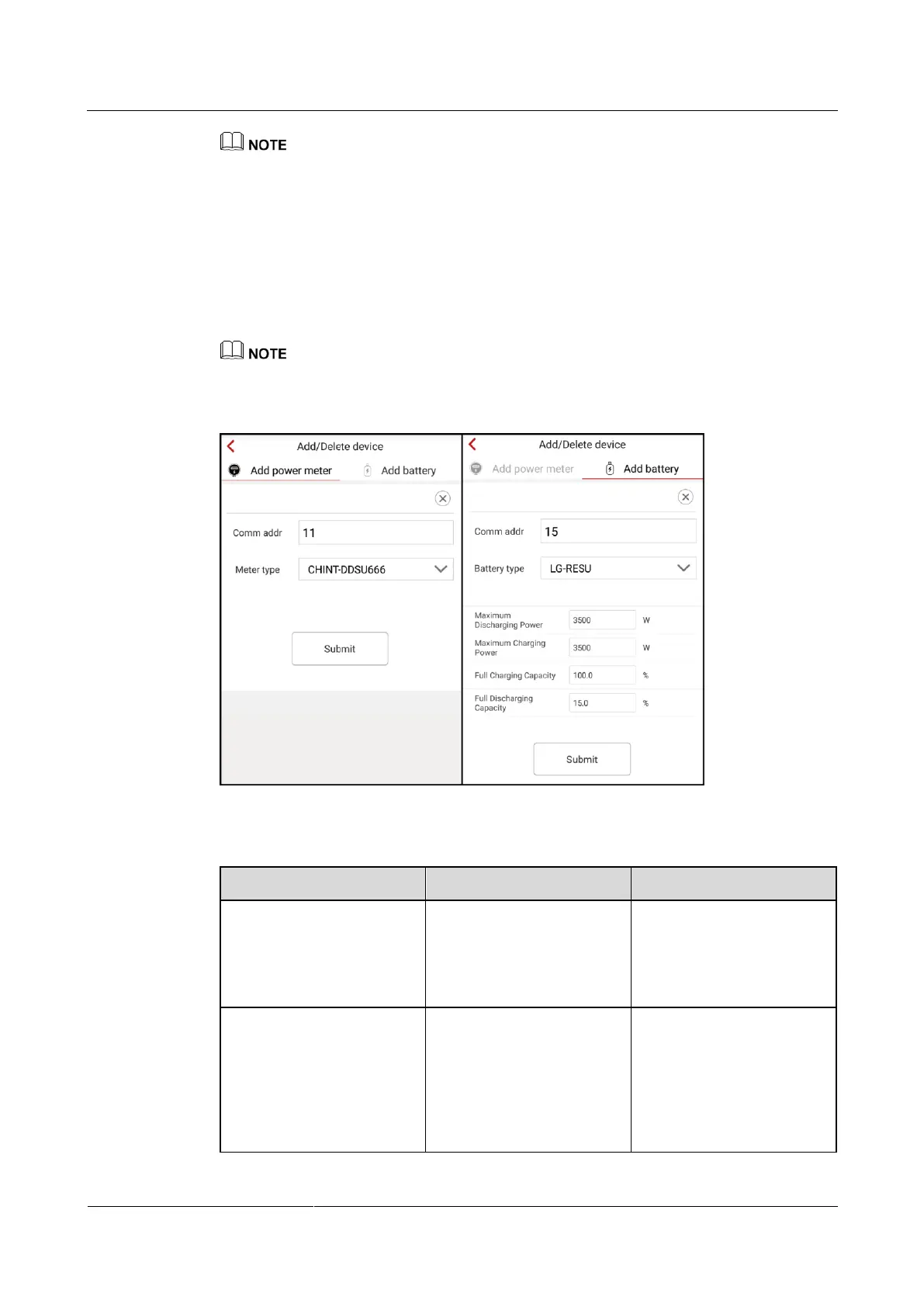
Step 1 On the Operation console screen, choose Device maint > Add/Delete device, and add a
power meter and battery according to actual conditions. Tap Submit to deliver the device
information to the SUN2000L.
Each device must have a unique communications address.
Figure 7-19 Adding/Deleting devices
Table 7-1 Description of the parameters on the Add meter tab page
Specifies the RS485 address
for the connected power
meter. The address should
be the same as the actual
address for the power meter.
Specifies the model of the
connected power meter. No
power meter of other models
can be connected.
CHINT-DDSU666
CCS-WNC-3Y-400-MB
Gavazzi-EM340DINAV
23XS1X
Gavazzi-EM111DINAV
81XS1X











 To Next Page