SUN2000L-(2KTL-5KTL)
User Manual
7 Operations on the Local FusionHome App
Huawei Proprietary and Confidential
Copyright © Huawei Technologies Co., Ltd.
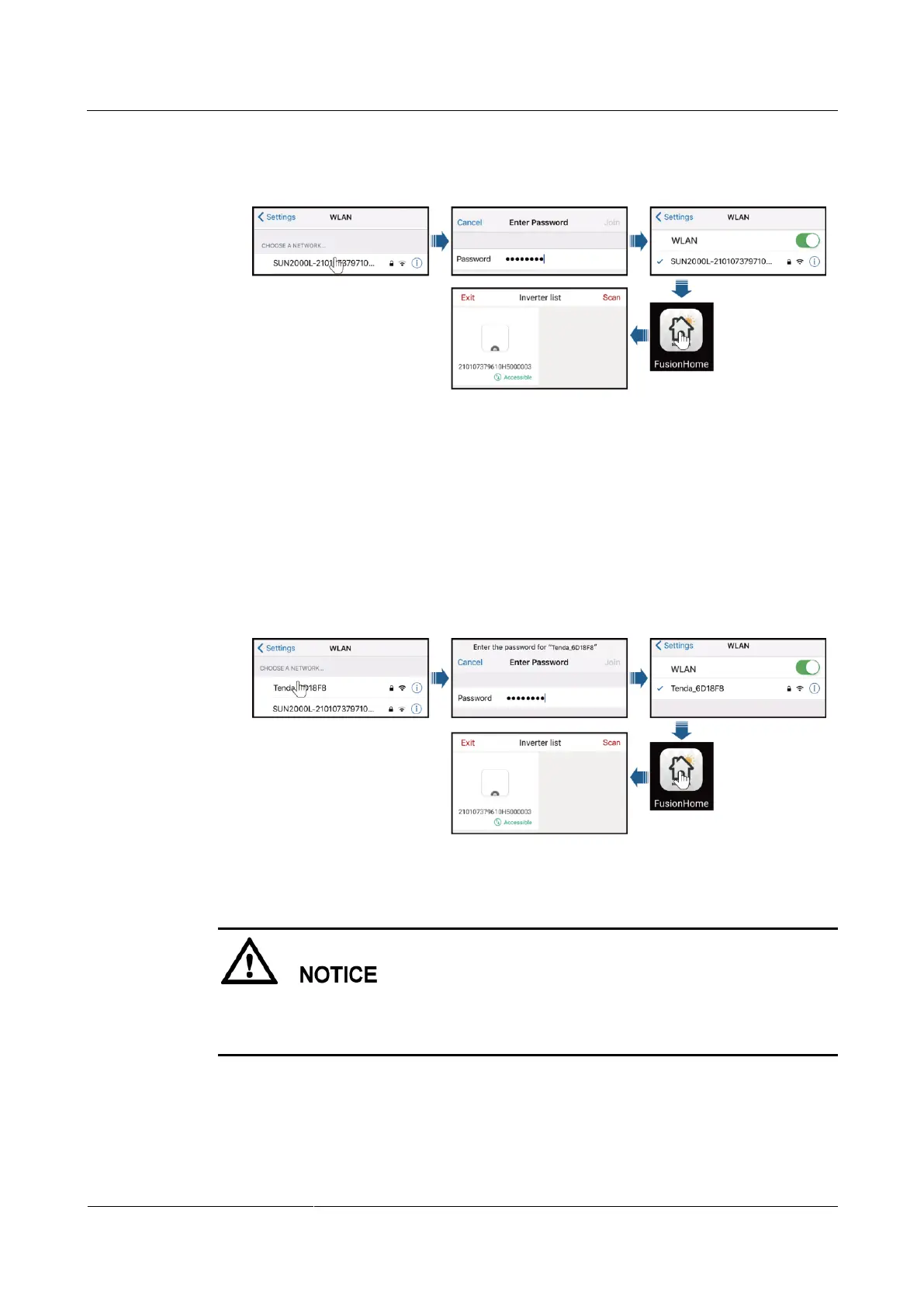
c. Run the app. After the connection succeeds, the Inverter list screen is displayed.
Figure 7-8 Mobile phone connecting to the SUN2000L directly
Method 2: The mobile phone connects to the SUN2000L over a router. Do not use this
method for the first login and ensure that the SUN2000L has connected to the router.
a. If the SUN2000L WiFi network has connected to the router, Choose Settings >
WLAN on the mobile phone and tap the WiFi name corresponding to the router.
b. Enter the router WiFi password for connection.
c. Run the app. The Inverter list screen displays all the Huawei SUN2000Ls that
have connected to the router.
Figure 7-9 Mobile phone connecting to the SUN2000L over a router
----End
The following text describes the operations on Android screens. The operations on iOS
screens are the same as those on Android screens, except that the screens are somewhat
different. The actual screens prevail.











 To Next Page