30
Outputs
Any programmed Input or Schedule can be mapped to an Output. The Dry Contact Outputs are Normally Open/Normally Closed
low voltage relays that can be used to initiate any programmed control to other systems. Outputs are available in Master Panels of
8, 16, or 24 Relays or Secondary Panels of 8, 16, or 24 Relays. CX 4 Relay Panels do not include Outputs
Select Inputs – Input Designations and Naming Inputs
Panels contain Outputs that are located on the panel motherboard. The Inputs that are located on the panel motherboard are
indicated on the input selection screen as “MDCX” for Master Panels OR “SDCX” for Secondary Panels. The “X” indicates the
output number. These outputs have “DRY CONTACT OUTPUT” screen printed adjacent to them on the motherboard.
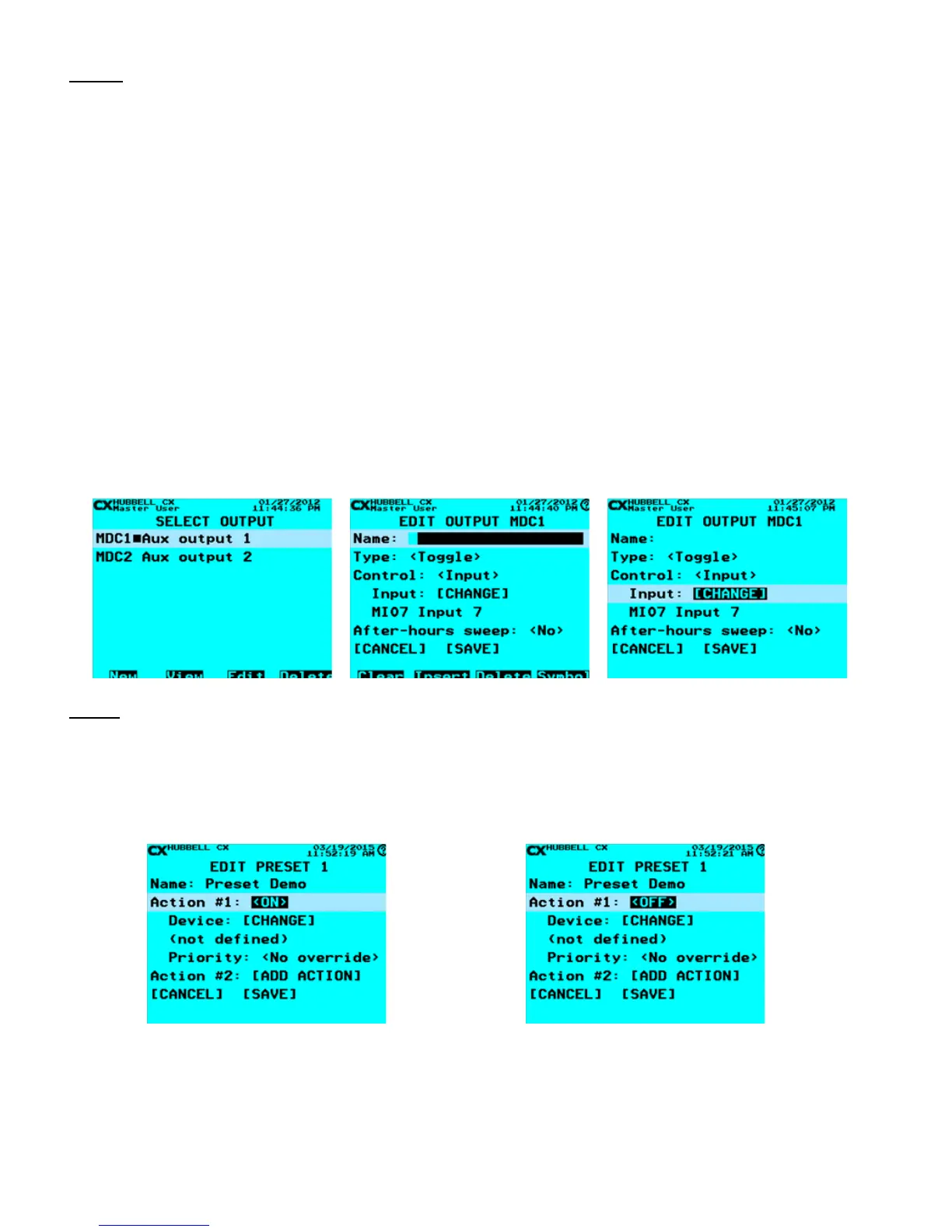
• From the Main Menu, select Outputs. Then press the ENTER key.
• Select Output – Scroll to an Output to program. Select any of the Outputs available based on the Panels in the CX Panel
system. When highlighted, press the ENTER key.
• Name Output – Use the Function keys and the alphanumeric keypad to edit the Output name. Refer to “Function Keys”
section at the beginning of the Programming Section of this manual.
• Type: – Use the right/left arrow keys to select <Toggle> for maintained (Latching) action or <Momentary> action.
• Control: – Use the right/left arrow keys to select <Input> or <Schedule> to map for control. If <Input> is selected scroll to
[CHANGE], Press ENTER and select an Input, If <Schedule> is selected scroll to [CHANGE], Press ENTER and select a
Schedule,
• After-hours Sweep: Select <Yes> or <No> to be included in the After-hours sweep.
Presets
Presets are used to control multiple relays from a single input or schedule. There are 32 Presets available. There are 8 Actions
available in each Preset. There are 9 functions selectable for every Action. When programming an Input device or Schedule that
requires a Preset event to occur, select the Preset when choosing the Control of the Input or Schedule. Note: Presets do not exist
until they have been created. Create a Preset prior to programming the Input or Schedule.
<ON> - This would turn On a Relay or Group in response
to an ON command.
Device: [CHANGE] – Select the Relay or Group to
control.
Priority: - Off priority level
<OFF> - This would turn Off a Relay or Group in
response to an OFF command.
Device: [CHANGE] – Select the Relay or Group to
control.
Priority: - On priority level


 To Next Page