PSP8620311
Rev. E
21
6 — Control Programming
NOTE: Because Hubbell has a policy of continuous product improvement, we reserve the right to change
design and specications without notice.
Windows XP Local Radio Drivers Installation Guide
Before using the Local Radio for the first
time, the Windows
®
device drivers will
have to be installed. The following steps
illustrate the process.
1. Download the radio drivers from the
Hubbell Power Systems website. Be sure to
extract the files.
2. Connect the USB plug to USB port on
the radio.
3. Connect the other end of the USB cord
to USB port on the PC/laptop.
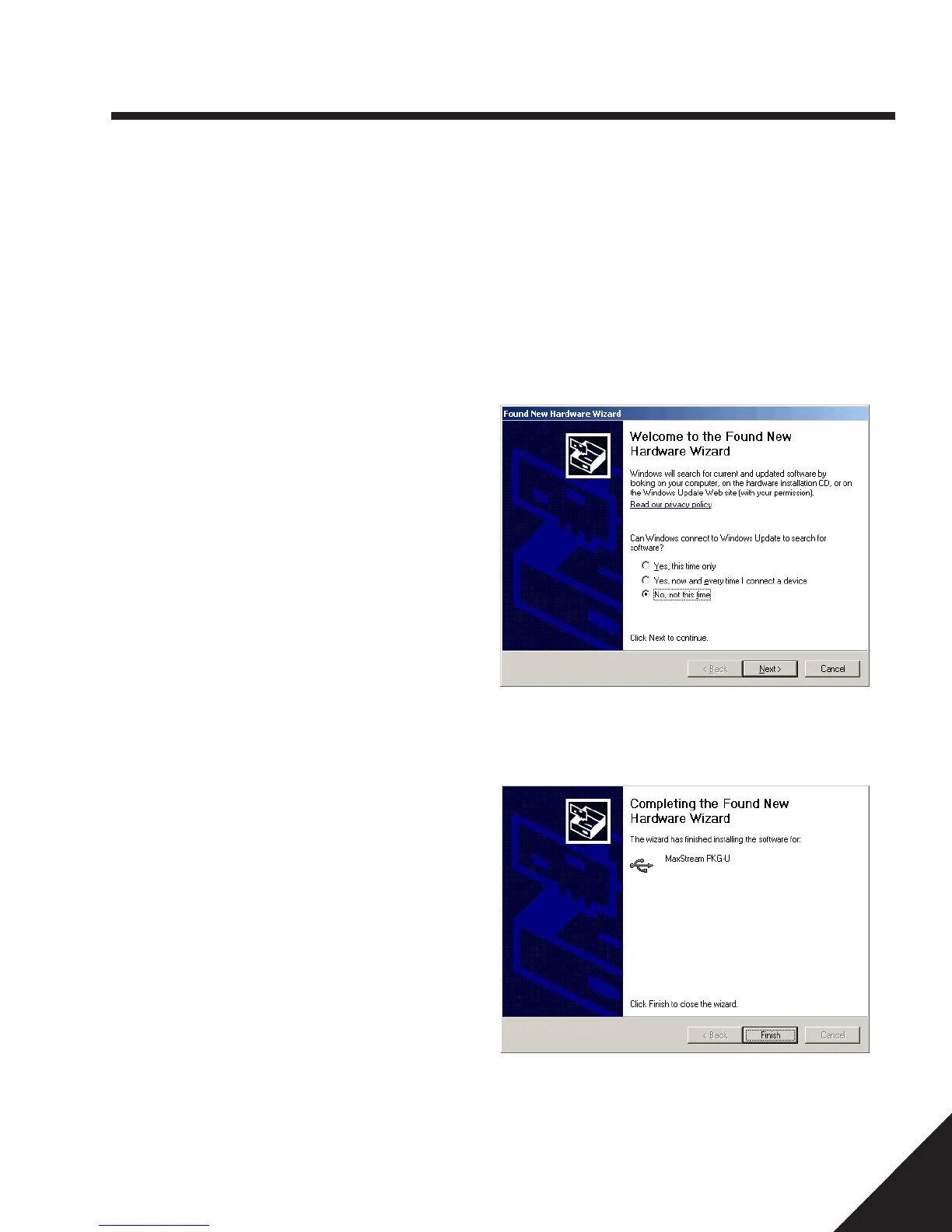
4. “Found New Hardware” Wizardshould
start.
5. At the “Can Windows connect to
Windows Update to search for
software?” window, select “No, not at
this time” and click <NEXT>
6. Insert the provided Hubbell USB drive.
Found New Hardware wizard should
automatically continue, if not, click
<NEXT>.
7. Click Finish.
8. “Found New Hardware” Wizard should
start again. This time it is adding the
USB port.
9. Repeat Steps 5 to 7 above.


 To Next Page