11
Rev 1.0 9/21
• Channels – Adjust the audio channel of the embedded audio.
o Options include: Mono & Stereo
• Encode Type – Adjust the Audio Encoding type of the embedded audio.
o Options include: AAC
• Sample Rate – Adjust the audio sample rate of the embedded audio.
o Options include: 16KHz, 44.1KHz, & 48KHz
• Audio Rate – Adjust the audio rate of the embedded audio.
o Options include: 48Kbps, 64Kbps, 96Kbps, & 128Kbps
• Input Pin – Adjust the embedded audio connection type.
o Options include: LineIn & MicIn
• Volume Slider – Adjust the audio level of the embedded audio.
o Range: 0 ~ 100
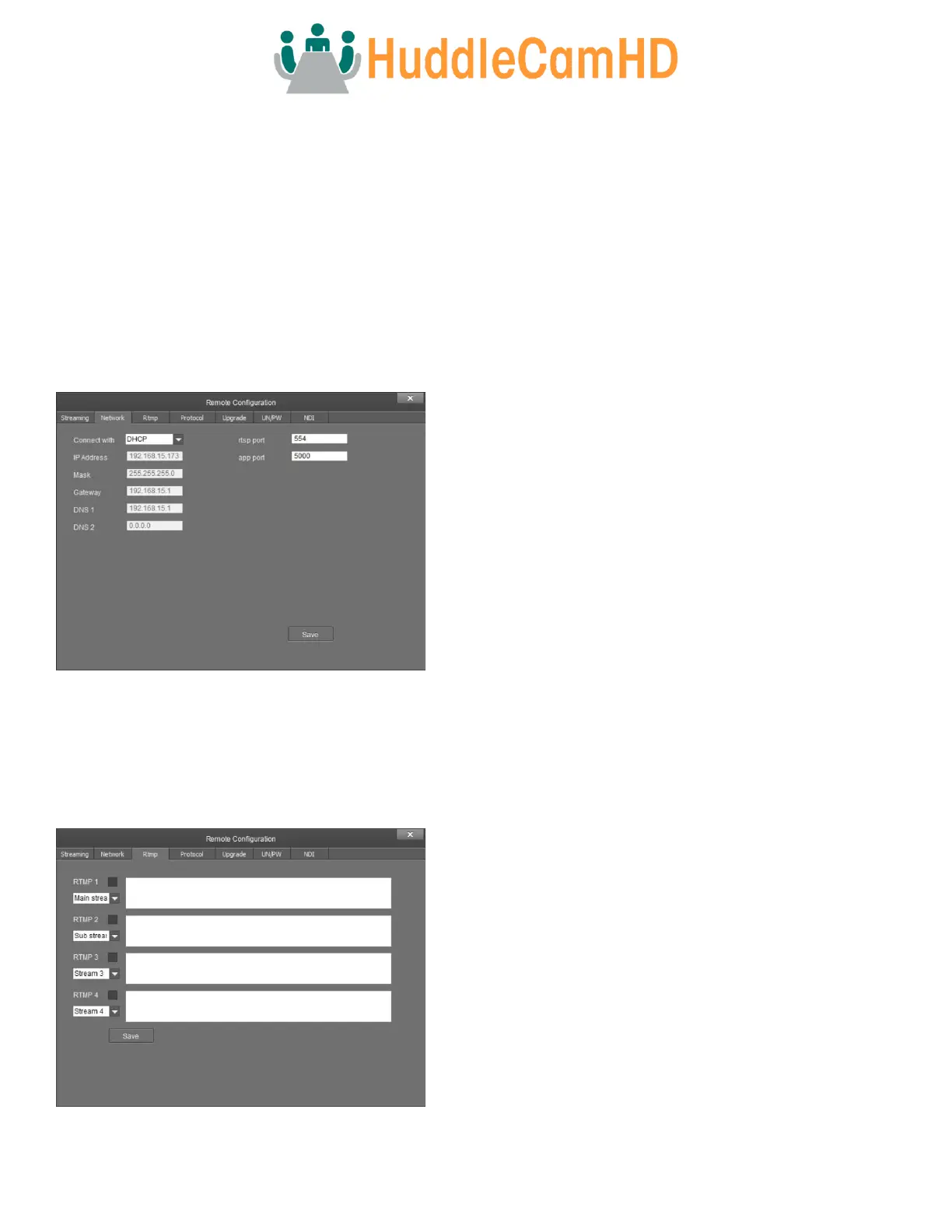
Network – The Network tab allows you to adjust the camera’s network settings.
• Connect With – Adjust the method of network connection.
o Options include: DHCP & Static IP
Note: While in DHCP, you can only adjust the RTSP Port &
App Port.
• IP Address – Displays the IP Address of your camera.
o Default value: DHCP; or 192.168.1.180 (Fallback IP
address).
• Mask – Adjust the camera’s Subnet Mask.
o Default Value: 255.255.255.0
• Gateway – Adjust the camera’s gateway.
o Default value: 192.168.1.1
• DNS 1 – Adjust the camera’s DNS 1.
o Default value: 0.0.0.0
• DNS 2 – Adjust the camera’s DNS 2.
o Default value: 0.0.0.0
• RTSP Port – Adjust the camera’s RTSP port number.
o Default value: 554
• App Port – Adjust the camera’s App Port number.
o Default value: 5000
RTMP – The RTMP tab allows you to adjust the camera’s Real Time Multimedia Protocol settings for up to 4 streams.
• RTMP # Checkbox – Enable / Disable the corresponding RTMP
stream.
• Stream # Dropdown – Select the stream you would like to
utilize.
o Options include: Main Stream, Sub Stream, Stream 3, &
Stream 4.
• RTMP Text Field – This field allows you to input the RTMP
server address and stream key you wish to stream to.



 To Next Page