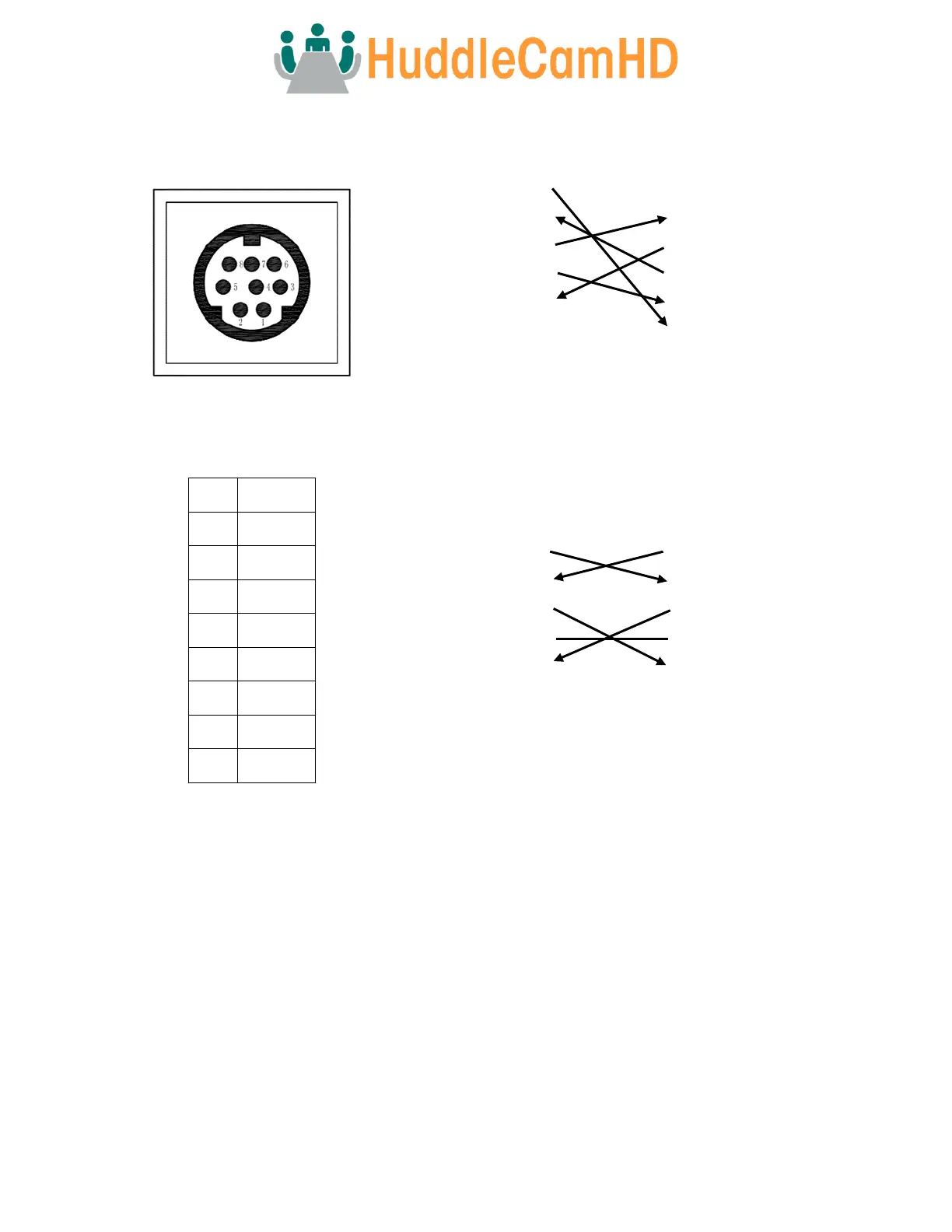
For Initial Connection
Camera PC/Controller DB-9
1. DTR 1. CD
2. DSR 2. RXD
3. TXD 3. TXD
4. GND 4. DTR
5. RXD 5. GND
6. GND 6. DSR
7. IR OUT 7. RTS
8. NC 8. CTS
9. RI
For Daisy Chain Control
1
st
Camera 2
nd
Camera Mini Din
1. DTR 1. DTR
2. DSR 2. DSR
3. TXD 3. TXD
4. GND 4. GND
5. RXD 5. RXD
6. GND 6. GND
7. IR OUT 7. NC
8. NC 8. NC
Serial Communication Control
In default working mode, the camera is able to connect to a VISCA controller with an RS-232 serial interface.
RS-232 Communication Control
The camera can be controlled via RS-232. The parameters for RS-232C are as follows:
Baud rate: 2400, 4800, 9600, or 38400 bps.
Start bit: 1 bit
Data bit: 8 bits.
Stop bit: 1 bit.
Parity Bit: none.



 To Next Page