2 ABOUT THE MEDLINK™ DRAWER SYSTEM
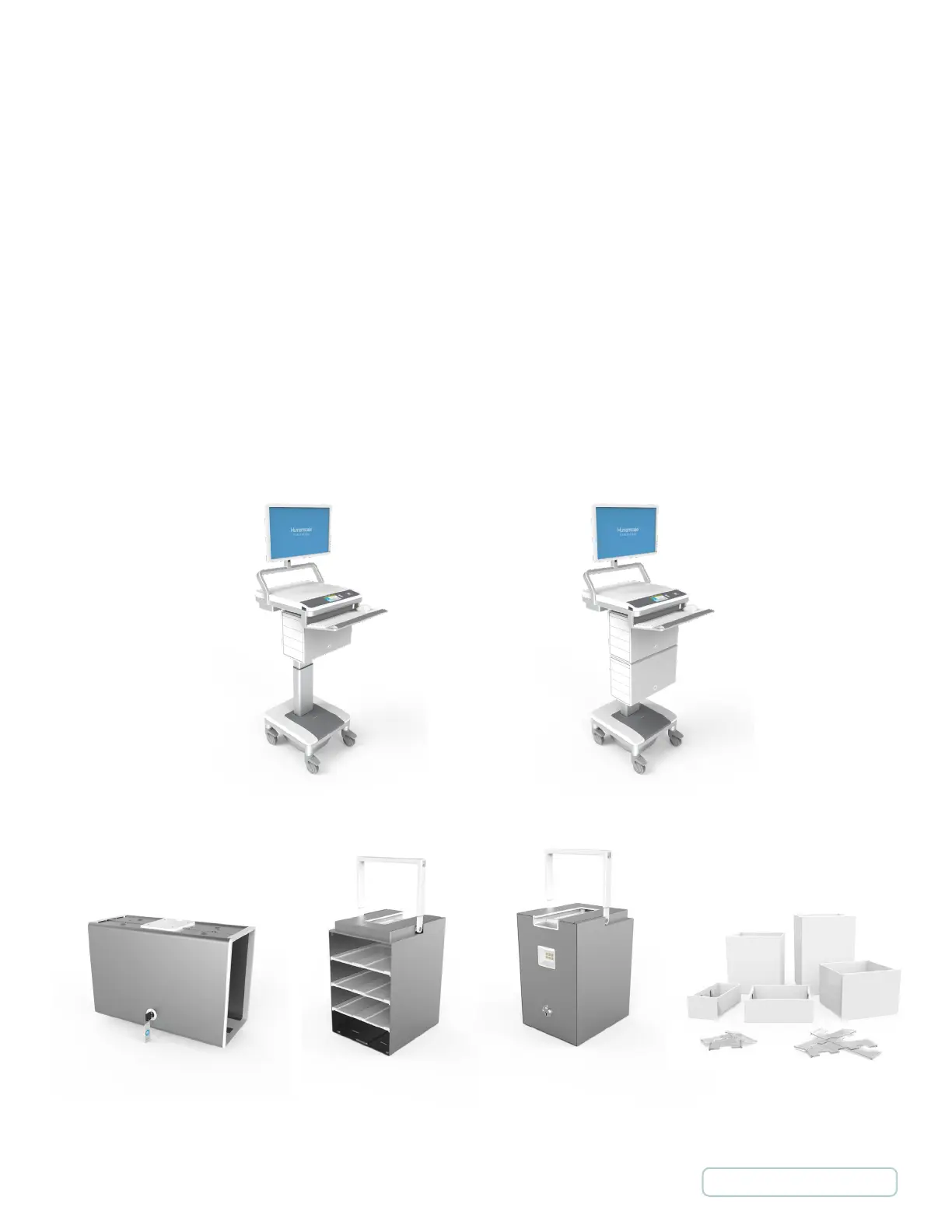
• Housing: is permanently attached to the T7
TM
cart. The housing is modular and there may be a second
housing fitted under the first to create a high capacity medication cart.
• Cassettes: are removable from the housing and are interchangeable from cart to cart.
• Drawers: are where medication is placed and fit into the cassettes. There are 5 sizes of drawers: small,
medium, large, XL and XXL.
• Shelves: are used to compartmentalize cassettes depending on the required drawer layout.
• Dividers: can be placed into the drawers to create multiple compartments within a single drawer.
• Override Keys: are used to unlock and gain access to the drawers in the event of a system or power failure.
The keys are not used during normal operation and should be held by a manager or supervisor to prevent
unauthorized use.
Setting up MedLink™
M1 - MedLink Standard
Configuration
M2 - MedLink High-Capacity
Configuration
Drawers and DividersHousing with Override Key Back of the Cassette with
Communication Connection
and Override Lock
Cassette with Shelves
6
Return to Table of Contents



 To Next Page