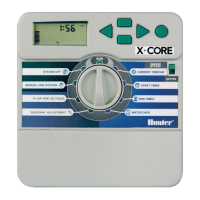
CONTROLLER PROGRAMMING
Setting Current
Date
and Time
The
SET
CURRENT DATE
AND
TIME
dial
posit
ion allows you
to
set
the
current
date
and
time
in
your
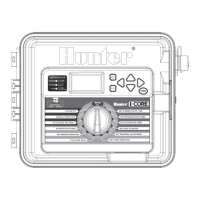
I-Core controller.
1.
Turn
the
dial
to
the
SET
CURRENT DATE/TIME position.
2. The year will be flashing
in
the
display. Use
the
+ I -
button
to
change
the
year. P
ress
the
.,.
button
to
proceed.
3. The
month
will
be
flashing.
Use
the
+I
-
button
to
change
the
month.
Press
the
.,.
button
to
proceed.
4. The day will
be
flashing.
Use
the
+ I -
button
to
change
the
day.
Press
the
.,.
button
to
proceed
and set
the
time.
5. Use
the
+ I -
button
to
select
AM,
PM,
or
24
HR.
Press
the
.,.
button
.
6.
Use
the
+ I -
button
to
set
the
hour.
Press
the
.,.
to
set
the
minutes.
Use
the
+I
-
button
to
change
the
minutes until they are correct. The
correct
date
and
time
have
now
been set. Always return
the
dial
to
the
RUN
position when you are finished
programm
ing
the
controller.
Setting Program Start Times
The
SET
PROGRAM
STA
RT TIMES
mode
allows you
to
program start times
for
each
of
the
four
programs (A,
B,
C,
or
D) in
dependent
ly.
Up
to
eight
start times
per
day can
be
set
for
each program.
1.
NOTE: Two
programs
are
allowed
to
run
at
the
same
time
if
there
Start
Times
coincide
or
overlap
. This is
an
important
element
to
consider
when
programming
the
Start
Times
if
the
hydraulics
of
your
system
do
not
allow
for
more
than
one
station
to
run
at
the
same
time
.
Turn
the
dial
to
the
SET
PROGRAM
START
TIMES position.
2. Program A and start
time
1 will
be
displayed. If necessary, you can
select Program
B,
C,
or
D
by
pressing
the
PRG
button.
3. The program start
time
will
be
flashing. Use
the
+ I -
button
to
change
the
start
time
. The
time
will change in 15
minute
increments.
Press
the
.,.
button
to
select
an
additional start
time
if
you
would
like
more
than
one
watering cycle
per
day
to
occur
for
that
program.
Programs A,
B,
C have
eight
start times
per
day, while program D has
16 start times. P
ress
the
PRG
button
to
change
between
programs
A,
B,
C, and D
to
ass
ign a start
time
to
the
particular program.
4.
To
eliminate a program start time turn the dial
to
the
SET
PROGRAM
START
TIMES position, use the
PRG
button
to
select the program and
the .,. button
to
select the start time you would like
to
eliminate.
Press
the + I - button until you reach 12:00
AM
.
Press
the - button once more
and the display will show dashed lines --:--, indicating no start time.
If a program start
time
is
skipped (for example, a start
time
is
set
for
1 and
3),
the
start
time
will
be
accepted,
but
when returning
to
this dial position,
the
start times will be
moved
to
sequential
order
(the Start
Time
3 will
be
moved
to
2).
If
an
earlier start
time
is
set
for
a higher-numbered start (for example,
start
time
1
is
set
to
4:00
AM,
and start
time
2
is
set
to
3:00 AM). when
returning
to
this dial position
the
start times will have been reorganized in
chronological order. The lowest
numbered
start
time
will always have
the
earliest
time
of
day
(in
the
example, the start
time
1 will
be
at
3:00
AM
and
start
time
2
at
4:00 AM).
NOTE:
One
start
tim
e
will
activate
all
stations
sequent
ially
that
are assigned t o a
program
.
Multiple
start
times
are
typically
used
when
separate
morning
,
afternoon,
or
evening
water
i
ng
cycles are
required
. You
cannot
enter
a
start
time
for
each
station
.
If
you
only
want
to
water
your
stations
once
a
day
within
a
particular
program,
you
would
only
program
start
time
1. The rest
of
the
start
times
2
through
8
would
be
left
blank
-:--
.
The I-Core controller has
the
ability
to
operate
five Hunter valves at
one
time, and, therefore, allows
for
more
than
one
program
to
run at
the
same
time.
Only
two
programs can
be
allowed
to
run concurrently. If you set
two
programs
to
have
the
same start time,
or
their
start times overlap,
both
programs will run concurrently. This
is
a
great
feature if you have a short
water
window
and
the
available water
to
feed
multiple
stations; however, it
could
become
an
issue if
the
fl
ow
of
your irrigation system cannot
support
operating
multiple
stations at
the
same
time
.
If you
do
not
have
the
available water
to
operate
multiple stations at
one
time, you will need
to
cons
ider
and calculate when each program will finish,
or
review
the
Total Watering Time
for
each program within
the
ADVANCED
FEATURES dial position.
Each
Program
's
Start Time must
be
programmed
to
start after
the
previous Program finishes in
order
to
eliminate
the
possibility
of
multiple
Programs watering at once.
Setting Station
Run
Times
(Length
of
Watering
for
Each
Station)
The
SET
STATION
RUN
TIMES
mode
allows you
to
enter
a length
of
run
time
for
each station assigned
to
a particular program. Each station
that
has a run
time
associated with a program will be activated and
operate
one
after another sequentially with each start
time
for
that
program.
1.
Turn
the
dial
to
the
SET
STATION RUN TIMES position.
2.
The display will show
the
station
number
and program. Use
the
PRG
button
to
select a program.
3. Use
the
+I
-
button
to
change
the
station run
time
on
the
display.
4. Use
the
.,.
button
to
advance
to
the
next station
for
which you
would
like
to
enter
a
run
time
.
5.
When finished entering run times, rotate
the
dial
to
the
RUN
position.
By
pressing
the
PRG
button,
you can
move
between
programs while
staying on
the
same station. However,
it
is
recommended
that
one program
is
completed
before
going
on
to
the
next program.
IS


 To Next Page