EasyManua.ls Logo

Hunter ICC2 - User Manual

Hunter ICC2
36 pages
Print Icon
To Next Page IconTo Next Page
Loading...
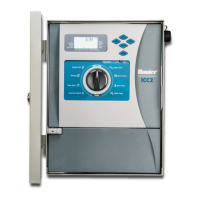
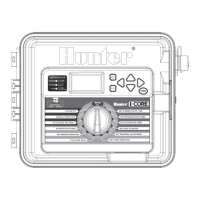
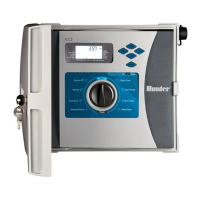
ICC2
MODULAR RESIDENTIAL AND COMMERCIAL
IRRIGATION CONTROLLER
Owners Manual
I2C-800-PL: 8-station base model, expandable to 38 stations, plastic outdoor cabinet
I2C-800-M: 8-station base model, expandable to 54 stations, gray metal outdoor cabinet
I2C-800-SS: 8-station base model, expandable to 54 stations, stainless steel outdoor cabinet
I2C-800-PP: 8-station base model, expandable to 54 stations, plastic pedestal
Date/TimeSystem O
Start Times
Run Times
Water Days
Solar Sync
®
Manual
Seasonal Adjust

Table of Contents

Other manuals for Hunter ICC2

Questions and Answers

  • T
    thomas45Aug 15, 2025
    What to do if Hunter ICC2 display shows a station number with 'ERR'?
    • N
      Nathan CrossAug 15, 2025
      If your Hunter Controller displays a station number with “ERR”, it typically indicates a problem with the station solenoid or a short in the field wiring. You should: * Check the field wiring and solenoids for continuity. * Replace any faulty solenoids.
  • C
    Catherine MorenoAug 18, 2025
    What to do if my Hunter ICC2 Controller display shows a station number with 'ERR'?
    • C
      Christopher BrownAug 18, 2025
      If the display on your Hunter Controller shows a station number with "ERR", it indicates a problem with the field wiring or the station solenoid. Check the field wiring and solenoids for continuity, and replace any faulty solenoids.
  • N
    Norma BrownAug 21, 2025
    Why is my Hunter ICC2 program running, but not watering?
    • M
      Mark MacdonaldAug 21, 2025
      If your Hunter Controller display shows the program is running, but the system isn't watering, there may be a problem in the field wiring, faulty solenoid(s), or poor wire connections. Check the field wiring and solenoids for continuity. Replace any faulty solenoids and/or repair any body breaks or diaphragm tears. Also, ensure the water source is open and pressurized.
  • J
    John ChanAug 25, 2025
    Why is my Hunter Controller not running automatic programming?
    • T
      Todd ClarkeAug 25, 2025
      If your Hunter Controller isn't running automatic programming, it could be due to several reasons: * A sensor is activated and interrupting the circuit. * Programmable Off is in effect. * There are time/date errors. Verify all programs, days to water, start times, and station run times are programmed correctly. Check the display for a sensor fault notification and for "OFF" days. Also, check the controller's time, date, and AM/PM/24-hour mode settings.
  • K
    Kelly ChristianAug 27, 2025
    What does 'P ERR' mean on my Hunter Controller display?
    • J
      Jordan BoydAug 27, 2025
      The "P ERR" message on your Hunter Controller indicates a short in the pump start/master valve wiring. Check the master valve or pump start wires for continuity. Replace or repair any shorted wiring or faulty pump start or master valve wires. Make sure all wire connections are good and watertight. Check the pump start relay specifications for proper installation.
  • D
    Dawn LevineAug 30, 2025
    Why doesn't my rain sensor stop irrigation on my Hunter Controller?
    • D
      Daniel GonzalezAug 30, 2025
      If your rain or other Clik-type sensor isn't stopping irrigation on your Hunter Controller, it could be because the sensor switch is in the "Bypass" position or an incompatible sensor is installed. Remember to remove the red jumper wire on the SEN terminals. Ensure the sensor switch is set to "active." Verify a normally closed (NC) sensor is installed.
  • C
    carolynrivasSep 2, 2025
    Why does my Hunter Controller seem to water continuously?
    • K
      Kelly VincentSep 2, 2025
      If your Hunter Controller seems to water continuously, it might be due to too many start times programmed. Remove all unnecessary start times.
  • A
    Alyssa RothSep 5, 2025
    What does 'SP ERR' mean on my Hunter ICC2 Controller and how to fix it?
    • A
      Autumn CareySep 5, 2025
      The "SP ERR" message on your Hunter Controller indicates electrical noise near the connection to a remote receiver. Check the SmartPort wiring harness and verify the red wire is attached to the AC terminal, and the blue wire to the REM terminal. If the SmartPort wiring harness is extended from the controller, ensure shielded cable is used (ROAM-SCWH).
  • R
    Robert VegaSep 8, 2025
    How to fix 'NO AC' message on my Hunter Controller?
    • A
      Aaron RussoSep 8, 2025
      If your Hunter Controller displays "NO AC", it means it's not receiving power. Check the fuse or breaker and the incoming power supply to the controller. Also, make sure the transformer is wired and installed correctly.
  • K
    Kayla ScottSep 12, 2025
    How to fix a frozen display on my Hunter ICC2 Controller?
    • P
      Pam Davis MDSep 12, 2025
      A frozen or garbled display on your Hunter Controller can be caused by a power surge or module issues. Try the following: 1. Reset the controller. 2. Verify modules are seated properly and locked into position, oriented the correct way in proper slots. 3. Press the "Reset" button on the back of the control panel after adding a new module.

Summary

Specifications Overview

Operating Specifications

Details operational parameters like station count, run times, start times, and watering schedules.

Electrical Specifications

Outlines transformer input/output, station output, and battery specifications.

ICC2 Components and Controls

Control Dial Functions

Control Dial Positions

Explains the functions of each position on the ICC2 control dial for operation.

Wiring Compartment Details

Wiring Compartment Components

Details the components found within the controller's wiring compartment.

Mounting the Controller: Plastic Cabinet

Plastic Cabinet Wall Mounting

Provides step-by-step instructions for mounting the plastic cabinet to a wall.

Mounting the Controller: Metal Cabinet

Metal Cabinet Wall Mounting

Provides step-by-step instructions for mounting the metal cabinet to a wall.

Mounting the Controller: Metal Pedestal

Metal Pedestal Mounting

Lists hardware and illustrates the process for mounting the controller on a metal pedestal.

Pedestal Installation Procedures

Connecting AC Power: Initial Steps

Initial Power Connection Steps

Outlines the initial steps for disconnecting power and accessing the cabinet.

AC Wiring and Grounding

Grounding Procedures

Details how to properly ground the controller for safety.

Battery Activation and Replacement

Battery Activation

Guides on how to activate and replace the controller's internal batteries.

Installing Controller Modules

Installing Modules

Provides instructions on how to install expansion modules into the controller.

Controller Module Types

Expansion Module Installation

Installation Instructions: Station and Master Valve

Connecting Station Wires

Guides on routing and connecting wires for station valves.

Connecting a Master Valve (Optional)

Explains how to connect an optional Master Valve to the P/MV output.

Installation Instructions: Pump Start Relay

Connecting a Pump Start Relay (Optional)

Guides on connecting an optional Pump Start Relay to the P/MV output.

Installation Instructions: Clik Sensors

Connecting a Hunter Clik Sensor

Details how to connect various Hunter Clik-type sensors.

Installation Instructions: Solar Sync

Connecting a Hunter Solar Sync Sensor (Not Included)

Covers connecting the wired and wireless Solar Sync sensor.

Installation Instructions: Remotes

Programming the Controller: Date, Time, Start Times

Setting Current Date and Time

Step-by-step instructions for setting the controller's date and time.

Setting Program Start Times

Guides on setting up to eight start times for each watering program.

Programming: Run Times and Water Days

Setting Station Run Times

Instructions for setting watering duration for each station and program.

Programming: Pump Activation and Seasonal Adjust

Programming: Solar Sync and Manual Operation

Programming: System Off and Rain Delay

Hidden and Advanced Features: Reset and Diagnostics

Troubleshooting

Troubleshooting Symptoms and Solutions

Lists common symptoms, their possible causes, and solutions for the controller.

Hunter ICC2 Specifications

General IconGeneral
Zones8 to 54
Start Times Per Program8
Warranty Period5 years
Sensor Inputs1
Weather AdjustmentSolar Sync Compatible
Power SourceExternal Transformer
InstallationWall Mount
TypeModular Irrigation Controller
Stations8 base, expandable to 54
EnclosureIndoor/Outdoor Rated
Programs4
Station Run Time12 hours
Transformer Input120 VAC or 230 VAC
Transformer Output24 VAC
Station Output0.56 A per station
ConnectivityOptional Wi-Fi with WAND Module
CompatibilityHunter Sensors
Remote AccessVia Hydrawise App with WAND Module

Related product manuals