EasyManua.ls Logo

Hunter i-core IC-600PL - Connecting Earth Ground

Hunter i-core IC-600PL
25 pages
Print Icon
To Next Page IconTo Next Page
To Previous Page IconTo Previous Page
Loading...
CONNECTING EARTH
GROUND
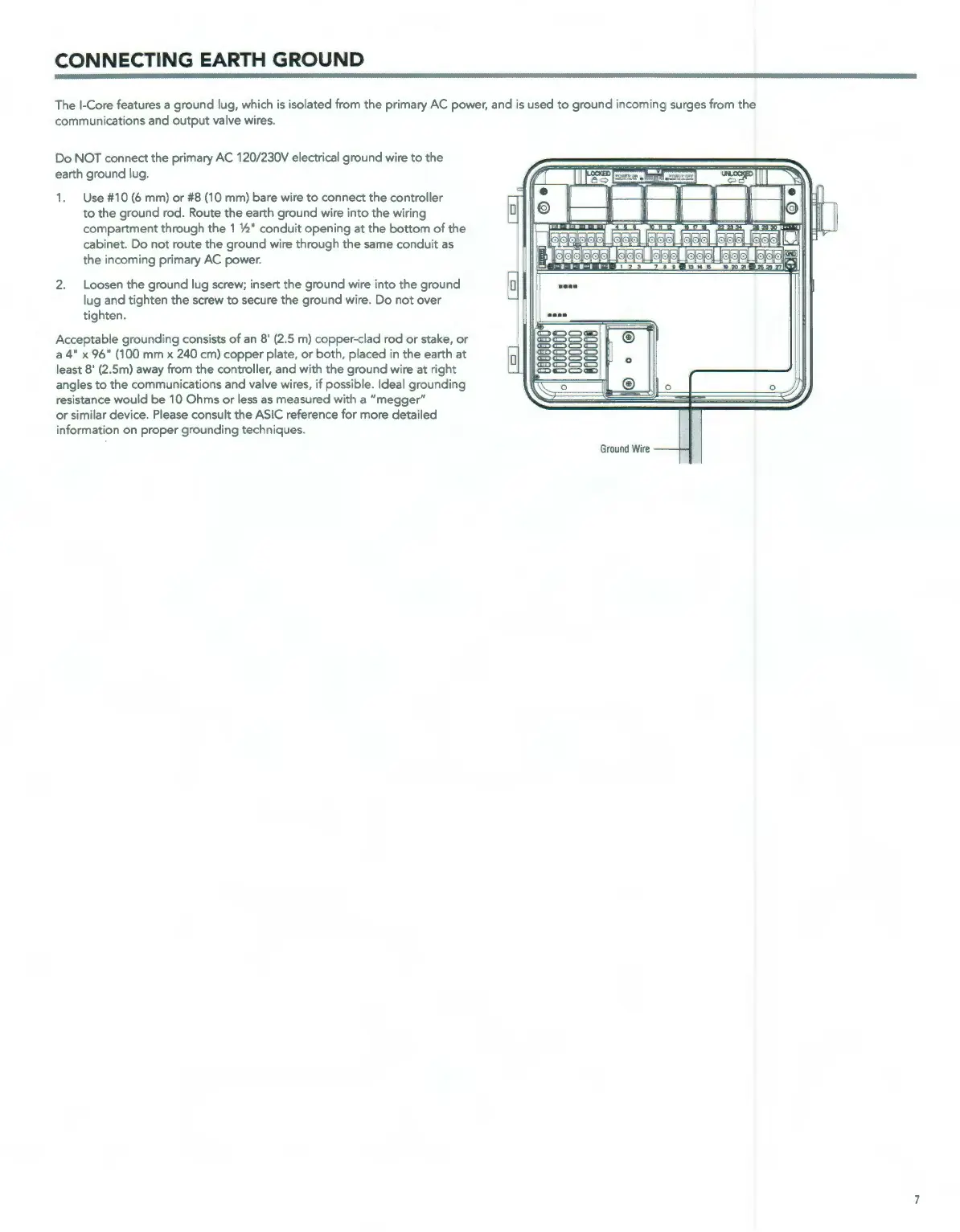
The I-Core features a
ground
lug, which
is
isolated from
the
primary AC power, and
is
used
to
ground
incoming surges from
the
communications and
output
valve wires.
Do
NOT
connect
the
primary
AC
120/230V electrical
ground
wire
to
the
earth ground lug.
1.
Use #10
(6
mm)
or
#8 (10 mm) bare wire
to
connect
the
controller
to
the
ground
rod. Route
the
earth
ground
wire
into
the
wiring
compartment
through
the
1 W'
conduit
opening
at
the
bottom
of
the
cabinet. Do
not
route
the
ground
wire
through
the
same
conduit
as
the
incoming
primary
AC
power.
2. Loosen
the
ground
lug screw; insert
the
ground
wire
into
the
ground
lug and
tighten
the
screw
to
secure
the
ground
wire.
Do
not
over
tighten
.
Acceptable
grounding
consists
of
an
8'
(2
.5 m)
copper
-
dad
rod
or
stake,
or
a
4"
x
96"
(100
mm
x 240 cm)
copper
plate,
or
both,
placed
in
the
earth at
least 8'
(2
.
Sm)
away from
the
controller, and with
the
ground
wire
at
right
angles
to
the
communications and valve wires,
if
possible. Ideal
grounding
resistance
would
be 10
Ohms
or
less
as
measured with a
"megger"
or
similar device. Please consult
the
ASIC reference
for
more
detailed
information on
proper
grounding
techniques.
Ground
Wire
7

Related product manuals