EasyManua.ls Logo

Hunter ROAM XL - User Manual

Hunter ROAM XL
32 pages
Print Icon
To Next Page IconTo Next Page
Loading...
A
ROAM XL
Commercial Remote Control
ROAM XL Commercial Remote Control
Owner’s Manual and Programming Instructions
NEW

Questions and Answers

  • M
    mruizJul 26, 2025
    Why is the Hunter ROAM XL transmitter display blank?
    • F
      Francisco SmithJul 27, 2025
      The transmitter display might be blank because the transmitter is off. Try pressing the MODE button for 5 seconds. Alternatively, the battery might be dead, so try replacing it.
  • A
    Alyssa Jones MDAug 1, 2025
    What to do if Hunter Remote Control receiver doesn’t beep after plugging into SmartPort?
    • A
      anthonyturnerAug 1, 2025
      If the receiver doesn’t beep 4 times after plugging it into the SmartPort®, it could be due to: * The SmartPort not being connected properly. Recheck the SmartPort wiring. * The controller not having power. Check the controller power.
  • H
    Hannah WillisAug 6, 2025
    What to do if Hunter ROAM XL receiver won’t respond to Transmitter?
    • S
      Shane ColonAug 6, 2025
      If the receiver isn’t responding to the transmitter, it might be because the receiver and transmitter addresses don’t match. Try relearning the address at the receiver.
  • A
    Andrew LawrenceAug 11, 2025
    What does ERR message mean on Hunter controller display?
    • J
      John ChapmanAug 11, 2025
      The “ERR” message in the controller display, when the controller is in the run position, indicates that the SmartPort wiring leads have been extended and are receiving electrical or radio interference. Replace the lengthened wire with shielded cable to reduce radio interference. Use Hunter SRR-SCWH.
  • B
    bakercynthiaAug 15, 2025
    Why Hunter Remote Control receiver does not receive signal from remote at close range?
    • S
      Sandra MarshallAug 15, 2025
      If the receiver isn't getting a signal from the remote even when it's close, it could be due to mismatched addresses in the transmitter and receiver. Try resetting the receiver's address.
  • P
    patrickwilliamAug 20, 2025
    Why does Hunter ROAM XL transmitter display stays on?
    • B
      Brianna SanchezAug 20, 2025
      The transmitter display will turn off automatically. Wait approximately 5 minutes without pressing any buttons and the transmitter will go to sleep.

Summary

INTRODUCTION

ROAM XL COMPONENTS

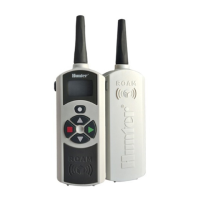
Transmitter Overview

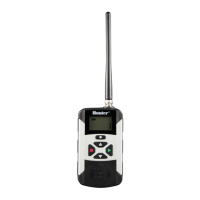
Details the components and functions of the ROAM XL transmitter, including its LCD display and control buttons.

Receiver Overview

Details the components of the ROAM XL receiver, including its SmartPort connection and antenna.

SmartPort Overview

Details the SmartPort outlets, rubber cover, and control wires for connecting the ROAM XL to Hunter controllers.

WIRING HARNESS;SMARTPORT CONNECTION KIT

INSTALLING THE ROAM XL REMOTE WIRING HARNESS

WIRING THE SMARTPORT TO HUNTER CONTROLLERS

SRC Controller SmartPort Installation

Instructions for wiring the SmartPort to the SRC controller terminal strip.

X-Core Controller SmartPort Installation

Instructions for wiring the SmartPort to the X-Core controller terminal strip.

Pro-C Controller SmartPort Installation

Instructions for wiring the SmartPort to the Pro-C controller main module.

ICC Controller SmartPort Installation

Instructions for wiring the SmartPort to the ICC controller power module.

TYPICAL INSTALLATIONS

Receiver Mounted Indoors

Ideal installation for permanent connection to a controller in an indoor area.

Receiver Mounted Outdoors

Ideal for accessing controllers from outside a locked building; receiver removal required after use.

MAXIMIZING OPERATING RANGE

EXTENDING WIRING ON SMARTPORT HARNESS

INSTALLING THE TRANSMITTER BATTERIES

CHANGING THE REMOTE ACTIVATED STATION RUN TIME

CHANGING THE TRANSMITTER ADDRESS

CHANGING THE MAXIMUM NUMBER OF STATIONS

Switching Between Residential and Commercial Modes

Explains how to switch the transmitter between Residential and Commercial modes for compatibility with different controllers.

PREPARING THE RECEIVER FOR USE

CHANGING THE RECEIVER ADDRESS

ACTIVATING A STATION WITH THE ROAM XL REMOTE SYSTEM

ACTIVATING A PROGRAM WITH THE ROAM XL REMOTE SYSTEM

Activating a Program with the ROAM XL

Instructions on how to manually start a complete program on the controller using the ROAM XL remote.

OPERATING RANGE

SPECIFICATIONS

Operating Specifications

Details the operating range, maximum stations, and run time settings of the ROAM XL system.

Electrical Specifications

Lists power source and system operating frequency for the ROAM XL transmitter.

Default Settings

Outlines the factory default address, number of stations, and run time for the ROAM XL.

Dimensions

Provides the physical dimensions for the ROAM XL transmitter and receiver.

NOTES

Hunter ROAM XL Specifications

General IconGeneral
BrandHunter
ModelROAM XL
CategoryRemote Control
LanguageEnglish

Related product manuals