CARE
15
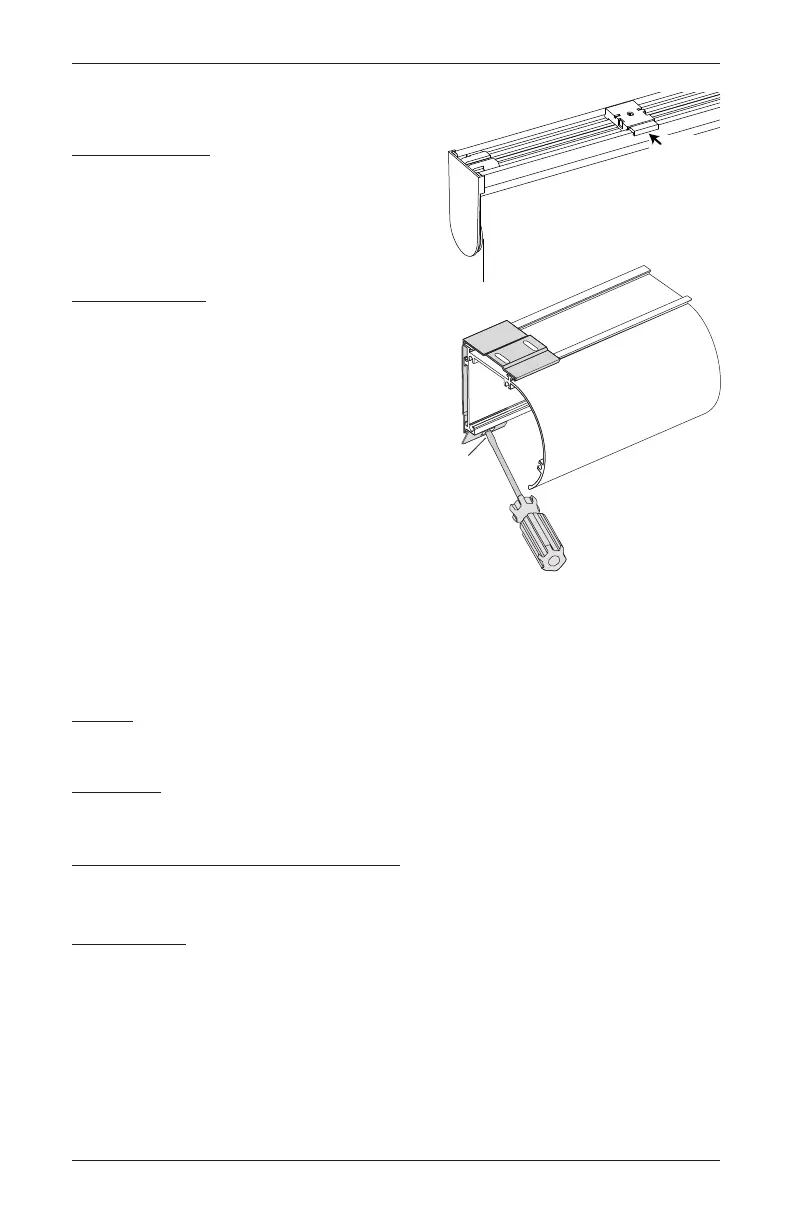
Removing the Shade (If Necessary)
Standard Shade
■ Fully raise the shade.
■ While holding the shade, push in the white tab on
each bracket to release.
Cassette Shade
■ Insert the tip of a flat head screwdriver
into the screwdriver slot provided on the
bracket.
■ Press down to release the cassette.
■ Roll the cassette forward and then down
to remove.
Cleaning Procedures
Designer Roller and Designer Screen Shades are made from anti-static, dust-resistant materials
which repel dirt and dust. The following options are available if your shade needs cleaning.
Dusting
Regular light dusting with a feather duster is all the cleaning needed in most circumstances.
Vacuuming
Use a hand-held vacuum with low suction for more thorough dust removal.
Compressed Air/Hair Dryer (Cool Setting)
■ Use compressed air or a hair-dryer on a cool setting, to blow dust and dirt off of shades.
Spot-Cleaning
CAUTION: Do not spot-clean Aerial, Antigua, Ashlyn, Fiji, Fiji Dimout, and Raffia fabrics.
■ Prepare a solution of warm water and a mild detergent.
■ Dampen a clean cloth in the solution and wring it out.
■ Dab the spot with the dampened cloth until it is gone. Do not rub the fabric.
■ Allow the shade to dry in the completely lowered position.
Push
Tab
Insert a
screwdriver
to release









 To Next Page