OPERATION INSTRUMENTS
- 13 -
ENGLISH
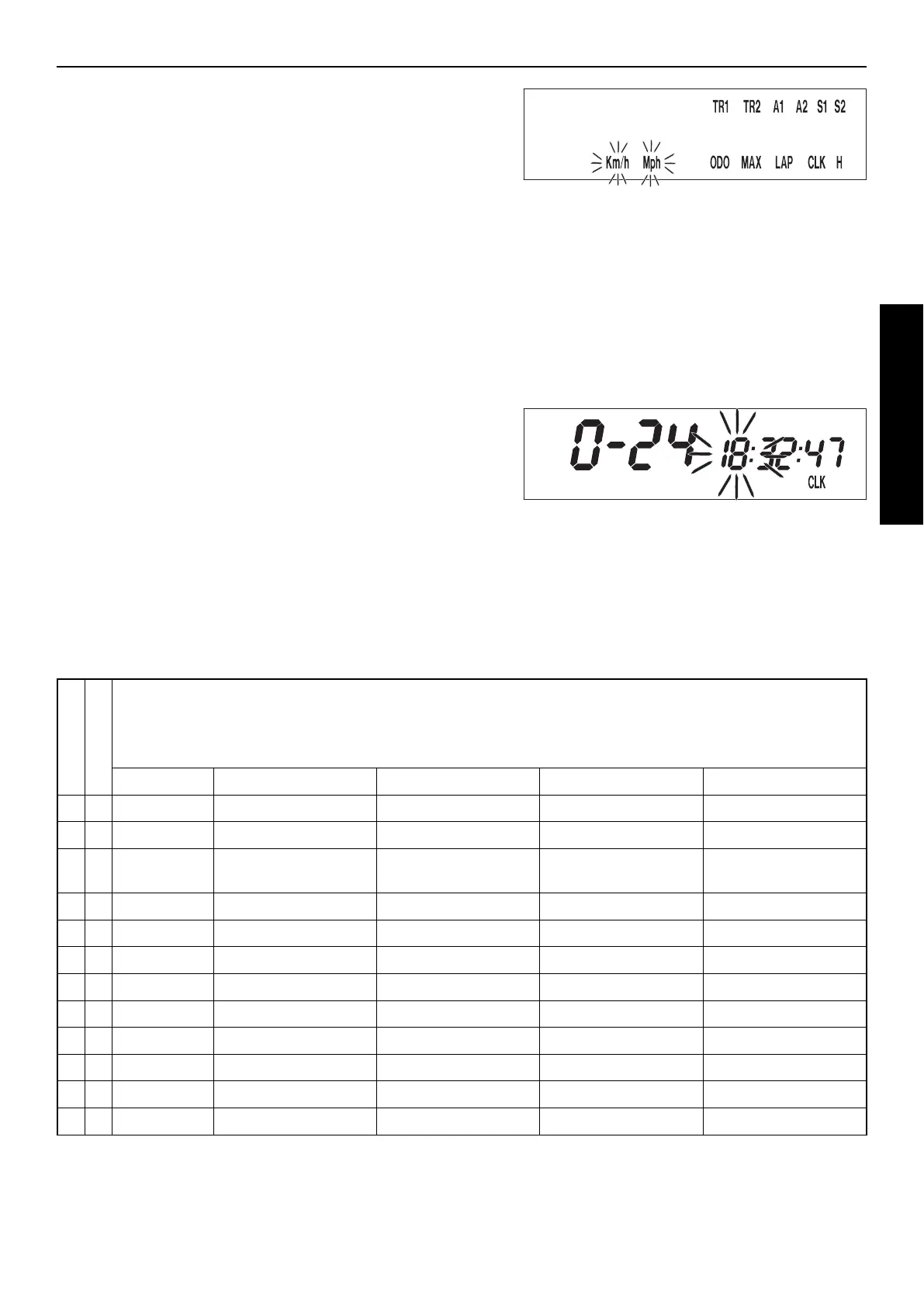
KILOMETERS OR MILES
The unit (kilometers or miles) can also be changed. The ODO figure will
be retained and converted accordingly. The TR1, A1, S1, TR2 and A2 figu-
res will be cleared.
To select the unit, select the SPEED/H mode and hold the | button for
3 seconds to access the SETUP menu. Press the | button until the
KMH/MPH function blinks. Press the + button briefly to move to the
options. Press the + button for KMH or the – button for MPH.
To set, briefly press the | button 1 x and hold for 3 seconds until the dis-
play returns to the SPEED/H mode.
If no button is pressed for 20 seconds, the setting will be stored automa-
tically and the display will return to the SPEED/H mode.
+ button to access the menu
to activate the KMH display
– button to activate the MPH display
briefly press | button changes to the next mode
changes from the menu to the SETUP menu
hold | button 3 secs. stores and closes the SETUP menu
SETTING THE CLOCK
To set the clock, switch the ignition off and select the SPEED/CLK mode.
Press and hold the | button for 3 seconds. The blinking digits can be
changed using the + and - buttons. Press the | button to move to the
next digit. 0-12 will show the time in the 12-hour mode, 0-24 in the 24-
hour mode.
Press and hold the | button for 3 seconds to store the settings.
If no button is pressed for 20 seconds, the settings will be stored auto-
matically and the display will return to the SPEED/CLK mode.
+ button time +
– button time -
briefly press | button changes to the next digit
hold | button 3 secs. starts the SETUP menu
stores the time and changes to the SPEED/CLK
display mode
If the CLK, LAP, MAX, TR1, TR2 A1, A2, S1 and S2 figures are suddenly cleared, the battery in the electronic speedometer is empty
and must be replaced (see: Replacing the battery in the electronic speedometer).
A tripmaster switch is available as an accessory that lets you control the electronic speedometer functions from the handlebar.
Motorcycle is standing
Motorcycle is driving
OVERVIEW OF THE ELECTRONIC SPEEDOMETER FUNCTIONS
display briefly press + button briefly press – button
briefly press
|
button hold
|
button 3 secs.
X
SPEED / H no function no function next display mode
displays the SETUP menu
X X
SPEED / CLK
no function no function next display mode Setting the clock menu
X X
SPEED /
LAP
starts/stops LAP without
clearing LAP figure
stops LAP, stores LAP
figure, resets LAP to 0
next display mode clears all LAP figures
X
LAP / LAP next figure no function next display mode next display mode
X X
SPEED / MAX
no function no function next display mode clears MAX
X
SPEED / ODO
no function no function next display mode next display mode
X X
SPEED / TR1
no function no function next display mode clears TR1, S1, A1
X X
SPEED / TR2
increases the TR2 figure
reduces the TR2 figure next display mode clears TR2
X X
SPEED / A1 no function no function next display mode clears TR1, S1, A1
X X
SPEED / A2 no function no function next display mode next display mode
X X
SPEED / S1 no function no function next display mode clears TR1, S1, A1
X X
SPEED / S2 starts - stops S2 no function next display mode clears S2




 To Next Page