8 ETS 300
Status: 29.01.2014 HYDAC ELECTRONIC GMBH Part No.: 669651 E
7.2 ANALOGUE OUTPUT
Depending on the model, the ETS 300 has one analogue output with a 4 .. 20 mA signal.
7.3 SETTING THE SWITCHING POINTS, HYSTERESES AND/OR SWITCHING VALUES
FOR THE WINDOW FUNCTION
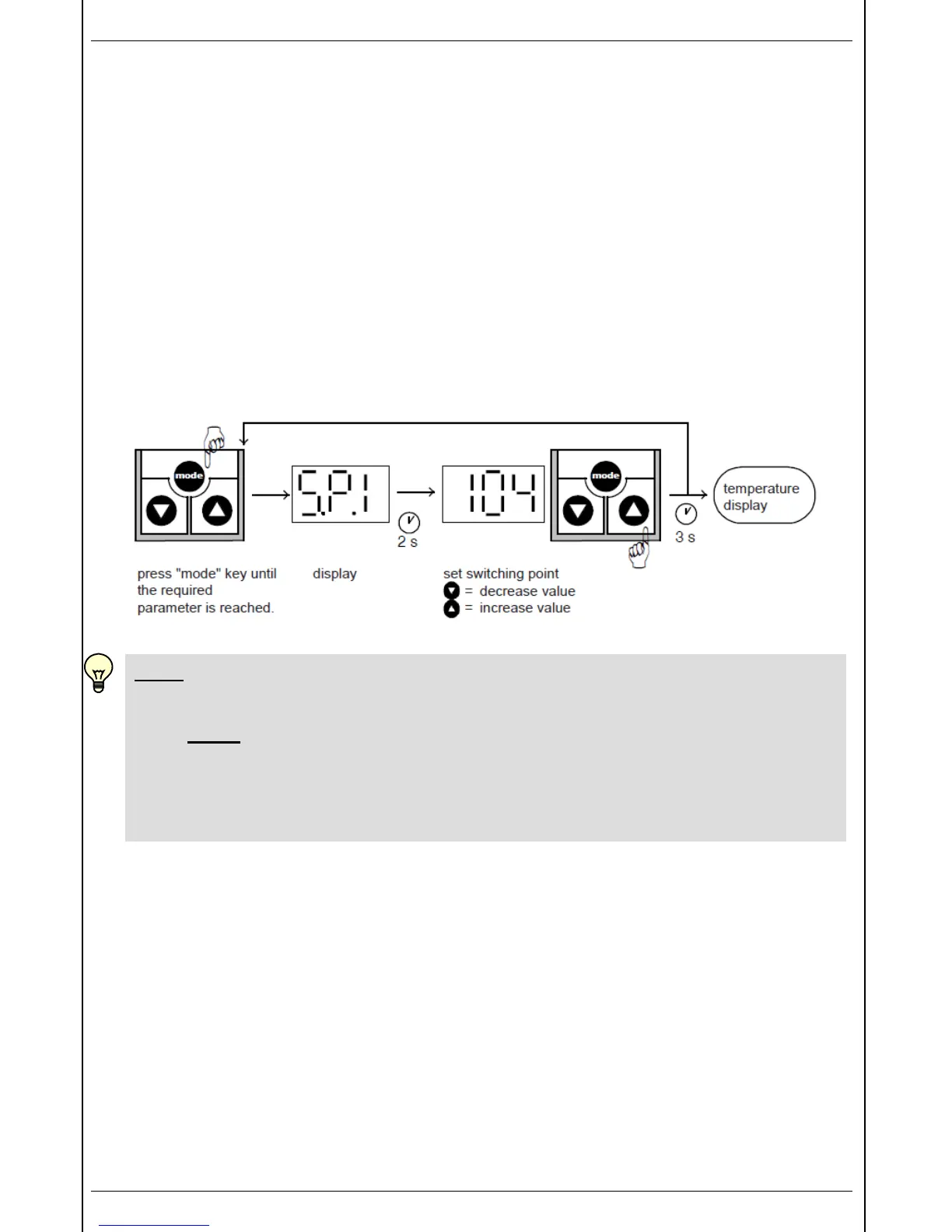
• Press "mode" key
• "S.P.1" or "hi.1" is displayed
• Keep pressing the "mode" key until the required parameter is displayed (depending on the
basic setting: "S.P.1", "h.Y.1", "S.P.2", "h.Y.2", "hi.1", "Lo.1", "hi.2" or "Lo.2").
• After 2 seconds the actual setting flashes.
• Use the ▼ or ▲ the keys to alter the setting.
• Use the "mode" key to call up other parameters, if required, and alter the setting
• using the ▼ and the ▲ keys.
• If no keys are pressed for 3 seconds, the display changes back and the settings are saved.
NOTE:
• If "LOC" appears in the display when trying to alter the settings, programming is
disabled.
Action: set programming enable to "ON"
(see point 9 "Programming enable")
• If the or the key is held down during alteration, the value automatically advances.
• If a setting has been altered, "PRG" appears briefly in the display when the display is
switched over. The new setting is then saved in the unit.


 To Next Page