WeatherTRAK 2-Wire Controller Installation Guide
35
©
2020 HydroPoint Data Systems Inc. All rights reserved. 800.362.8774 • hydropoint.com
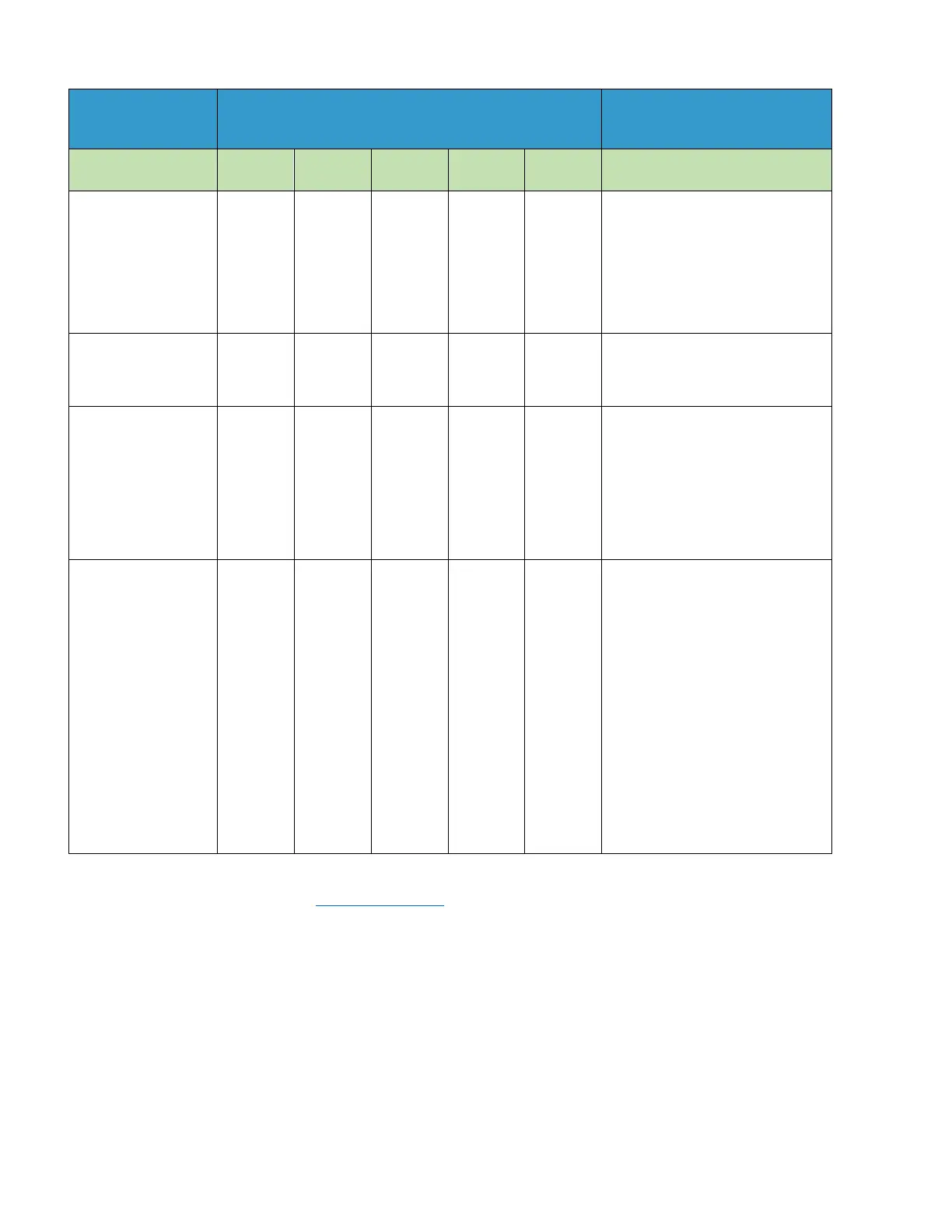
The following table gives some guidelines as to whether or not your system is operating as expected.
Current could be in these ranges depending on
the number of connected stations:
Number of connected
stations
15%
42mA
It is possible that one or
more stations are not
connected correctly. Try
running the test
.
% to 20%
-12mA
-24mA
-36mA
-48mA
-60mA
system
-15mA
-30mA
-45mA
-60mA
-75mA
You might have a problem
somewhere
on the 2
-
‐
wire
causing an excess
consumption.
Problems that
dramatically increase under
wetter conditions.
Excessive current
greater than 50%
Immediate attention is
required.
Locate the
problem in the field right
away.
T
ypically
be a bad connection or
open
-
‐
ended in
field.
Troubleshooting is
identical to when locating
for
short circuits in the field,
current will not be
as excessive as when a short
occurs.
P
lease refer to the WeatherTRAK Knowledge Base
for articles specific to various 2-wire troubleshooting
articles.


 To Next Page