WeatherTRAK 2-Wire Controller Installation Guide
32
©
2020 HydroPoint Data Systems Inc. All rights reserved. 800.362.8774 • hydropoint.com
If you need to stop irrigation during a manual test for any reason, press the – button to set the minutes
back to 0. You can also press and hold the
OFF button for 5 seconds, then press the RUN button to finish.
Manual Test by Program
Press the MANUAL/TEST button.
Press the + or - button to select By Program.
Press the button. The MANUAL WATER screen displays.
Press the button to select the desired program.
Press the + or – button to select the number of minutes you would like to manually test for. Irrigation will
begin immediately. The controller will immediately begin to irrigate stations on the selected program
If you need to stop irrigation during a manual test for any reason, press the – button to set the minutes
back to 0. You can also press and hold the
OFF button for 5 seconds, then press the RUN button to finish.
Viewing Decoder Information
After decoders are installed, you can get an overview for each decoder while in the SETUP menu.
Press SETUP.
Press until CONFIGURE H2O 2-WIRE displays.
Press + or – to view Pump Starts, Stations, or Master Valves.
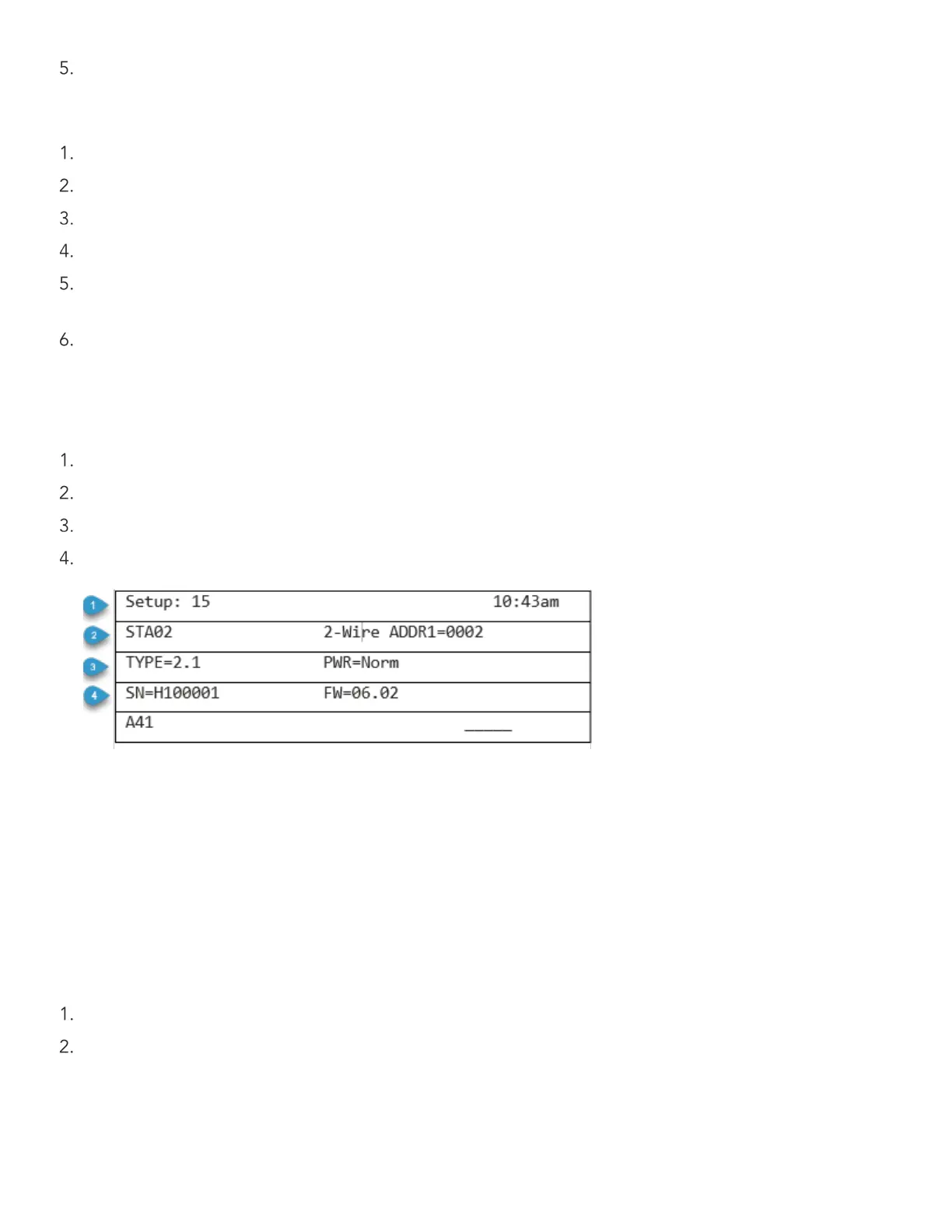
Press SELECT to enter. The display screen will look something like this:
Line 1: Screen number, time of day
Line 2: Station number (or master valve/flow sensor/pump start number)
with number indicating 2-Wire address port
Line 3: Decoder type, power level
Line 4: Serial number of decoder, the decoder’s firmware version
Viewing Electrical Information for Stations and Valves
You can also view electrical information for each station, master valve, pump start or flow sensor to see how
much electricity is being drawn. Viewing electrical information is done in the
MANUAL TEST menu.
Press MANUAL TEST.
Press + or – until the diagnostics screen displays.


 To Next Page