8
Remote Sensor Installation (Optional)
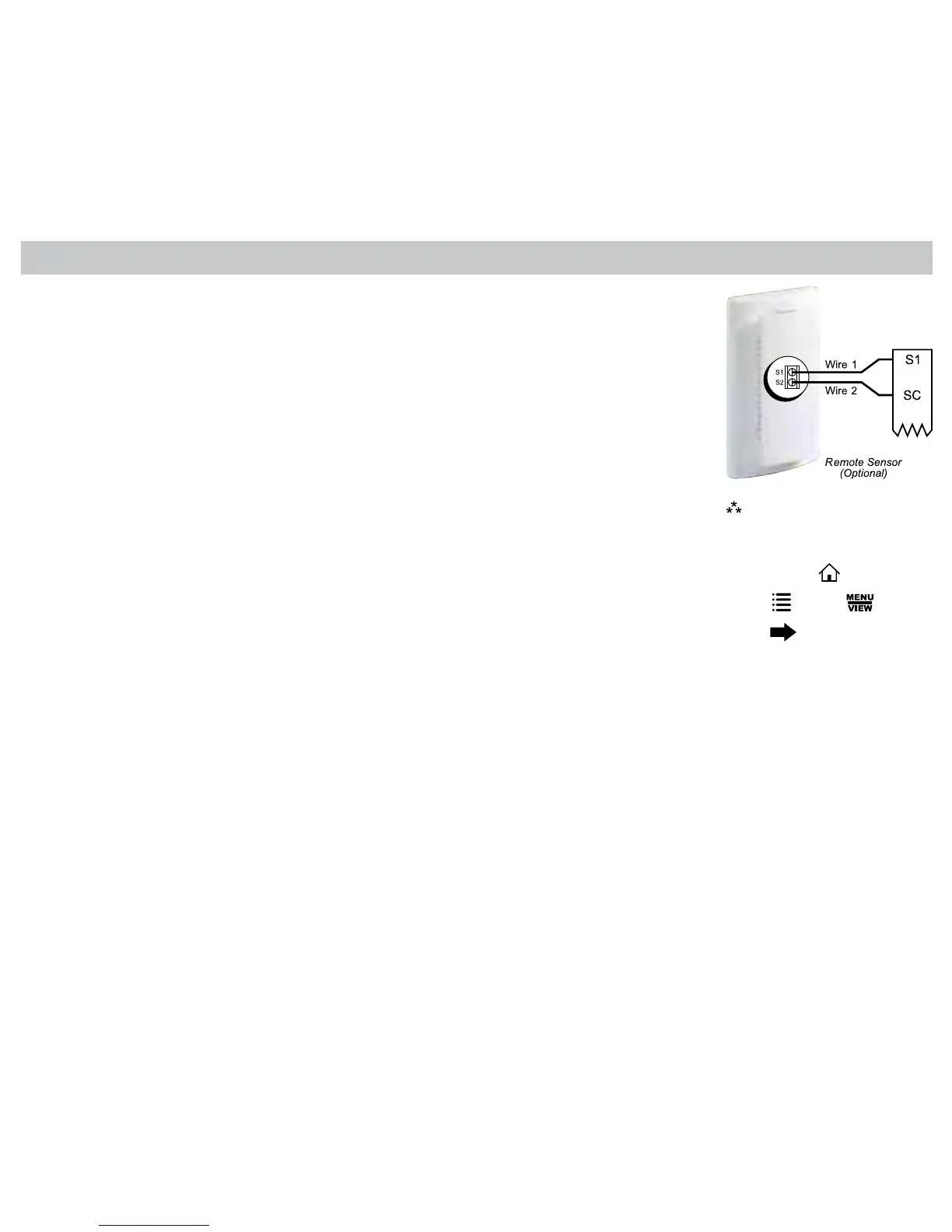
TerminalsS1,S2,andSCareusedwithremotesensors.S1canbeusedwitharemote
sensortomonitorindoororoutdoortemperatures.Anoutdoorremotesensorcanbeused
tochangesystemoperationbasedontheoutdoortemperaturewithheatpumpswithgas/
oilbackuporheatpumpswithelectricbackup.Anindoorremotesensorisusedtoread
theindoortemperatureinadifferentlocation.Thisisbenecialwhenthethermostatisnot
mountedintheideallocation.
S2isa10kΩNTCthermistorsensorthatcanonlymonitorthetemperatureinadifferentarea.
1.Removecoverfromremotesensorhousing.
2.Selectanappropriatelocationformountingtheremotesensors.
3.Mounttheremotesensorsusinghardwareprovided.
4.Installtwo-strandshieldedwirebetweentheS1terminalontheremotesensorandtheS1
terminalonthethermostat.
5.Installtwo-strandshieldedwirebetweenthe10kΩNTCremotesensorandtheS2terminal
onthethermostat.
6.Frombothremotesensors,installatwo-strandshieldedwirefromtheircommontotheSC
terminalonthethermostat.
7.Congurethethermostattoworkwiththeremotesensor.
OrderingInformation:
RemoteSensor1
–Indoorremotesensor:ACC-RT104
–Outdoorremotesensor:ACC-OD104
RemoteSensor2
–10kΩNTCthermistorsensor
Note:
Remote or outdoor sensor
reading can be displayed by
pressingthe icon.
Press
,select
press







 To Next Page