Previous view
5
SETTING A FREQUENCY
2
Preparation ■
D Turning power ON/OFF
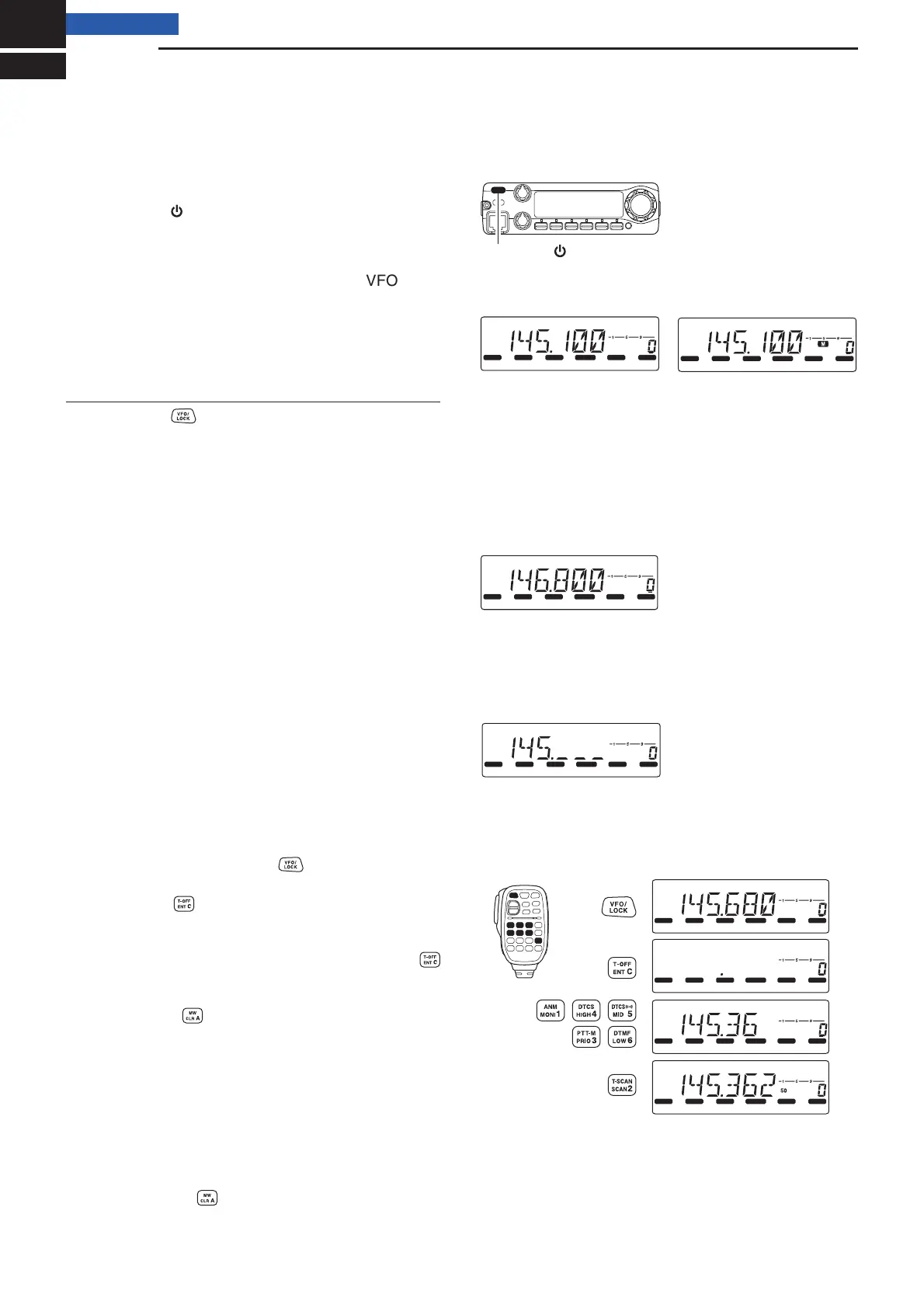
➥ Hold down [ ] for 1 second to turn the power ON
or OFF.
D VFO mode selection
The IC-2300H has 2 basic operating modes; VFO mode
and memory mode.
➥ Push [V/MH z] to select the VFO mode.
•Push [M/CALL] to select the memory mode.
Using the HM-133V
➥ Push [VFO] to select the VFO mode.
Using the dial ■
➥ Rotate [DIAL] to set the frequency.
• If necessary, push [V/MH z] to select the VFO
mode.
• The frequency changes according to the selected
tuning step. (p. 6)
• Push [V/MH z] several times, to toggle the frequen-
cy step between 1 MHz and 10 MHz, if desired.
If the scan starts:
• Holding down [SCAN] (V/MHz) for 1 second will start
a scan. Push [V/MH z] again to cancel it.
z If necessary, push [VFO] to select the VFO
mode.
x Push [ENT]
to activate the keypad for numerical
input.
c Push 6 keys to input the frequency.
• When a digit is mistakenly input, push [ENT]
to clear the input, and then re-enter from the 1st
digit.
• Push [CLR] to clear the input digits and recall
the previous frequency.
➥ Push [Y] or [Z] to select the desired frequency.
• Holding down [Y] or [Z] for 1 second activates a
scan. If a scan has started, push [Y] or [Z] again
or push [CLR] to cancel it.
Hold down [ ] for 1 second.
LOCK
S
E
T
ANM
MONI
DUP
LOW
T
-
SCAN
TONE
PRIO
M/CALL
SCAN
V/MHz
DIGITAL
PRIO
AO
BUSY
MUTE
NAR
MID
LOW
LOCK
S
E
T
ANM
MONI
DUP
LOW
T
-
SCAN
TONE
PRIO
M/CALL
SCAN
V/MHz
DIGITAL
PRIO
AO
BUSY
MUTE
NAR
MID
LOW
Push [V/MHz]
to select the VFO mode.
VFO mode
Push [M/CALL]
to select the memory mode.
Memory mode
LOCK
S
E
T
ANM
MONI
DUP
LOW
T
-
SCAN
TONE
PRIO
M/CALL
SCAN
V/MHz
DIGITAL
PRIO
AO
BUSY
MUTE
NAR
MID
LOW
Rotate [DIAL] to set the frequency.
In the VFO mode
LOCK
S
E
T
ANM
MONI
DUP
LOW
T
-
SCAN
TONE
PRIO
M/CALL
SCAN
V/MHz
DIGITAL
PRIO
AO
BUSY
MUTE
NAR
MID
LOW
The 1 MHz tuning step is selected
Push [V/MHz] to toggle the tuning step.
LOCK
S
E
T
ANM
MONI
DUP
LOW
T
-
SCAN
TONE
PRIO
M/CALL
SCAN
V/MHz
DIGITAL
PRIO
AO
BUSY
MUTE
NAR
MID
LOW
LOCK
S
E
T
ANM
MONI
DUP
LOW
T
-
SCAN
TONE
PRIO
M/CALL
SCAN
V/MHz
DIGITAL
PRIO
AO
BUSY
MUTE
NAR
MID
LOW
LOCK
S
E
T
ANM
MONI
DUP
LOW
T
-
SCAN
TONE
PRIO
M/CALL
SCAN
V/MHz
DIGITAL
PRIO
AO
BUSY
MUTE
NAR
MID
LOW
LOCK
S
E
T
ANM
MONI
DUP
LOW
T
-
SCAN
TONE
PRIO
M/CALL
SCAN
V/MHz
DIGITAL
PRIO
AO
BUSY
MUTE
NAR
MID
LOW
[EXAMPLE]: Setting the frequency to 145.3625 MHz.
Push
Push
Push
Push
Using the keypad on the HM-133V ■
Using ■ [Y] or [Z] on the HM-133V



 To Next Page