Previous view
42
10
POCKET BEEP AND TONE SQUELCH
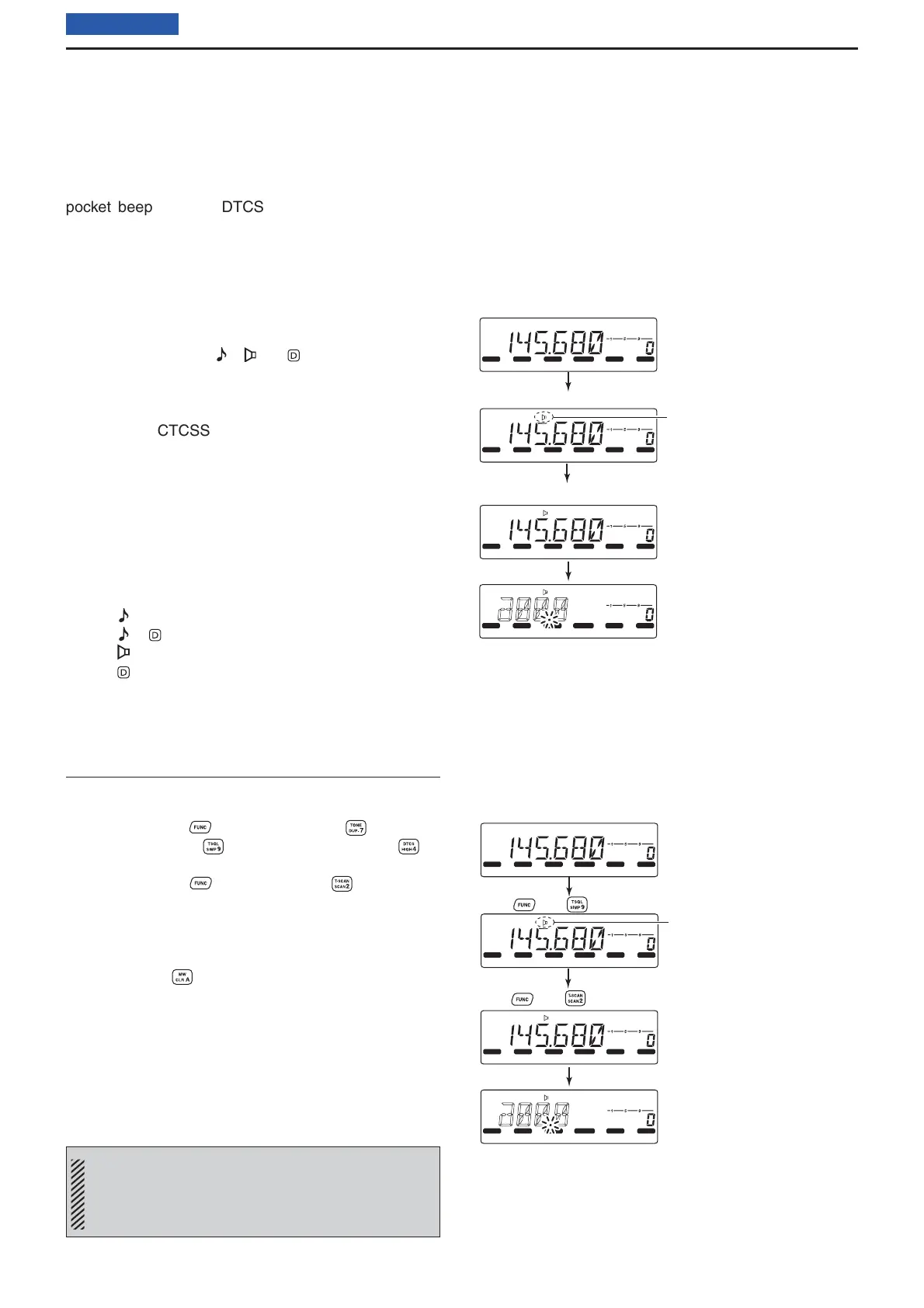
■ Tone scan
By monitoring a signal that is being operated with the
pocket beep, tone or DTCS Squelch function turned
ON, you can determine the tone frequency or DTCS
code necessary to open the squelch.
q Set the channel to be checked for a tone frequency
or code.
w Push [TONE] several times to select the tone type
to be checked.
• One of the icons “ ,” “ ” or “ ” appear.
e Hold down [T-SCAN] (TONE) for 1 second to start
the tone scan.
• Rotate [DIAL] to change the scanning direction.
r When the CTCSS tone frequency or DTCS code is
detected, the squelch opens and the detected tone
frequency is temporarily programmed into the mem-
ory or Call channel.
• The scan pauses when a CTCSS tone frequency or
DTCS code is detected.
• The detected CTCSS tone frequency or DTCS code
is used for the tone encoder or decoder, depending
on the tone condition or type selected in step w.
- No icon : Cannot be used for operation.
- “ ” : CTCSS tone encoder
- “ ”+“ ” : DTCS tone encoder
- “ ” : CTCSS tone encoder/decoder
- “ ” : DTCS tone encoder/decoder
t Push [V/MH z] to cancel the scan.
Using the HM-133V
z Set the channel to be checked for a tone frequency.
x Select the tone type to be checked.
• Push [FUNC] then push; [TONE] for repeat-
er tone; [TSQL] for tone squelch; [DTCS] for
DTCS squelch.
c Push [FUNC] then [T-SCAN] to start the
tone scan.
v When the tone frequency is matched, the squelch
opens and the tone frequency is programmed into
the selected memory or Call channel.
b Push [CLR] to cancel the scan.
NOTE: The detected tone frequency is temporarily
programmed when a memory or Call channel is se-
lected. However, this will be cleared when the
memory or Call channel is re-selected.
LOCK
S
E
T
ANM
MONI
DUP
LOW
T
-
SCAN
TONE
PRIO
M/CALL
SCAN
V/MHz
DIGITAL
PRIO
AO
BUSY
MUTE
NAR
MID
LOW
LOCK
S
E
T
ANM
MONI
DUP
LOW
T
-
SCAN
TONE
PRIO
M/CALL
SCAN
V/MHz
DIGITAL
PRIO
AO
BUSY
MUTE
NAR
MID
LOW
LOCK
S
E
T
ANM
MONI
DUP
LOW
T
-
SCAN
TONE
PRIO
M/CALL
SCAN
V/MHz
DIGITAL
PRIO
AO
BUSY
MUTE
NAR
MID
LOW
LOCK
S
E
T
ANM
MONI
DUP
LOW
T
-
SCAN
TONE
PRIO
M/CALL
SCAN
V/MHz
DIGITAL
PRIO
AO
BUSY
MUTE
NAR
MID
LOW
During CTCSS tone scan
Push [TONE] one or more times to select the tone type.
Hold down [T-SCAN] (TONE) for 1 second.
Appears
LOCK
S
E
T
ANM
MONI
DUP
LOW
T
-
SCAN
TONE
PRIO
M/CALL
SCAN
V/MHz
DIGITAL
PRIO
AO
BUSY
MUTE
NAR
MID
LOW
LOCK
S
E
T
ANM
MONI
DUP
LOW
T
-
SCAN
TONE
PRIO
M/CALL
SCAN
V/MHz
DIGITAL
PRIO
AO
BUSY
MUTE
NAR
MID
LOW
LOCK
S
E
T
ANM
MONI
DUP
LOW
T
-
SCAN
TONE
PRIO
M/CALL
SCAN
V/MHz
DIGITAL
PRIO
AO
BUSY
MUTE
NAR
MID
LOW
LOCK
S
E
T
ANM
MONI
DUP
LOW
T
-
SCAN
TONE
PRIO
M/CALL
SCAN
V/MHz
DIGITAL
PRIO
AO
BUSY
MUTE
NAR
MID
LOW
During CTCSS tone scan
Push then to select the tone type.
Push then .
Appears
[i.e.]: Checking for the tone frequency on the
145.680 MHz.
[i.e.]: Checking for the tone frequency on the
145.680 MHz.



 To Next Page