EasyManua.ls Logo

Icom IC-756 - Electronic CW Keyer

Icom IC-756
72 pages
Print Icon
To Next Page IconTo Next Page
To Previous Page IconTo Previous Page
Loading...
35
4
RECEIVE AND TRANSMIT
The transceiver has an electronic keyer. Keying speed
can be adjusted with [KEY SPEED]. Keying weight,
the ratio of dot:space:dash, can be set from 1:1:2.8
to 1:1:4.5 in keyer set mode.
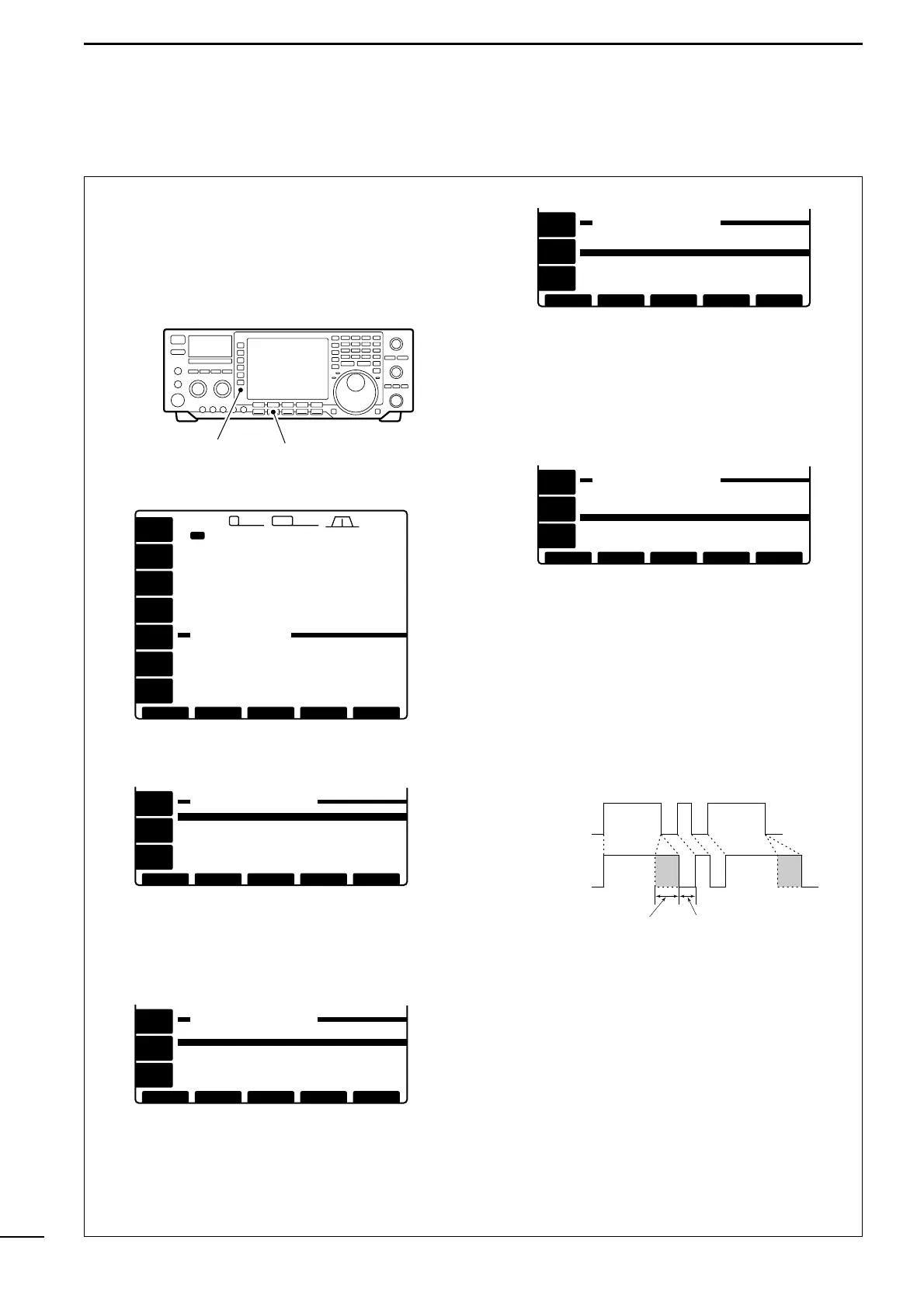
Setting the electronic keyer
q Push [CW] to select CW mode.
w Push [KEYER] to select keyer set mode.
e Push [(F-4)CW KEY] to enter keyer set mode.
r Select the Dot/dash ratio item using [F-1] or [F-2].
t Rotate the tuning dial to select the keying weight.
- 1:1:2.8 to 1:1:4.5 can be set.
- Check the ratio with side tone in CW mode.
- Push [
(F-3)DEF] to select a default ratio of 1:1:3.0.
y Push [F-2] to select the Paddle polarity item.
u Rotate the tuning dial to select the key polarity be-
tween normal and reverse polarity.
i Push [F-2] to select the Keyer type item.
o Rotate the tuning dial to set the electronic keyer
function to electronic keyer, bug-key or straight key
(electronic keyer OFF).
- Bug-key setting can be substituted for a bug-key while
operating with a paddle. Set for straight for a real bug-
key or connect the bug-key to [KEY] on the rear panel.
!0 Push [F-2] to select the Mic up/down keyer item.
!1 Rotate the tuning dial to turn the substitute paddle
function ON or OFF.
- The up/down keys of the microphone can be substi-
tuted for a paddle. When ON is selected, they do not
function as up/down keys in all modes.
!2 Push [(F-5)
EXIT] to exit keyer set mode.
Electronic CW keyer
KEYING WEIGHT EXAMPLE: morse code K
DASH
Weight setting:
1:1:3 (default)
Weight setting:
Adjusted
DASH
DOT
(Fixed*)
Adjustable range SPACE (Fixed*)
*SPACE and DOT length can be adjusted with [KEY
SPEED] only.
≥≥ DEFDEF
BK-INBK-IN
OFFOFF
≤≤
AGCAGC
MIDMID
[CW[CW KEYERKEYER SETTING]SETTING]
EXITEXIT
Repeat time
2sec
1:1:3.0
NORMAL
ELEC-KEY
OFF
Paddle polarity
Dot/dash ratio
Keyer type
Mic up/down keyer
Mic up/down keyer
Paddle polarity
≥≥ DEFDEF
BK-INBK-IN
OFFOFF
≤≤
AGCAGC
MIDMID
[CW[CW KEYERKEYER SETTING]SETTING]
EXITEXIT
Repeat time
2sec
1:1:3.0
ELEC-KEY
OFF
Dot/dash ratio
Keyer type
NORMAL
Paddle polarity
≥≥ DEFDEF
BK-INBK-IN
OFFOFF
≤≤
AGCAGC
MIDMID
[CW[CW KEYERKEYER SETTING]SETTING]
EXITEXIT
Repeat time
2sec
1:1:3.0
ELEC-KEY
OFF
Dot/dash ratio
Keyer type
Mic up/down keyer
NORMAL
Paddle polarity
≥≥ DEFDEF
BK-INBK-IN
OFFOFF
≤≤
AGCAGC
MIDMID
[CW[CW KEYERKEYER SETTING]SETTING]
EXITEXIT
Repeat time
2sec
1:1:3.0
ELEC-KEY
OFF
Dot/dash ratio
Keyer type
Mic up/down keyer
NORMAL
[KEYER] switch [CW] switch
1ß
14.195.00
VFOVFO
USBUSB
CWCW
14.100.0014.100.00
14.205.0014.205.00
USBUSB
CWCW
14.100.0014.100.00
TX
ANTANT
1
METERMETER
PoPo
P.AMPP.AMP
OFFOFF
ATTATT
OFFOFF
2.4k2.4k9 2.8k2.8k455455
12:3412:34
SEND
EDIT
CONTACT NUMBER(001)
CW KEYER
[MEMORY[MEMORY KEYER]KEYER]
EDITEDIT CWCWKEYKEY001001 EXITEXIT
AGCAGC
MIDMID
BK-INBK-IN
OFFOFF
KEYERKEYER
SENDSEND
1ß
VFOVFO

Table of Contents

Other manuals for Icom IC-756

Related product manuals