EasyManua.ls Logo

Icom IC-756 - Memory Channel Screen and Settings

Icom IC-756
72 pages
Print Icon
To Next Page IconTo Next Page
To Previous Page IconTo Previous Page
Loading...
42
5
MEMORY OPERATION
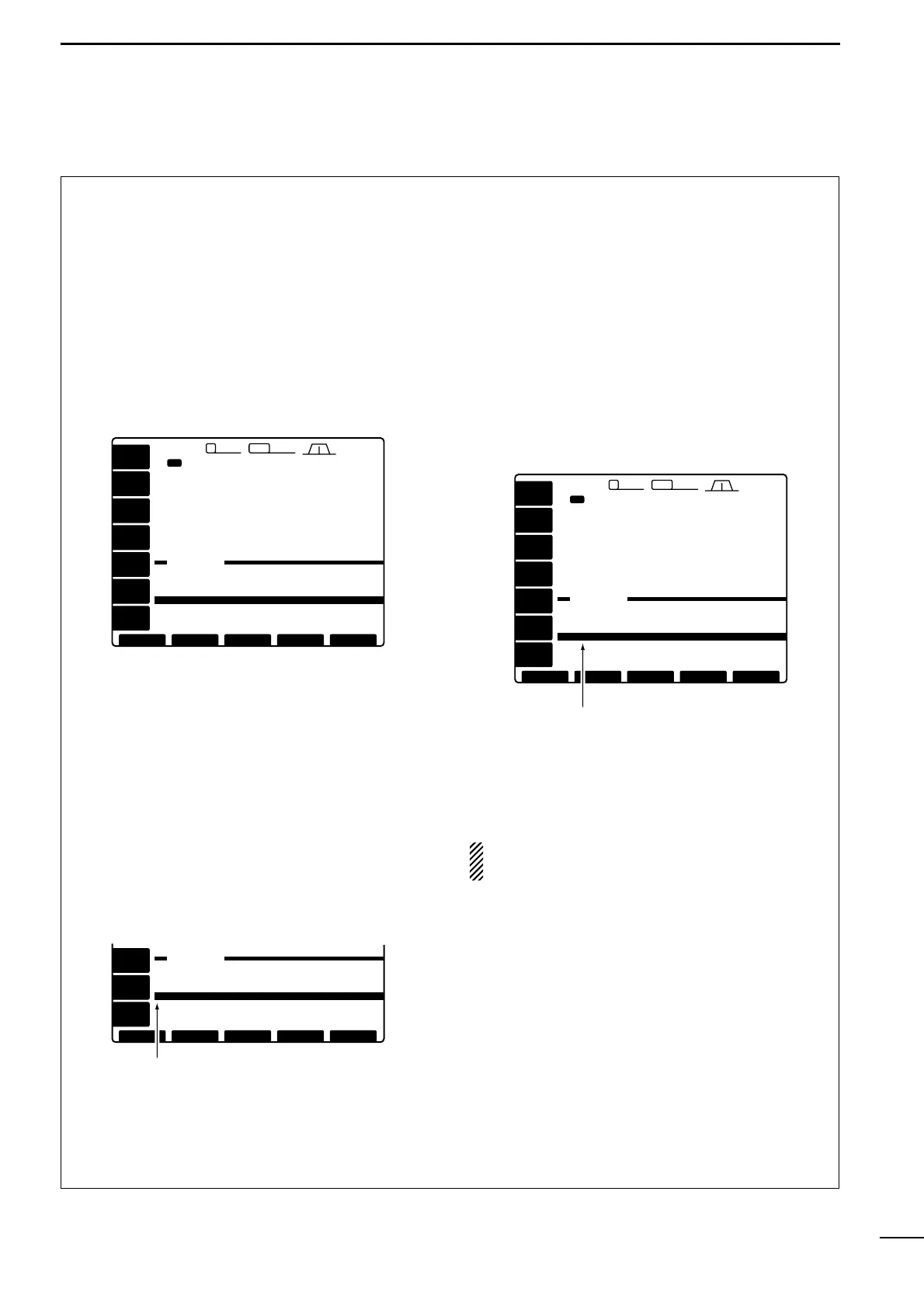
Memory channel screen
The memory channel screen simultaneously shows 9
memory channels and their programmed contents.
You can select a desired memory channel from the
memory channel screen.
Selecting a memory channel using the
memory channel screen
q If the start up screen is not selected (if [F-5]s func-
tion is [EXIT]), push [F-5] one or more times to exit.
w Push [
(F-3)MEMORY] to select the memory chan-
nel screen.
e Rotate the tuning dial while pushing [
(F-2)
SET] to
select the desired memory channel.
r Push [
(F-5)
EXIT] to exit the memory channel
screen.
Conrming programmed memory
channels
q Select the memory channel screen as described
above.
w Rotate the tuning dial while pushing [(F-1)ROLL] to
scroll the screen.
e Push [(F-2)SET] to select the highlighted memory
channel, if desired.
r Push [(F-5)EXIT] to exit the memory channel
screen.
Setting a memory channel as a select
memory
Select memory channels are used for select memory
scan. Select memory scan repeatedly scans the se-
lect memory channels only. This is useful to speedup
the memory scan interval. Of course, select memory
channels are also scanned during normal memory
scan.
q Select the memory channel screen as described
at left.
w Rotate the tuning dial while pushing [(F-2)
SET] to
select the desired memory channel.
e Push [
(F-3)SELECT] to set the memory channel as
a select memory or not.
r Repeat steps w to e to program another memory
channel as a select memory channel, if desired.
t Push [
(F-5)EXIT] to exit the memory channel
screen.
NOTE: Setting select memory channels is also
possible in the scan screen.
[MEMORY]
[MEMORY]
EXIT
EXIT
2.4k
2.4k
9 2.8k
2.8k
455
455
12:34
12:34
1ß
14.195.00
VFO
VFO
USB
USB
USB
USB
14.100.00
14.100.00
1ß 14.100.00
14.100.00
14.205.00
14.205.00
USB
USB
USB
USB
TX
VFO
VFO
98--.---.-- -------
99--.---.-- -------
P10.500.00 LSBSCAN EDGE
P229.999.99 USBSCAN EDGE
1 ß 14.100.00 USB˘
4 --.---.-- -------
5 --.---.-- -------
2 --.---.-- -------
3 --.---.-- -------
SET
SET
NAME
NAME
SELECT
SELECT
VOX
VOX
OFF
OFF
COMP
COMP
OFF
OFF
ROLL
ROLL
ANT
ANT
1
METER
METER
Po
Po
P.AMP
P.AMP
OFF
OFF
ATT
ATT
OFF
OFF
AGC
AGC
MID
MID
VOX
VOX
OFF
OFF
COMP
COMP
OFF
OFF
ROLL
ROLL
ANT
ANT
1
METER
METER
Po
Po
P.AMP
P.AMP
OFF
OFF
ATT
ATT
OFF
OFF
AGC
AGC
MID
MID
[MEMORY]
[MEMORY]
EXIT
EXIT
2.4k
2.4k
9 2.8k
2.8k
455
455
12:34
12:34
1ß
14.195.00
VFO
VFO
USB
USB
USB
USB
14.100.00
14.100.00
1ß 14.100.00
14.100.00
14.205.00
14.205.00
USB
USB
USB
USB
TX
VFO
VFO
98--.---.-- -------
99--.---.-- -------
P10.500.00 LSBSCAN EDGE
P229.999.99 USBSCAN EDGE
1 ß 14.100.00 USB˘
4 --.---.-- -------
5 --.---.-- -------
2 --.---.-- -------
3 --.---.-- -------
SET
SET
NAME
NAME
SELECT
SELECT
ß appears for select memory channel.
VOX
VOX
OFF
OFF
COMP
COMP
OFF
OFF
ROLL
ROLL
AGC
AGC
MID
MID
[MEMORY]
[MEMORY]
EXIT
EXIT
98--.---.-- -------
99--.---.-- -------
P10.500.00 LSBSCAN EDGE
P229.999.99 USBSCAN EDGE
1 ß 14.100.00 USB˘
4 --.---.-- -------
5 --.---.-- -------
2 --.---.-- -------
3 --.---.-- -------
SET
SET
NAME
NAME
SELECT
SELECT
˘ appears when the memory
channel is selected.

Table of Contents

Other manuals for Icom IC-756

Related product manuals