EasyManua.ls Logo

Icom IC-756 - Memory Names and Clearing

Icom IC-756
72 pages
Print Icon
To Next Page IconTo Next Page
To Previous Page IconTo Previous Page
Loading...
45
5
MEMORY OPERATION
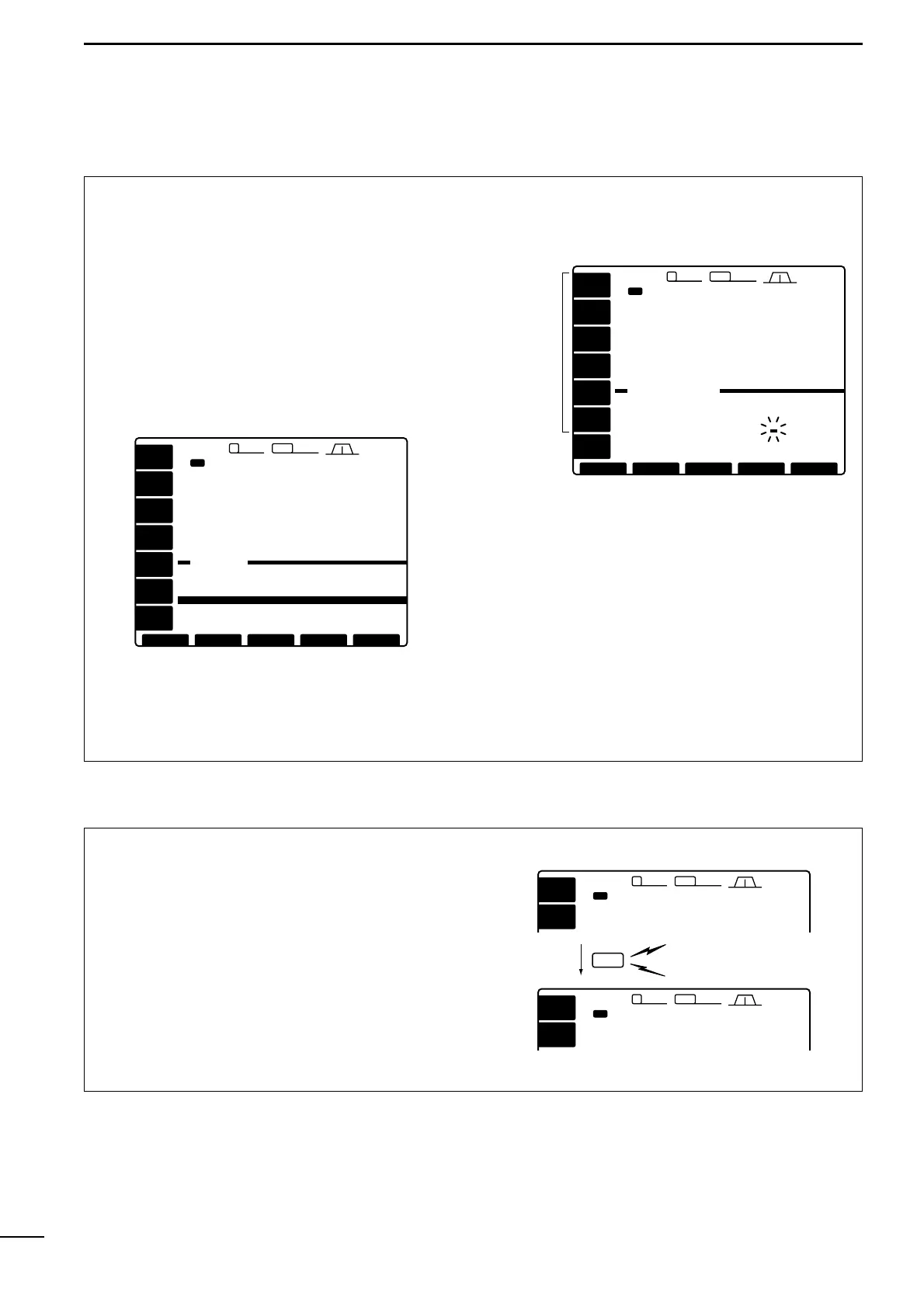
All memory channels (including scan edges) can be
tagged with alphanumeric names of up to 10 charac-
ters each.
Letters (capitals), numerals, some symbols (, ?, M)
and spaces can be used.
Editing (programming) memory names
q If the start up screen is not selected (if [F-5]s func-
tion is [EXIT]), push [F-5] one or more times to exit.
w Push [(F-3)MEMORY] to select the memory chan-
nel screen.
e Select the desired desired memory channel.
r Push [(F-4)NAME] to edit memory channel name.
- A cursor appears and blinks.
- Memory channel names of blank channels cannot be
edited.
t Input the desired character by pushing the charac-
ter keys (as shown above) one or more times or by
pushing the band key for number input.
- Push [(F-1)] or [(F-2)] for cursor movement.
- Push [
(F-3)DEL] to delete the selected character.
- Push [
(F-4)SPACE] to input a space.
y Push [(F-5)EXIT] to input the set the name.
- The cursor disappears.
u Repeat steps e to y to program another memory
channels name, if desired.
i Push [(F-5)EXIT] to exit the memory channel
screen.
Memory names
[MEMORY][MEMORY]
EXITEXIT
2.4k2.4k9 2.8k2.8k455455
12:3412:34
1ß
14.195.00
VFOVFO
USBUSB
USBUSB
14.100.0014.100.00
1ß
14.100.0014.100.00
14.205.0014.205.00
USBUSB
USBUSB
TX
VFOVFO
98--.---.-- -------
99--.---.-- -------
P10.500.00 LSBSCAN EDGE
P229.999.99 USBSCAN EDGE
1 ß 14.100.00 USB˘
4 --.---.-- -------
5 --.---.-- -------
2 --.---.-- -------
3 --.---.-- -------
SETSET NAMENAMESELECTSELECT
VOXVOX
OFFOFF
COMPCOMP
OFFOFF
ROLLROLL
ANTANT
1
METERMETER
PoPo
P.AMPP.AMP
OFFOFF
ATTATT
OFFOFF
AGCAGC
MIDMID
ÇÇ SPACESPACEDELDEL
/?*/?*
ÅÅ
UVWXYUVWXY
Z
[MEMORY[MEMORY NAME]NAME]
EXITEXIT
ABCDEABCDE
FGHIJFGHIJ
KLMNOKLMNO
PQRSTPQRST
2.4k2.4k9 2.8k2.8k455455
12:3412:34
1ß
14.195.00
VFOVFO
USBUSB
USBUSB
14.100.0014.100.00
1ß
14.100.0014.100.00
14.205.0014.205.00
USBUSB
USBUSB
TX
VFOVFO
98--.---.-- -------
99--.---.-- -------
P10.500.00 LSBSCAN EDGE
P229.999.99 USBSCAN EDGE
1 ß 14.100.00 USB˘
4 --.---.-- -------
5 --.---.-- -------
2 --.---.-- -------
3 --.---.-- -------
Character
keys
Any unnecessary memory channels can be cleared.
The cleared memory channels become blank chan-
nels.
q Select memory mode with [VFO/MEMO].
w Select the desired memory channel with [Y]/[Z].
e Push [M-CL] for 2 sec. to clear the contents.
- The programmed frequency and operating mode dis-
appear.
r To clear other memory channels, repeat steps w
and e.
Memory clearing
VFOVFO
24.960.00
CWCW
USBUSB
14.195.0014.195.00
TX
ANTANT
1
METERMETER
PoPo
2.4k2.4k9 2.8k2.8k455455
12:3412:34
1212
VFOVFO
24.960.
CWCW
USBUSB
14.195.0014.195.00
TX
ANTANT
1
METERMETER
PoPo
2.4k2.4k9 2.8k2.8k455455
12:3412:34
1212
Push for 2 sec.
M-CL
Beep
Beep
Beep

Table of Contents

Other manuals for Icom IC-756

Related product manuals