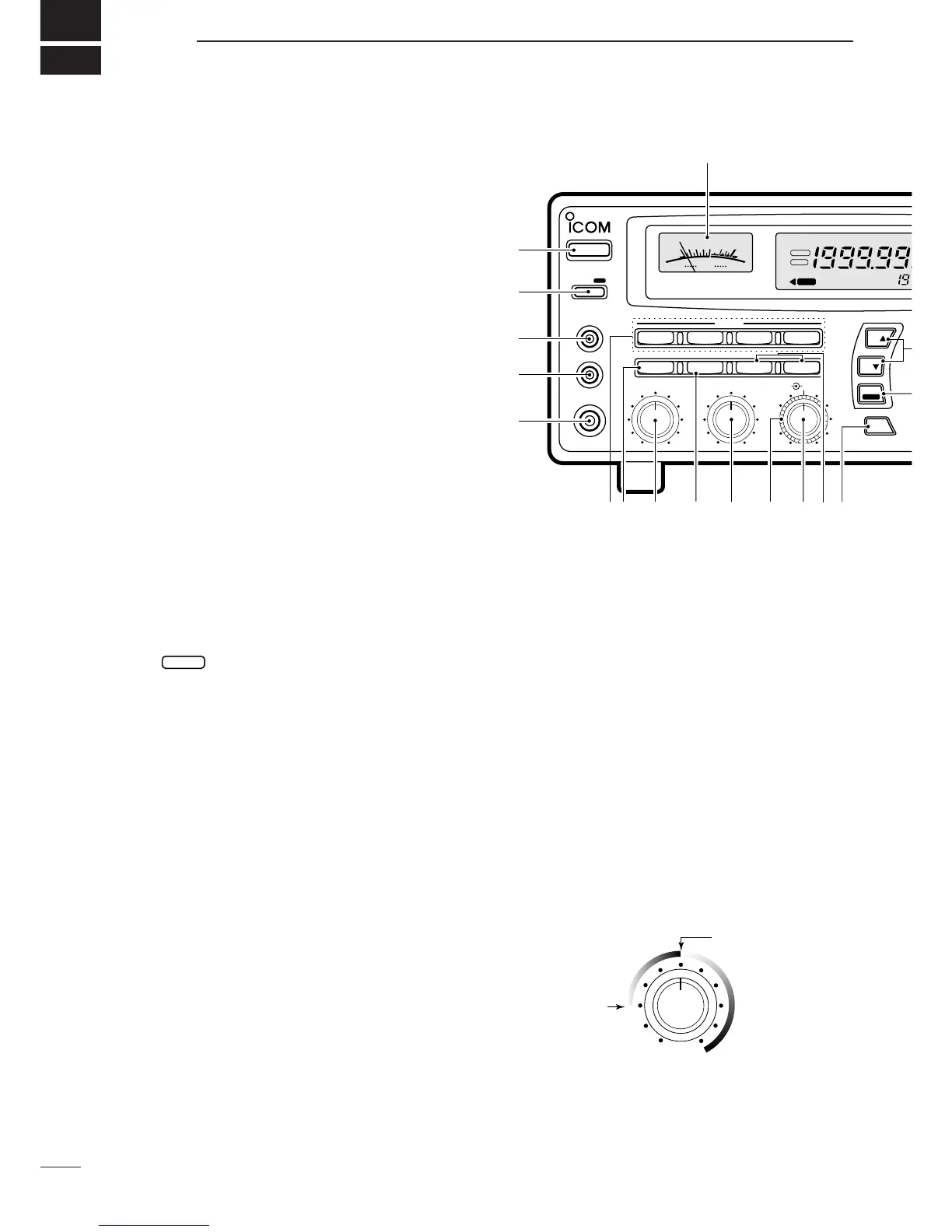
➊ POWER SWITCH [POWER]
Turns power ON and OFF.
➋ SLEEP/SET SWITCH [SLEEP/SET]
➥ Push momentarily to set the sleep timer (p. 29).
•Selectable times are 30, 60, 90, 120 min. or OFF.
•“ ” appears in the function display when the
sleep timer is set.
➥ Push for 1 sec. to enter quick set mode (p. 30).
•Use the [M-CH] selector and main dial to select items
and contents, respectively.
➌RECORDER REMOTE JACK [REC REMOTE] (p. 10)
Controls the running of a tape recorder for record-
ing. Connects to the REMOTE jack on a tape
recorder.
➍ RECORDER JACK [REC OUT] (p. 10)
Outputs an audio signal. Connect to the AUX or
LINE IN jack on a tape recorder.
➎ HEADPHONE JACK [PHONES]
Accepts headphones with 4–16 Ω impedance.
•When headphones are connected, no receive audio comes
from the speaker.
•Stereo headphones can be connected, however, output
is monaural.
➏ MODE SWITCHES [WFM]/[FM]/[AM]/[SSB/CW]
(p. 13)
➥ Push to select an operating mode.
•The following keys toggle between several modes:
[FM] .................FM, FM narrow
[AM] .................AM, AM narrow, AM wide
[SSB/CW] ........USB, LSB, CW, optional CW narrow
➥ When SSB/CW mode is selected, push [SSB/CW]
for 1 sec. to adjust the BFO frequency. (p. 15).
➐ NOISE BLANKER/AFC SWITCH [NB]/[AFC]
Activates the noise blanker function or automatic fre-
quency control function.
•The noise blanker is used for removing pulse-type noise
when SSB, CW or AM mode is selected (p.15).
•The automatic frequency control tunes the displayed fre-
quency automatically when an off-center frequency is re-
ceived. It activates when FM or WFM is selected (p.14).
➑ AUDIO FREQUENCY GAIN CONTROL
[AF GAIN] (p. 13)
Rotate clockwise to increase the audio output; rotate
counterclockwise to decrease the audio output.
➒ AUTOMATIC GAIN CONTROL [AGC] (p. 15)
Toggles the time constant of the AGC circuit be-
tween “slow” and “fast.”
•When “fast” is selected, “AGC-F” appears.
•Cannot be used in FM or WFM modes.
➓ SQUELCH CONTROL [SQUELCH] (p. 14)
Varies the squelch threshold level (to mute noise
when receiving no signal).
!1 IF SHIFT CONTROL [IF SHIFT] (p. 14)
Shifts the center frequency of the receiver’s IF pass-
band to reject interfering signals.
•Cannot be used in FM, WFM and AM modes.


 To Next Page
 Loading...