Software
MVS6000 System Level Manual/1.0/Dec-2001 3-21
Hardware_
By default, you run CNF_edit with hardware check, that is, it checks whether the selected
configuration is compatible with the hardware that is installed in your system, that is:
· you can not specify more boards than present in your rack
· you can not configure a board for an empty slot.
Applications_
In MMI 5.0, the Lead Frame Check, Dambar Check and Mark Absence/Presence applications are
not available on MVS6000-based systems.
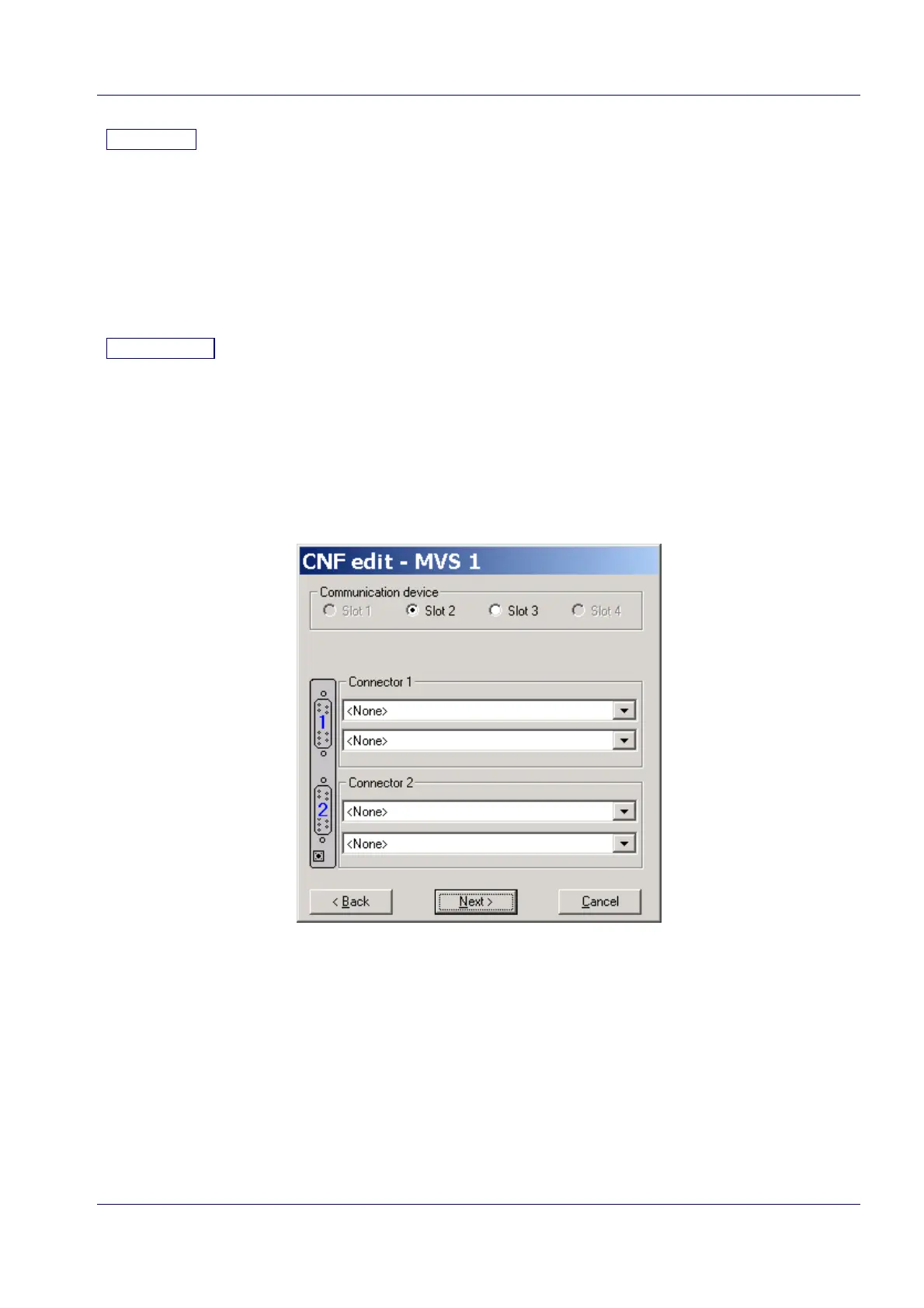
3.3.2 CNF_edit - MVS <n>:
Note: If you specified n board in the #MVS group box of the CNF_edit - General dialog box (see
page 3-20) the system shows n CNF_edit - MVS<n> dialog boxes.
In this dialog box, you specify the relation between the physical boards and the MVS1, MVS2,
MVS3 ... numbering used by CNF_edit.
For each CNF_edit - MVS<n> dialog box you have to specify:
· the slot of the board
· the type of cameras connected to each connector.


 To Next Page