EasyManua.ls Logo

IDEAL SecuriTest IP - IP Settings Configuration; LAN Socket and Wi-Fi Configuration; DHCP Server Status and Configuration; Static vs Dynamic IP Selection

IDEAL SecuriTest IP
63 pages
Print Icon
To Next Page IconTo Next Page
To Previous Page IconTo Previous Page
Loading...
171810.01 SecuriTEST® IP 8
SecuriTEST® IP User Manual
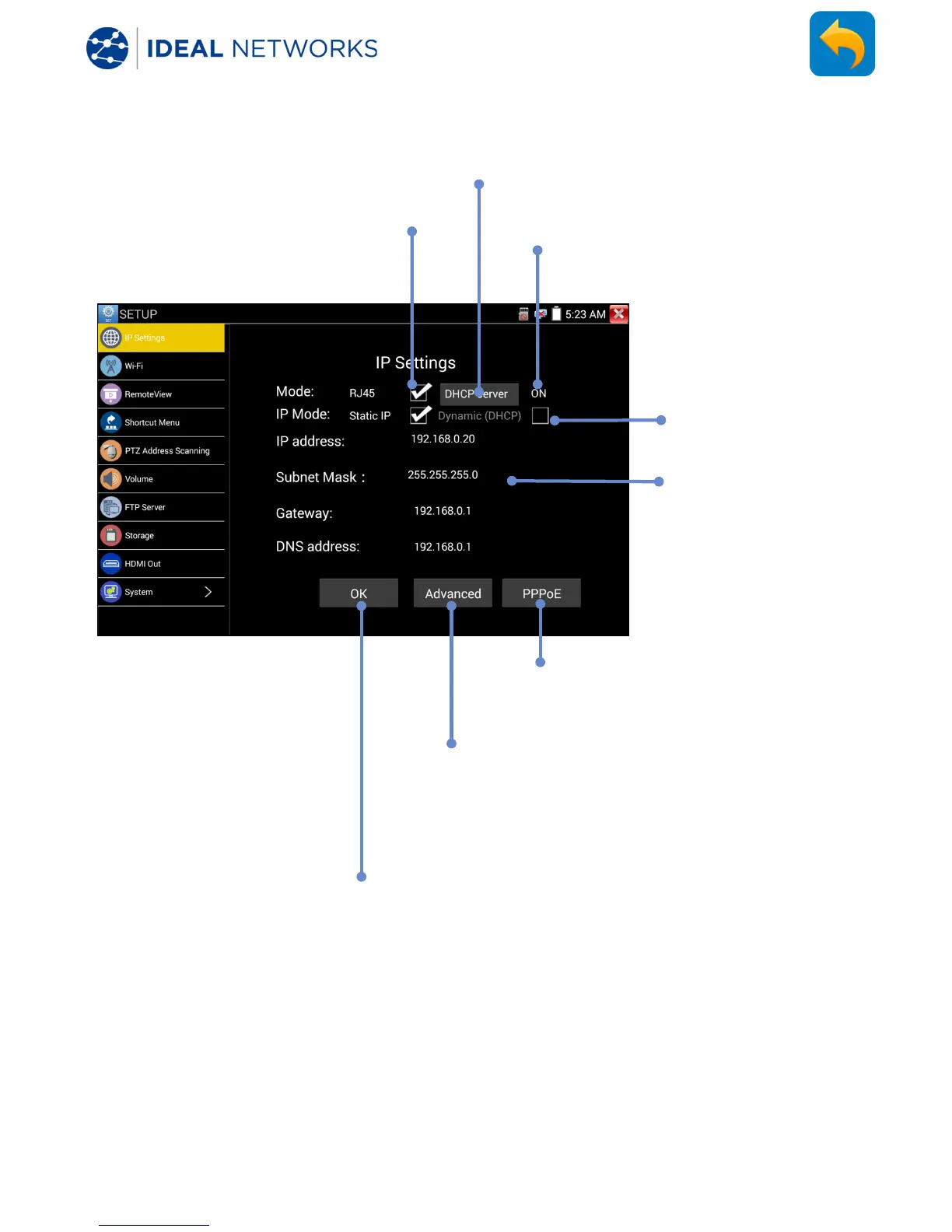
SETTINGS - IP Settings
SETUP>>IP Settings
Tick RJ45 to enable
the LAN socket and
switch off Wi-
Fi
Tap to configure the
DHCP server
Select Static IP or
Dynamic IP (DHCP)
Edit static addresses
or display network
-
assigned Dynamic IP
addresses
PPPoE is used for authentication
of the network access with
known user name and password.
Enables preset IP addresses to be entered
for future use. The IP address could be in a
different subnet.
OK applies the new settings only if they
are valid
DHCP server status on/off

Table of Contents

Related product manuals