EasyManua.ls Logo

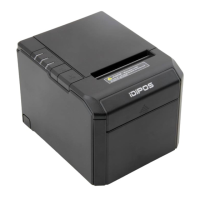
iDiPOS TP-80 - User Manual

iDiPOS TP-80
54 pages
Print Icon
To Next Page IconTo Next Page
Loading...
1. COMMANDS
1.1 Command Notation
[Name] The name of the command.
[Format] The code sequence.ASCII,Hex, Decimal 3 kinds of formats, default Decimal format.
[Range] Gives the allowable ranges for the arguments.
[Description] Describes the command’ s function.
[Details] Describes the usage of the command in detail.
[Notes] Provides important information on setting and using the printer command, if necessary.
[Default] Gives the default values, if any, for the command parameter s.
[Reference] Lists related commands.
2. HT
[Name] Horizontal tab
[Format] ASCII HT
Hex 09
Decimal 9
[Description] Moves the print position to the next horizontal tab position.
[Details]
This command is ignored unless the next horizontal tab position has been set.
If the next horizontal tab position exceeds the printing area, the printer sets the
printing position to [Printing area width + 1].
Horizontal tab positions are set with ESC D.
If this command is received when the printing position is at [printing area width
+ 1], the printer executes print buffer-full printing of the current line and
horizontal tab processing from the beginning of the next line.
The default setting of the horizontal tab position for the paper roll is font A
(12
24) every 8th character (9th, 17th, 25th, ... column).
[Reference] ESC D
3. LF
[Name] Print and line feed
[Format] ASCII LF
Hex 0A
Decimal 10
[Description] Prints the data in the print buffer and feeds one line based on the current line
spacing.
[Note] This command sets the print position to the beginning of the line.
[Reference] ESC 2, ESC 3
PROGRAM MANUAL
Thermal receipt printer TP-80
Question and Answer IconNeed help?

Do you have a question about the iDiPOS TP-80 and is the answer not in the manual?

Summary

HT

Horizontal tab

Moves the print position to the next horizontal tab position.

LF

Print and line feed

Prints buffer data and feeds one line based on current spacing.

FF

Print and return to standard normal mode in page mode

Prints buffer data and returns to normal mode.

CAN

Cancel print data in page mode

Deletes all print data in the current printable area.

DLE EOT n

Real-time status transmission

Transmits printer status in real-time based on parameter n.

ESC!n

Select print mode(s)

Selects print modes like font, emphasis, underline, etc.

ESC $ nL nH

Set absolute print position

Sets the distance from the line beginning to the print position.

ESC @

Initialize printer

Clears buffer data and resets the printer mode to power-on state.

ESC L

Select page mode

Switches from normal mode to page mode.

ESC W xL xH yL yH dxl dxh dyl dyh

Set printing area in page mode

Defines the horizontal/vertical starting position and area dimensions.

GS! n

Select character size

Selects character height and width using bits 0-7 of n.

GS $ nL nH

Set absolute vertical print position in page mode

Sets absolute vertical print position in page mode.

GS L nL nH

Set left margin

Sets the left margin using nL and nH.

GS P x y

Set horizontal and vertical motion units

Sets horizontal and vertical motion units for precise positioning.

GS k...

Print bar code

Selects a bar code system and prints the bar code.

GS v 0 m...

Print raster bit image

Prints raster bit images in various modes.

iDiPOS TP-80 Specifications

General IconGeneral
Print MethodDirect Thermal
Print Resolution203 DPI
Paper Width80 mm
Paper TypeThermal Paper
Auto CutterYes
InterfaceUSB, Ethernet, Serial
Print Speed250 mm/sec

Related product manuals